
Mystarting123: a persistent malware

pixmagic
Posted messages
99
Status
Member
-
Destrio5 Posted messages 99820 Registration date Status Moderator Last intervention -
Destrio5 Posted messages 99820 Registration date Status Moderator Last intervention -
Hello everyone
So... I downloaded the SUPER software from its website.. I wasn't paying attention during the installation and I didn't notice that it installed a large amount of malware.. since then, I can't get rid of it...
I had, then, AVIRA (free) which I had been using for 5 years without any problems..
- I replaced it with Kaspersky... nothing
- f_secure ... nothing
=> these last 2 detect threats, they neutralize them but after restart, the problems reappear...
As you can see in the attached screenshot .. I can't get rid of the problem..

I can't remove the search engines highlighted in red (there's no cross on the right when I hover the mouse over it [to the right]).
+ I tried using Kaspersky's solution (rescue disk) but I don't know why it doesn't work.. it always freezes after starting with the USB.
I reset Chrome.. and as a result I lost all my bookmarks..
but the problem is still there.
*
Thank you for your help with your advice.
So... I downloaded the SUPER software from its website.. I wasn't paying attention during the installation and I didn't notice that it installed a large amount of malware.. since then, I can't get rid of it...
I had, then, AVIRA (free) which I had been using for 5 years without any problems..
- I replaced it with Kaspersky... nothing
- f_secure ... nothing
=> these last 2 detect threats, they neutralize them but after restart, the problems reappear...
As you can see in the attached screenshot .. I can't get rid of the problem..
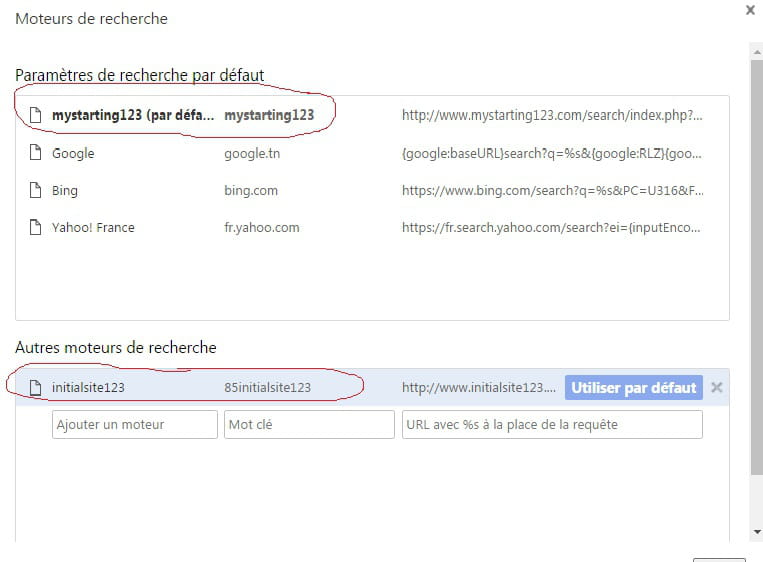
I can't remove the search engines highlighted in red (there's no cross on the right when I hover the mouse over it [to the right]).
+ I tried using Kaspersky's solution (rescue disk) but I don't know why it doesn't work.. it always freezes after starting with the USB.
I reset Chrome.. and as a result I lost all my bookmarks..
but the problem is still there.
*
- adwcleaner_6.047 finds 7 to 8 threats that it neutralizes but when I reboot, the same threats come back...
- luckily I have Ubuntu (Linux) in dual boot.. otherwise I would have lost everything. since the last threats, I have all my files in the Cloud... you never know...!
Thank you for your help with your advice.
3 answers
-
Hello,
--> Download Farbar Recovery Scan Tool (by Farbar) to your Desktop.
Warning: you need to take the version compatible with your system: 32 or 64 bits.
32 or 64 bits - How to know?
--> Close all running applications.
--> Run FRST (On Windows Vista/7/8/10, right-click on FRST > Run as administrator).
--> Check the box Addition.txt.
--> Click on Scan.
--> Once the scan is complete, two reports FRST.txt and Addition.txt will be on the Desktop.
--> Upload the two reports on pjjoint.malekal.com and copy-paste the provided links in your next response.-
Good evening Destrio5
I did as you indicated and here are the 2 files:
Addition.txt =>
https://pjjoint.malekal.com/files.php?id=20170529_p15r8n13d6g10
FRST.txt =>
https://pjjoint.malekal.com/files.php?id=FRST_20170529_q10h8z15w15k10
-
-
Good evening
I think I've found a solution that works...
I found this on a forum:
https://www.nicolascoolman.com/en/download/resetbrowser/
download the application.. run it as Admin
and it will reset all the installed browsers.
I recovered all my missing bookmarks and I now have brand new browsers. -
There are other infections.
Since you used ResetBrowser in the meantime, can you redo the FRST / Addition reports for me?-
Hello
last night I ran a scan with a Panda Security rescue key USB... it took a little over 2 hours... Panda found 4 infections (Trojans) that it disinfected (but they are in compressed files that I only used once a few months ago) which is a bit surprising anyway... I know that it's the log. Super that's the source of the infection!
Well, here is the Addidion file:
https://pjjoint.malekal.com/files.php?id=20170529_6j11r6w13i8
https://pjjoint.malekal.com/files.php?id=FRST_20170529_m5q5i10g13i6
as of now, I have no browsing issues. -
"Copernic Desktop Search 4"
--> Is this software intended?
Yes, the SUPER installer offers lots of junk :(
--> Open Notepad (Start => All Programs => Accessories => Notepad).
--> Copy-paste the bold text below into Notepad:
start
CreateRestorePoint:
CloseProcesses:
HKU\S-1-5-18\...\Run: [SpybotPostWindows10UpgradeReInstall] => C:\Program Files\Common Files\AV\Spybot - Search and Destroy\Test.exe [1011200 2015-07-28] (Safer-Networking Ltd.)
C:\Program Files\Common Files\AV\Spybot - Search and Destroy
HKLM\...\Providers\oqfxjsqv: C:\Program Files\Hetutain Monitor\local32spl.dll
C:\Program Files\Hetutain Monitor
ShellExecuteHooks: No name - {F5AFEDBA-3EB8-11E7-83D1-64006A5CFC23} - -> No file
BootExecute: autocheck autochk * sdnclean.exe
DPF: {8AD9C840-044E-11D1-B3E9-00805F499D93} hxxp://java.sun.com/update/1.8.0/jinstall-1_8_0_45-windows-i586.cab
DPF: {CAFEEFAC-0017-0000-0013-ABCDEFFEDCBA} hxxp://java.sun.com/update/1.7.0/jinstall-1_7_0_13-windows-i586.cab
DPF: {CAFEEFAC-0018-0000-0045-ABCDEFFEDCBA} hxxp://java.sun.com/update/1.8.0/jinstall-1_8_0_45-windows-i586.cab
DPF: {CAFEEFAC-FFFF-FFFF-FFFF-ABCDEFFEDCBA} hxxp://java.sun.com/update/1.8.0/jinstall-1_8_0_45-windows-i586.cab
FF HKLM\...\Firefox\Extensions: [12x3q4@3244516.com] - C:\Program Files\Better-Surf\ff => not found
C:\Program Files\Better-Surf
FF HKLM\...\Firefox\Extensions: [ext@WebexpEnhancedV1alpha877.net] - C:\Program Files\WebexpEnhancedV1\WebexpEnhancedV1alpha877\ff => not found
CHR HKLM\...\Chrome\Extension: [llpnacfkfgbdhapefgejnoabjhlebpgo] - C:\Program Files\WebexpEnhancedV1\WebexpEnhancedV1alpha877\ch\WebexpEnhancedV1alpha877.crx <not found>
C:\Program Files\WebexpEnhancedV1
S2 terana; C:\Windows\System32\svchost.exe [20992 2009-07-14] (Microsoft Corporation) <==== WARNING (ServiceDLL not found)
S2 WinSAPSvc; C:\windows\system32\svchost.exe [20992 2009-07-14] (Microsoft Corporation) <==== WARNING (ServiceDLL not found)
C:\Users\magic\AppData\Local\terana
C:\Users\magic\AppData\Roaming\WinSAPSvc
C:\Program Files\{E0B67BD1-E050-49A3-A92E-673B1B2FDF2C}
C:\Users\Public\Documents\temp.dat
C:\Program Files\MIO
C:\ProgramData\Spybot - Search & Destroy
C:\ProgramData\KZMount
C:\Program Files\3SLT0QNUDP
C:\ProgramData\Microsoft\Windows\Start Menu\Programs\极速压缩
C:\Users\magic\AppData\Roaming\Perbot
C:\Windows\system32\Drivers\vcdrom.sys
C:\Users\magic\AppData\Roaming\ServerTest
C:\Users\magic\AppData\Local\{6E6CCAF2-2D98-4BCE-8961-B60FC14F793A}
C:\Users\magic\AppData\Local\{C91BC81D-2FFC-4B8A-8BA6-CC0B9FF09CAA}
Task: {2BA1A751-6BD8-41C1-ADFC-953F4567D02F} - System32\Tasks\Microsoft\Windows\DeviceSettings\Dicuiedghersapy => msiexec.exe /i hxxp://D2bUH1bF1g584W.clOuDfroNt.net/mmtsk/occup.php?p=ST3160212ACE_9LS5HZLDXXXX9LS5HZLD&d=20170525 /q <==== WARNING
Task: {7D6148BE-6970-4E80-B7A6-A9ADE81CBF84} - System32\Tasks\Hetutain Monitor => C:\Program Files\Rehakgekity\yaupdcache.exe
C:\Program Files\Rehakgekity
Task: {EA6B7D4B-6D2E-46C8-8F8D-250ED8D4D469} - System32\Tasks\Norton Product InstallerIdle => C:\Windows\system32\Adobe\Shockwave 12\SymInstallStub.exe
Task: C:\Windows\Tasks\Norton Product InstallerIdle.job => C:\Windows\system32\Adobe\Shockwave 12\SymInstallStub.exe
C:\Windows\system32\Adobe\Shockwave 12\SymInstallStub.exe
FirewallRules: [{FB35EB6B-CC45-4CC4-8E52-D1EE14A53F78}] => (Allow) C:\Program Files\Dll-Files.com Fixer\DLLFixer.exe
FirewallRules: [{0FE8A1E2-BA72-40D3-B548-FFBC1DCDA29A}] => (Allow) C:\Program Files\Hippig\Application\chrome.exe
FirewallRules: [{1DBAFFD7-11BF-4A9D-BD0A-7DC7B5AFB32C}] => (Allow) C:\Program Files\Firefox\bin\FirefoxUpdate.exe
FirewallRules: [{7C3BE4A6-F332-4EF9-9180-FBEFEFE1D072}] => (Allow) C:\Program Files\Firefox\Firefox.exe
EmptyTemp:
end
--> Save the file in the "Downloads" folder (in the same place as FRST) under the name fixlist.txt
--> Run FRST (On Windows Vista/7/8/10, right-click on FRST > Run as administrator).
--> Click on Fix. Wait for the fix to complete.
Note: if the tool needs to restart, accept so it can finish its work.
--> Once the fix is completed, a Fixlog.txt report will replace the fixlist file.
--> Upload the report to pjjoint.malekal.com and copy-paste the provided link in your next response.
-

