How to activate the klipad kl4888 keyboard
harr
-
Colere -
Colere -
Hello,
how to activate the klipad kl4888fig keyboard
please
how to activate the klipad kl4888fig keyboard
please
2 answers
-
Hello,
The reference KL4888 is unknown?!
Is this keyboard a Bluetooth keyboard?
If so, see
Excerpt from http://www.klipad-support.com/questions_reponses/tablettes.html
Or
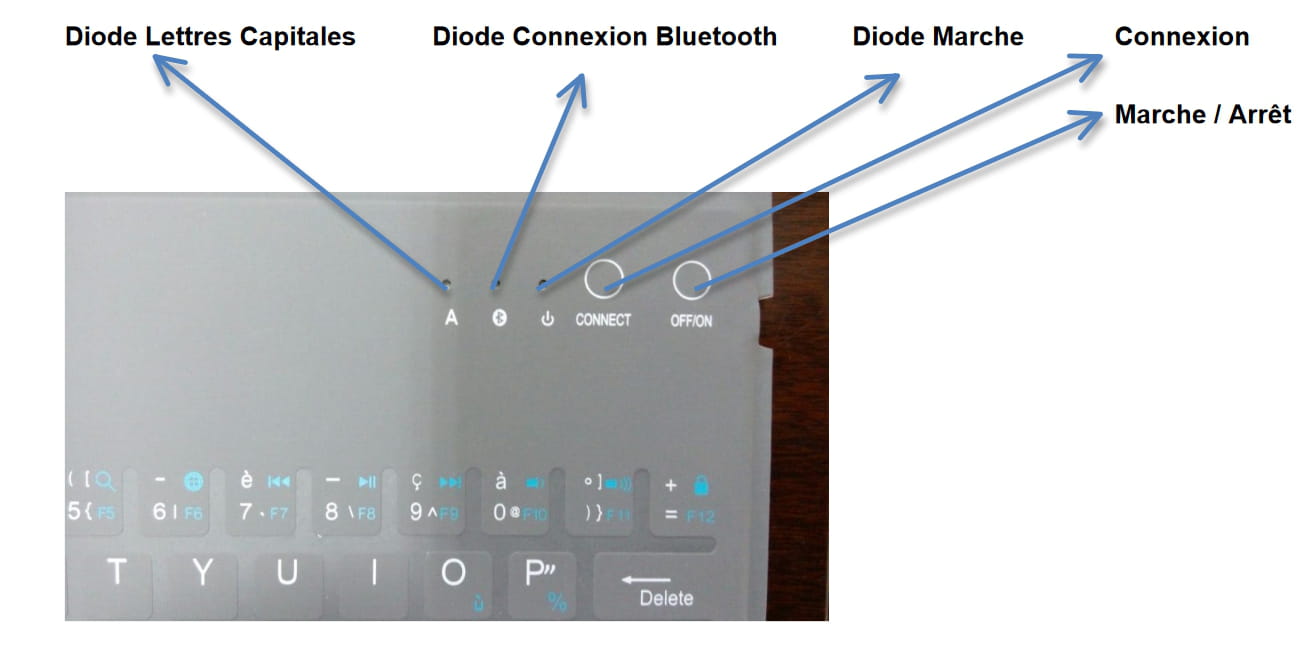
To connect your Bluetooth keyboard to your tablet, you will need to proceed as follows:

1 - charge the keyboard using the same charging cable you use for the tablet
2 - once sufficiently charged, turn on the keyboard and press the small Bluetooth button (next to the power button)
3 - go into the tablet settings, section "bluetooth", enable this function and start searching for pairing (three small dots at the top right of the screen then "scan").
4 - once the keyboard is detected, select the keyboard from the list of detected devices
5 - a new window will appear asking you to enter a connection code
6 - on the keyboard, on the top row with numbers, enter the code then press ENTER to validate

The keyboard will be connected to the tablet.
https://www.klipad-support.com/lib/documentDownload.php?idDoc=63
--It’s very hard to catch a black cat in a dark room.
Especially when it's not there...