
Unjustified and Unknown "Insufficient Memory" Issue
SoCullum
Posted messages
155
Status
Member
-
SoCullum Posted messages 155 Status Member -
SoCullum Posted messages 155 Status Member -
Hello everyone!
I often get a message (when I'm playing Diablo 3) saying "insufficient memory please close blablabla" and if I don't do it, I get a black screen.
I usually have Maya open and the internet, so I can afford it anyway, I have 16GB of RAM.
I check the task manager and see 30% of the memory used and still get a black screen!!
I browsed the internet and I thought I understood that there were things continuously being written to the disk and that they needed to be moved. I have a 128GB SSD where I've put my work programs, but everything else is on a 1TB HDD, but apparently the computer does this "operation" on the SSD (where I only have 20GB left) and that's where the problem comes from....
But I'm not sure xD..
Here's the message it gives (it does say Maya and not GTA V though):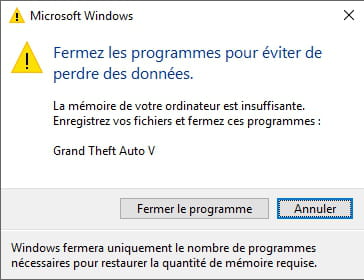
PC specs:
i7 7th Gen
GTX 1070
16GB of RAM
128GB SSD (40GB available)
1TB HDD
I often get a message (when I'm playing Diablo 3) saying "insufficient memory please close blablabla" and if I don't do it, I get a black screen.
I usually have Maya open and the internet, so I can afford it anyway, I have 16GB of RAM.
I check the task manager and see 30% of the memory used and still get a black screen!!
I browsed the internet and I thought I understood that there were things continuously being written to the disk and that they needed to be moved. I have a 128GB SSD where I've put my work programs, but everything else is on a 1TB HDD, but apparently the computer does this "operation" on the SSD (where I only have 20GB left) and that's where the problem comes from....
But I'm not sure xD..
Here's the message it gives (it does say Maya and not GTA V though):
PC specs:
i7 7th Gen
GTX 1070
16GB of RAM
128GB SSD (40GB available)
1TB HDD
