Menu principal
Moteur de recherche
Rechercher
Menu principal
Forum
Bureautique
Développement
Internet
Jeux vidéo
Matériel
Réseau
Vidéo/TV
Virus/Sécurité
CCM
CCM - Comment Ça Marche - Communauté informatique
Moteur de recherche
Rechercher
Connexion
Posez votre
question
Informatique
Mobile
Applis & Sites
Image & Son
Maison
Securité
Téléchargement
Forum
Bureautique
Développement
Internet
Jeux vidéo
Matériel
Réseau
Vidéo/TV
Virus/Sécurité
Emploi
Forum
View original (French)
The greater sign
Zonté
-
Bernard2422
Posted messages
3
Status
Membre
-
10 Apr 2017 at 09:30
Hello,
I read that you have to press Alt+62 to get the sign >. But my computer doesn't have a numeric keyboard, so it doesn't work. What should I do to type the signs < or >?
Configuration:
Windows / Edge 14.14393
Show more
Liens connexes:
How to get the exclamation mark with Azerty.
Azerty keyboard brackets < and >
type the abbreviation for numbers (N°s) using my computer keyboard
Customize your keys on Roblox.
Finding the @ key on a Lenovo QWERTY keyboard
at symbol on a Lenovo
2 réponses
Réponse 1 / 2
Cesel45
Posted messages
13762
Registration date
Status
Contributeur
Last intervention
2 845
Hello
< on the corresponding key
> on the < + shift (capital letter) key
--
Have a nice day.
Cesel45
Réponse 2 / 2
Bernard2422
Posted messages
3
Status
Membre
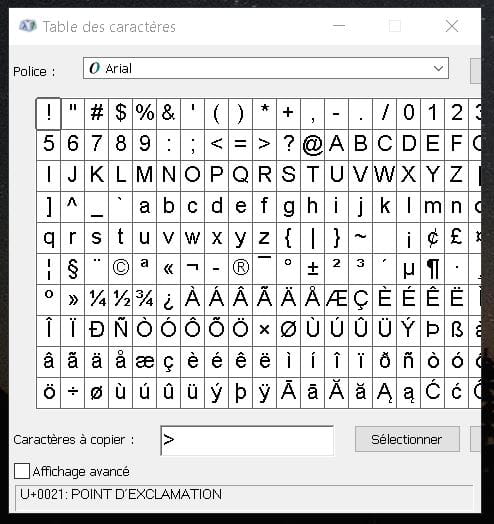
Hello, go to "Windows Accessories" and open the "Character Map":
All that's left is to select and copy-paste.
Afficher toute la discussion
Latest Discussions
Saracroche: the effective french app against phone spam
at 09:51
How to get the character µ on the android keyboard.
on 22 May
Texture issues in enshrouded
on 22 May
Access issue to my "contact me" profile
on 22 May
Windows spotlight is not working.
on 20 May
Black screen digital camera
on 19 May
Connecting rj45 cable with fiber
on 19 May
Sony bravia tv red led blinks 4 times
on 19 May
Free: associating with the freebox server in progress
on 19 May
Inuyasha in french
on 19 May
Other languages
🇫🇷
Français