
CMD Console Path
Solved
Cesel45
Posted messages
13762
Registration date
Status
Contributor
Last intervention
-
Cesel45 Posted messages 13762 Registration date Status Contributor Last intervention -
Cesel45 Posted messages 13762 Registration date Status Contributor Last intervention -
Hello,
When I want to open the CMD command prompt
I have several options...
- Via the start menu
- From Win + R
or by searching for it in Windows / System32
In the properties of the CMD command prompt, I checked
"Run as administrator"
Everything is fine so far...

However, when I do Win + R and type CMD
I don't have the same path to the console

My question = Where is the Windows explorer path
to change the property and change the option ...
"Run as administrator"
From the start menu or Windows / System32
Thank you in advance
Have a nice day.
Cesel45
When I want to open the CMD command prompt
I have several options...
- Via the start menu
- From Win + R
or by searching for it in Windows / System32
In the properties of the CMD command prompt, I checked
"Run as administrator"
Everything is fine so far...
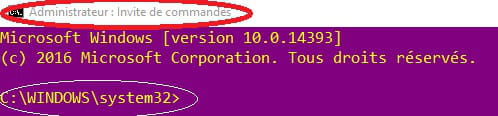
However, when I do Win + R and type CMD
I don't have the same path to the console
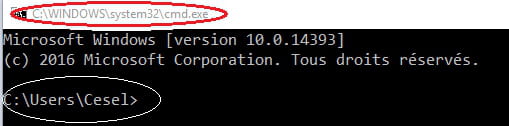
My question = Where is the Windows explorer path
to change the property and change the option ...
"Run as administrator"
From the start menu or Windows / System32
Thank you in advance
Have a nice day.
Cesel45
1 answer
-
Hello,
UAC principle: https://www.malekal.com/le-controle-des-comptes-utilisateurs-uac-de-windows/
The first is launched with an administrator token
the second one is not.
--
Please press any key to continue the disinfection...-
Thank you Malekal
I understand better now.
For those following the discussion =
I resigned myself to create a shortcut in the taskbar.
Here’s how =
C:/Windows/System32
CMD.exe.....Right-click copied
On the desktop: Right-click "New"===> Shortcut
In the empty box = Paste your clipboard==> confirm
Give a name to your shortcut (e.g.: CMD.exe)
Click on the shortcut created on the desktop and drag it to the taskbar.
There you go
-


