Send audio CD to USB key
Solved
-
Hello,
I would like to copy an audio CD onto a USB stick so I can use it with my car radio (no more CD players in car radios!).
But the files from my CD are only 1 KB per track. I can play them, but nothing happens with the USB stick.
If someone can explain to me.... or tell me how to copy a CD onto a USB drive, that would be nice.
Thanks in advance.
--
It is at the foot of the wall that one sees the wall best!
I would like to copy an audio CD onto a USB stick so I can use it with my car radio (no more CD players in car radios!).
But the files from my CD are only 1 KB per track. I can play them, but nothing happens with the USB stick.
If someone can explain to me.... or tell me how to copy a CD onto a USB drive, that would be nice.
Thanks in advance.
--
It is at the foot of the wall that one sees the wall best!
1 answer
-
Hello,
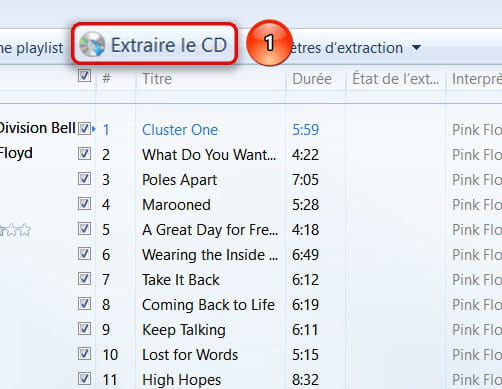
Place the audio disc to copy in the PC drive, start Windows Media Player.

Let it run until the CD is fully extracted.
Your music is now in the library but also in the Music folder that you just need to open.
You should find your music on your USB drive, however 1Ko per track is surprising, I don't know what the result will be!!!
Best regards.
--
He who does not bring pleasure upon arrival always brings pleasure upon leaving!
Breizh atao-
-
@casasaxYou're welcome saxophonist, happy for you!
From a guitarist also retired but still keeping his fingers busy!
Hello Corsica.
Best regards. -
-
-
-