
Robocopy suddenly returns ERROR_2 while it was working.
Solved
dauphin20217
Posted messages
193
Registration date
Status
Member
Last intervention
-
barnabe0057 Posted messages 14329 Registration date Status Contributor Last intervention -
barnabe0057 Posted messages 14329 Registration date Status Contributor Last intervention -
Soudain, mon fichier Batch de sauvegarde sur un disque dur externe en USB3 ne fonctionne plus.
@echo off
robocopy "D:\Favoris" "M:\Backup\Favoris" /MIR /DCOPY:T
robocopy "D:\Ma musique" "M:\Backup\Ma musique" /MIR /DCOPY:T
robocopy "D:\Mes documents" "M:\Backup\Mes documents" /MIR /DCOPY:T
robocopy "D:\Mes images" "M:\Backup\Mes images" /MIR /DCOPY:T
robocopy "D:\Mes vidéos" "M:\Backup\Mes vidéos" /MIR /DCOPY:T
@echo
Pause
Exit
Les 4 premières instructions s'exécutent normalement, mais la 5e concernant le répertoire Vidéos renvoie une erreur :

Le répertoire sur le DD de destination n'a pas été changé :
Merci pour votre aide, j'ai essayé d'attribuer un nouveau nom de répertoire, un nom sans accentuation, sans espace... rien n'y fait !
J'ai envisagé de reformater le DD, mais il fait 688 Go !
Pourrais-je seulement supprimer le répertoire "Mes vidéos"... puis relancer Robocopy seul sur ce répertoire, (en neutralisant les 4 premières lignes de code avec des "rem", mais lui seul fait aussi 546 Go tout de même !)
@echo off
rem robocopy "D:\Favoris" "M:\Backup\Favoris" /MIR /DCOPY:T
rem robocopy "D:\Ma musique" "M:\Backup\Ma musique" /MIR /DCOPY:T
rem robocopy "D:\Mes documents" "M:\Backup\Mes documents" /MIR /DCOPY:T
rem robocopy "D:\Mes images" "M:\Backup\Mes images" /MIR /DCOPY:T
robocopy "D:\Mes vidéos" "M:\Backup\Mes vidéos" /MIR /DCOPY:T
@echo
Pause
Exit
Cordialement.
@echo off
robocopy "D:\Favoris" "M:\Backup\Favoris" /MIR /DCOPY:T
robocopy "D:\Ma musique" "M:\Backup\Ma musique" /MIR /DCOPY:T
robocopy "D:\Mes documents" "M:\Backup\Mes documents" /MIR /DCOPY:T
robocopy "D:\Mes images" "M:\Backup\Mes images" /MIR /DCOPY:T
robocopy "D:\Mes vidéos" "M:\Backup\Mes vidéos" /MIR /DCOPY:T
@echo
Pause
Exit
Les 4 premières instructions s'exécutent normalement, mais la 5e concernant le répertoire Vidéos renvoie une erreur :
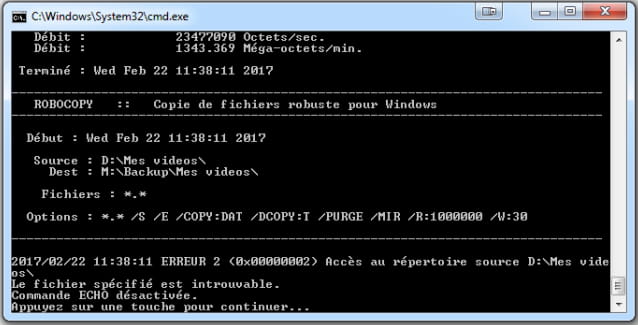
Le répertoire sur le DD de destination n'a pas été changé :
Merci pour votre aide, j'ai essayé d'attribuer un nouveau nom de répertoire, un nom sans accentuation, sans espace... rien n'y fait !
J'ai envisagé de reformater le DD, mais il fait 688 Go !
Pourrais-je seulement supprimer le répertoire "Mes vidéos"... puis relancer Robocopy seul sur ce répertoire, (en neutralisant les 4 premières lignes de code avec des "rem", mais lui seul fait aussi 546 Go tout de même !)
@echo off
rem robocopy "D:\Favoris" "M:\Backup\Favoris" /MIR /DCOPY:T
rem robocopy "D:\Ma musique" "M:\Backup\Ma musique" /MIR /DCOPY:T
rem robocopy "D:\Mes documents" "M:\Backup\Mes documents" /MIR /DCOPY:T
rem robocopy "D:\Mes images" "M:\Backup\Mes images" /MIR /DCOPY:T
robocopy "D:\Mes vidéos" "M:\Backup\Mes vidéos" /MIR /DCOPY:T
@echo
Pause
Exit
Cordialement.
1 answer
-
Hello,
If you typecd /d D:\My videos
do you get an error message?-
Thank you for your help ...
Yes, error message: the specified path was not found.
However, I did a dir /b /ad on D: ... and I see the directory named videos.
I had already seen it by going through Properties..Sharing ... and the name is videos.
So I tried the following:
robocopy "D:\Videos" "M:\Backup\My videos" /MIR /DCOPY:T
(in Administrator mode) ... but it created a new directory on M and started the full copy ...!
I will make do with that, delete the old and the new directory created (and interrupted), at least the next backups will be done normally.
But the behavior of robocopy is quite strange, I've never had this problem with xcopy and the same directory names.
Thank you for your help.
Best regards.
Please what task is performed by /b /ad? ... thank you.- dir /b: it lists only the names, without any other information such as date, size, etc...
dir /ad: it lists only the folders - Thank you.
In fact, with these little problems with robocopy, I remember a warning regarding the /MIR function which should be used with caution, as there is a risk of deleting files or directories if one mistakenly deletes on the destination, and a risk of deleting the source... I think I will reformatthe M disk and go back to xcopy which seems less risky to me.
Best regards.
-

