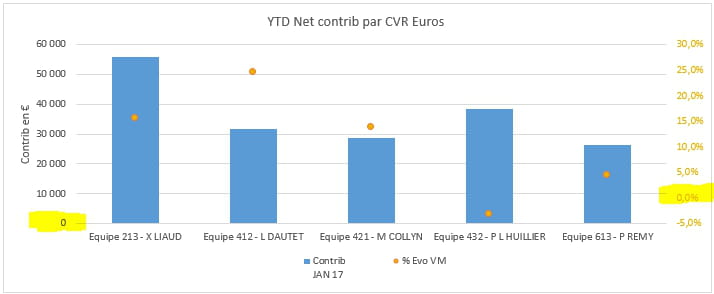
Graph of intersection at 0 of both axes

Vincent-CT Posted messages 26 Status Member -  
ccm81 Posted messages 11033 Status Member -
Hello,
I have a graph with a secondary axis, my problem is that the 0 on the right axis does not align with the 0 on the left axis. How can I make it so?
Thank you very much.

4 answers

  1. Frenchie83 Posted messages 2254 Status Member 339
     
    Hello
    Right-click on the secondary axis,
    -format the axis
    -in Axis Options, check "Fixed" for Minimum and set the value to 0
    Best regards
    0
    1. Vincent-CT Posted messages 26 Status Member
       
      Unfortunately, it doesn't work.. I had tried though...
      0
      1. Frenchie83 Posted messages 2254 Status Member 339 > Vincent-CT Posted messages 26 Status Member
         
        Could you please attach a copy of your data table along with the graph?
        0
    2. Vincent-CT Posted messages 26 Status Member
       
      Little question. How to attach a file on this forum? Thank you :)
      0
      1. Frenchie83 Posted messages 2254 Status Member 339 > Vincent-CT Posted messages 26 Status Member
         
        Hello
        To upload a file as an attachment
        go to "www.cjoint.com"
        -click on "browse"
        -select the file to send
        -click on "create Cjoint link" (button at the bottom)
        -right-click on the proposed link, and select "copy link address"
        -on your new CCM request, -right-click paste
        0
  2. Vincent-CT Posted messages 26 Status Member
     
    Hello,
    Here is the file in question:
    http://www.cjoint.com/c/GBomTR6o56z
    Thank you in advance
    0
  3. ccm81 Posted messages 11033 Status Member 2 434
     
    Set the minimum of the main y-axis scale to -40000
    http://www.cjoint.com/c/GBonfmhzA2f

    Best regards
    0
    1. Vincent-CT Posted messages 26 Status Member
       
      Sorry, but this is still a hack that I don't have the time to do. Unless I misunderstood...
      Thanks anyway :)
      0
    2. ccm81 Posted messages 11033 Status Member 2 434
       
      If you want the graduations of the two axes to be opposite each other, you'll have to tinker with it a bit. So while you're at it...
      Have a good end of the day.
      0
  4. tontong Posted messages 2575 Registration date   Status Member Last intervention   1 064
     
    Hello everyone,
    Another solution:
    To set the origin of the secondary y-axis, you need to go to the settings of the secondary X!!!
    You should then display a secondary x-axis and place the y intersection at 1. Afterwards, make the secondary X invisible without deleting it: no line, no ticks, no labels.

    In image:
    http://www.cjoint.com/c/GBonSZCOtlp
    0
    1. Vincent-CT Posted messages 26 Status Member
       
      Thank you for the advice, but I am using ME 2013... I can't find the equivalent of what you're talking about.
      Best regards,
      0
      1. tontong Posted messages 2575 Registration date   Status Member Last intervention   1 064 > Vincent-CT Posted messages 26 Status Member
         
        Sorry, but I don't have 2013.
        If you find a translator from 2003 to 2013, you will have two options, that of ccm81 and mine.
        0