
Background frame
Solved
Anthony
-
VBAnthony -
VBAnthony -
Hello,
I am currently working on a project for my company and I can’t figure out how to format a UserForm. The solution must surely be stupid, but I’ve just spent a bit over an hour searching and I can’t find it, which is why I’m turning to you.
Here’s my problem:
I’m creating a UserForm to fill out a form. The fields are as follows:
- Name:
- First name:
- Location:
Then there is a Frame in which there are 3 OptionButtons.
According to these OptionButtons I change the size of my UserForm and the position of the buttons so that ComboBoxes appear and it looks “pretty”.
The problem is the following: I’d like to move my ComboBox INSIDE my Frame. However, it ends up positioned behind my Frame and I can’t bring the ComboBox to the front. I’ve tried ZOrder, and several other “solutions,” but nothing works. I can’t get it.
Could someone please help? :o
Here is the little code that concerns my problem:
Private Sub OptionButton_Agence_Click()
'If click on Agency Command
'Taille du Userform
Envoi_Pub.Height = 258.75
'Hauteur de la ComboBox en question
ComboBox_agence.Top = 140
'Taille de ma Frame afin qu'elle puisse contenir ma ComboBox
Frame1.Height = 78
'Déplacement d'un Bouton pour la lisibilité
CommandButton1.Top = 174
'Déplacement de 3 autres boutons en dehors de la zone visible
ComboBox1.Top = 258
ComboBox2.Top = 258
ComboBox3.Top = 258
End Sub
Thank you in advance for your help and have a nice day. :)
Anthony.
I am currently working on a project for my company and I can’t figure out how to format a UserForm. The solution must surely be stupid, but I’ve just spent a bit over an hour searching and I can’t find it, which is why I’m turning to you.
Here’s my problem:
I’m creating a UserForm to fill out a form. The fields are as follows:
- Name:
- First name:
- Location:
Then there is a Frame in which there are 3 OptionButtons.
According to these OptionButtons I change the size of my UserForm and the position of the buttons so that ComboBoxes appear and it looks “pretty”.
The problem is the following: I’d like to move my ComboBox INSIDE my Frame. However, it ends up positioned behind my Frame and I can’t bring the ComboBox to the front. I’ve tried ZOrder, and several other “solutions,” but nothing works. I can’t get it.
Could someone please help? :o
Here is the little code that concerns my problem:
Private Sub OptionButton_Agence_Click()
'If click on Agency Command
'Taille du Userform
Envoi_Pub.Height = 258.75
'Hauteur de la ComboBox en question
ComboBox_agence.Top = 140
'Taille de ma Frame afin qu'elle puisse contenir ma ComboBox
Frame1.Height = 78
'Déplacement d'un Bouton pour la lisibilité
CommandButton1.Top = 174
'Déplacement de 3 autres boutons en dehors de la zone visible
ComboBox1.Top = 258
ComboBox2.Top = 258
ComboBox3.Top = 258
End Sub
Thank you in advance for your help and have a nice day. :)
Anthony.
2 answers
-
Hello,
Here is an example to adjust:
'If click on Order Agency 'UserForm1.Height = 258.75 'Height of the ComboBox in question ComboBox_agence.Top = 40 'Size of my Frame so that it can contain my ComboBox Frame1.Height = 78 'Move a Button for readability CommandButton1.Top = 198 'Move 3 other buttons outside the visible area ComboBox1.Top = 6 ComboBox2.Top = 42 ComboBox3.Top = 78
It must be that the ComboBox: ComboBox_agence is inside the Frame!
@+ The Pivert -
For your information,
Here’s what would be great (the red checkmark done in Paint is just for explanation hahaha):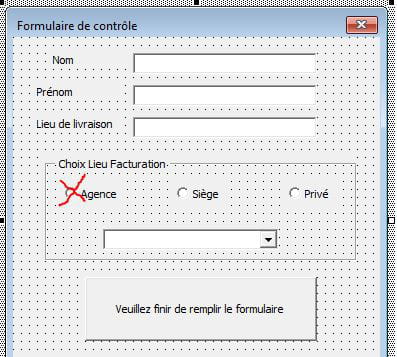
But here’s the reality of my Macro: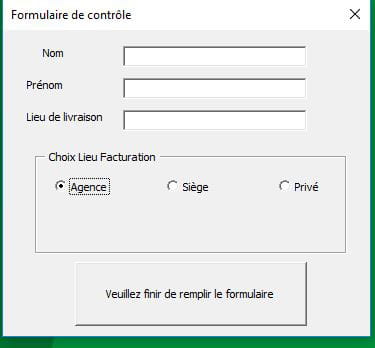
Thanks again for your help. :)
