Windows 7 won't start, black screen

léa-jl
Posted messages
12
Status
Member
-
léa-jl Posted messages 12 Status Member -
léa-jl Posted messages 12 Status Member -
Hello,
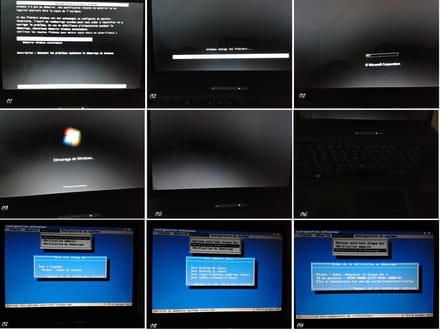
My laptop, HP 550, won't start under Windows 7. Windows 7 tries to start, then a black screen. The fan is running, but the screen remains black. I tried the F10 key: Diagnostics: Hard disk self-test option: error message read failure. Then, Startup check: message: failure replace hard disk 1.
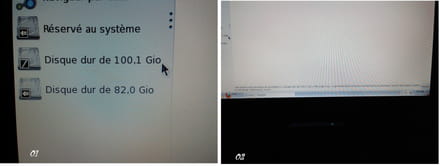
I also tried accessing the hard drive via Mandriva, installed on the same machine (dual boot), same thing, impossible to mount the hard drive; error message when I try to access the hard drive via Mandriva: org.freedesktop.Hal.Device.Volume.PermissionDenied: Device /dev/sda2 is listed in /etc/fstab. refusing to mount
Help. I need to boot into Windows 7 without formatting or losing my data.
Is there a way to resolve my hard drive issue via Mandriva?
Thank you in advance.
PS: I powered off the laptop, removed the battery, waited 30 seconds, then I turned it back on I don't know how many times, nothing works :(
Attached: the error messages on the screen.
Configuration: Windows / Chrome 50.0.2661.102
My laptop, HP 550, won't start under Windows 7. Windows 7 tries to start, then a black screen. The fan is running, but the screen remains black. I tried the F10 key: Diagnostics: Hard disk self-test option: error message read failure. Then, Startup check: message: failure replace hard disk 1.
I also tried accessing the hard drive via Mandriva, installed on the same machine (dual boot), same thing, impossible to mount the hard drive; error message when I try to access the hard drive via Mandriva: org.freedesktop.Hal.Device.Volume.PermissionDenied: Device /dev/sda2 is listed in /etc/fstab. refusing to mount
Help. I need to boot into Windows 7 without formatting or losing my data.
Is there a way to resolve my hard drive issue via Mandriva?
Thank you in advance.
PS: I powered off the laptop, removed the battery, waited 30 seconds, then I turned it back on I don't know how many times, nothing works :(
Attached: the error messages on the screen.


Configuration: Windows / Chrome 50.0.2661.102
1 answer
-
Hello léa-jl :)
My first instinct would be to try starting the machine with a Linux Live CD to attempt to access the data, but you’ve already tested a distribution without success…
Thank you for the screenshots… One of the messages I read advises replacing hard drive 1 and again "read failure." It seems to me that this warning is not a good sign, and given the additional symptoms (the behavior of the hard drive) that accompany it, it is quite likely that data recovery will require the intervention of professionals in the field.
We could potentially think about externalizing the hard drive (the warranty on the PC will be voided in case of physical interventions) to retest accessing the contents, but I want to warn you that in the event of damage to the hard drive, any subsequent tests risk worsening the situation and thus making the data completely inaccessible, even for experts.
@léa-jl, if you haven’t contacted the computer manufacturer’s support yet, I would suggest doing so to see what options are available.
To be continued :) Keep me updated!
--
-----
If you found the answer to your question, please feel free to click on Resolved to help other members with the same issue ;)