No internet access on Linux Mint via wired connection

Hello,
I have an SSD with Windows 7 Home Premium on it and an HHD (1 tera) with a 600Gb NTFS partition and a 400Gb EXT4 with Linux on it. This is a desktop PC connected via an Ethernet cable. I don’t know anything about networks.
The problem: When I am on Windows, I have Internet, everything works. When I am on Linux, the cable is detected but there is no Internet. It tells me that I have a wired connection, but when I try to go online, no way.
Thanks to those who take the time to help me.
PS: I also have a laptop running Linux Mint with Wi-Fi that works.
Configuration: Windows 7 64-bit Home Premium
Linux Mint 17.2 Cinnamon
Intel Core i5-4670k
NVDIA GeForce GTX 770
8Gb ram
I have an SSD with Windows 7 Home Premium on it and an HHD (1 tera) with a 600Gb NTFS partition and a 400Gb EXT4 with Linux on it. This is a desktop PC connected via an Ethernet cable. I don’t know anything about networks.
The problem: When I am on Windows, I have Internet, everything works. When I am on Linux, the cable is detected but there is no Internet. It tells me that I have a wired connection, but when I try to go online, no way.
Thanks to those who take the time to help me.
PS: I also have a laptop running Linux Mint with Wi-Fi that works.
Configuration: Windows 7 64-bit Home Premium
Linux Mint 17.2 Cinnamon
Intel Core i5-4670k
NVDIA GeForce GTX 770
8Gb ram
Related links:
- WiFi connection on Linux Mint
- Linux Mint installs automatically in live mode without a USB stick!!!!!!!
- Black screen on startup Linux Mint after installation
- My computer running UBUNTU Linux does not recognize an external hard drive.
- Setting up Wi-Fi on Linux Mint 18
- no internet access despite configured proxy
8 answers
-
ContributorHello,
Display the results of the following commands:inxi -Nx
lspci | grep -i network
ifconfig
--
☯ Zen my nuggets ☮
Do something for the environment, close your windows and adopt a penguin. <('') -
Thank you for your response
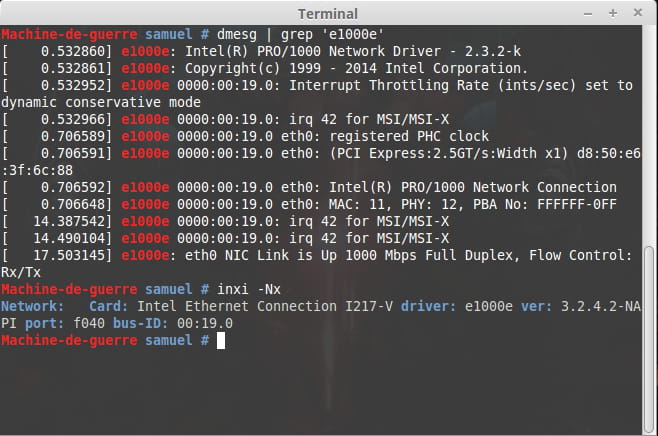
For inxi -Nx
Network: Card: Intel Ethernet Connection I217-V driver: e1000e ver: 2.3.2-k port: f040 bus-ID: 00:19.0
For lspci00:00.0 Host bridge: Intel Corporation 4th Gen Core Processor DRAM Controller (rev 06)
00:01.0 PCI bridge: Intel Corporation Xeon E3-1200 v3/4th Gen Core Processor PCI Express x16 Controller (rev 06)
00:14.0 USB controller: Intel Corporation 8 Series/C220 Series Chipset Family USB xHCI (rev 05)
00:16.0 Communication controller: Intel Corporation 8 Series/C220 Series Chipset Family MEI Controller #1 (rev 04)
00:19.0 Ethernet controller: Intel Corporation Ethernet Connection I217-V (rev 05)
00:1a.0 USB controller: Intel Corporation 8 Series/C220 Series Chipset Family USB EHCI #2 (rev 05)
00:1b.0 Audio device: Intel Corporation 8 Series/C220 Series Chipset High Definition Audio Controller (rev 05)
00:1c.0 PCI bridge: Intel Corporation 8 Series/C220 Series Chipset Family PCI Express Root Port #1 (rev d5)
00:1c.1 PCI bridge: Intel Corporation 8 Series/C220 Series Chipset Family PCI Express Root Port #2 (rev d5)
00:1c.6 PCI bridge: Intel Corporation 82801 PCI Bridge (rev d5)
00:1d.0 USB controller: Intel Corporation 8 Series/C220 Series Chipset Family USB EHCI #1 (rev 05)
00:1f.0 ISA bridge: Intel Corporation Z87 Express LPC Controller (rev 05)
00:1f.2 SATA controller: Intel Corporation 8 Series/C220 Series Chipset Family 6-port SATA Controller 1 [AHCI mode] (rev 05)
00:1f.3 SMBus: Intel Corporation 8 Series/C220 Series Chipset Family SMBus Controller (rev 05)
01:00.0 VGA compatible controller: NVIDIA Corporation GK104 [GeForce GTX 770] (rev a1)
01:00.1 Audio device: NVIDIA Corporation GK104 HDMI Audio Controller (rev a1)
03:00.0 SATA controller: ASMedia Technology Inc. ASM1062 Serial ATA Controller (rev 01)
04:00.0 PCI bridge: ASMedia Technology Inc. ASM1083/1085 PCIe to PCI Bridge (rev 03)
I couldn't manage to grep.
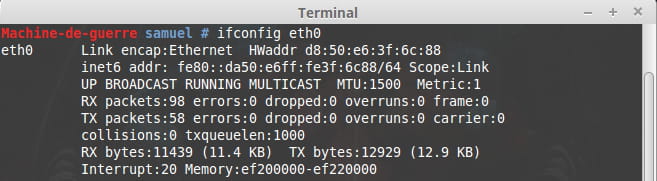
For ifconfigifconfig
eth0 Link encap:Ethernet HWaddr d8:50:e6:3f:6c:88
inet6 addr: fe80::da50:e6ff:fe3f:6c88/64 Scope:Link
UP BROADCAST RUNNING MULTICAST MTU:1500 Metric:1
RX packets:907 errors:0 dropped:0 overruns:0 frame:0
TX packets:306 errors:0 dropped:0 overruns:0 carrier:0
collisions:0 txqueuelen:1000
RX bytes:90487 (90.4 KB) TX bytes:65729 (65.7 KB)
Interrupt:20 Memory:ef200000-ef220000
lo Link encap:Local Loopback
inet addr:127.0.0.1 Mask:255.0.0.0
inet6 addr: ::1/128 Scope:Host
UP LOOPBACK RUNNING MTU:65536 Metric:1
RX packets:4 errors:0 dropped:0 overruns:0 frame:0
TX packets:4 errors:0 dropped:0 overruns:0 carrier:0
collisions:0 txqueuelen:0
RX bytes:240 (240.0 B) TX bytes:240 (240.0 B)
Here you go, do you have any leads?-
Contributorhttp://forums.debian.net/viewtopic.php?t=112327
It's for Debian, but it should work for Mint too ;-) -
-
So I went on the forum and I did this in my terminal:
cp e1000e-3.2.4.2.tar.gz /usr/local/src/
cp: cannot stat `e1000e-3.2.4.2.tar.gz': No such file or directory

cd /usr/local/src/
tar xzvf e1000e-3.2.4.2.tar.gz
e1000e-3.2.4.2/
e1000e-3.2.4.2/e1000e.spec
e1000e-3.2.4.2/SUMS
e1000e-3.2.4.2/e1000e.7
e1000e-3.2.4.2/COPYING
e1000e-3.2.4.2/src/
e1000e-3.2.4.2/src/kcompat.c
e1000e-3.2.4.2/src/82571.c
e1000e-3.2.4.2/src/Makefile
e1000e-3.2.4.2/src/defines.h
e1000e-3.2.4.2/src/e1000.h
e1000e-3.2.4.2/src/82571.h
e1000e-3.2.4.2/src/kcompat.h
e1000e-3.2.4.2/src/ethtool.c
e1000e-3.2.4.2/src/manage.c
e1000e-3.2.4.2/src/80003es2lan.c
e1000e-3.2.4.2/src/netdev.c
e1000e-3.2.4.2/src/ich8lan.c
e1000e-3.2.4.2/src/hw.h
e1000e-3.2.4.2/src/nvm.h
e1000e-3.2.4.2/src/mac.h
e1000e-3.2.4.2/src/mac.c
e1000e-3.2.4.2/src/kcompat_ethtool.c
e1000e-3.2.4.2/src/phy.h
e1000e-3.2.4.2/src/param.c
e1000e-3.2.4.2/src/nvm.c
e1000e-3.2.4.2/src/regs.h
e1000e-3.2.4.2/src/Module.supported
e1000e-3.2.4.2/src/phy.c
e1000e-3.2.4.2/src/ptp.c
e1000e-3.2.4.2/src/80003es2lan.h
e1000e-3.2.4.2/src/ich8lan.h
e1000e-3.2.4.2/src/manage.h
e1000e-3.2.4.2/pci.updates
e1000e-3.2.4.2/README

apt-get install linux-headers-amd64
Reading package lists... Done
Building dependency tree
Reading state information... Done
Package linux-headers-amd64 is not available, but is referred to by another package.
This may mean that the package is missing, has been obsoleted, or
is only available from another source

E: Package 'linux-headers-amd64' has no installation candidate
cd e1000e-3.0.4/src/
bash: cd: e1000e-3.0.4/src/: No such file or directory -
Contributor@Samuel le DXA la place de
apt-get install linux-headers-amd64
tapes :apt-get install linux-headers-$(uname -r)
affiches-nous d'abord le résultat deuname -r
-
Here it is
uname -r
3.16.0-38-generic

apt-get install linux-headers-$(uname -r)
Reading package lists... Done
Building dependency tree
Reading state information... Done
linux-headers-3.16.0-38-generic is already the newest version.
0 upgraded, 0 newly installed, 0 to remove and 0 not upgraded.

uname -r
3.16.0-38-generic

cd e1000e-3.0.4/src/
bash: cd: e1000e-3.0.4/src/: No such file or directory
-
-
ModeratorHello
Since you mentioned in an alert that the problem is resolved
For further reference ==> https://www.commentcamarche.net/infos/25917-marquer-un-fil-de-discussion-comme-etant-resolu/
--Very hard to catch a black cat in a dark room.
Especially when it's not there...-
-
Contributor@Samuel le DX
try a rmmod e1000e; modprobe e1000e
-
-
Contributor@Samuel le DXJust that. The first command (before the semicolon) unloads the driver and the second reloads it.
Root privileges (sudo) are required.
-
-
I don't think it's working
rmmod e1000e
rmmod: ERROR: Module e1000e is not currently loaded

modprobe e1000e-
-
-
Contributor@Samuel le DXCheck that your module is loaded correctly:
lsmod | grep 'e1000e'
Also, check that your module is not blacklisted:
grep 'e1000e' /etc/modprobe.d/blacklist.conf
-
When I run these commands, it goes to the next line and nothing happens. Except for lsmod, there's this
lsmod
Module Size Used by
joydev 17393 0
hid_generic 12559 0
usbhid 52616 0
hid 110426 2 hid_generic,usbhid
rfcomm 69509 0
bnep 19624 2
bluetooth 446409 10 bnep,rfcomm
6lowpan_iphc 18702 1 bluetooth
binfmt_misc 17468 1
snd_hda_codec_hdmi 47548 1
eeepc_wmi 13151 0
asus_wmi 24094 1 eeepc_wmi
sparse_keymap 13948 1 asus_wmi
snd_hda_codec_realtek 77467 1
snd_hda_codec_generic 69011 1 snd_hda_codec_realtek
dm_multipath 22843 0
scsi_dh 14882 1 dm_multipath
snd_hda_intel 30469 5
snd_hda_controller 30228 1 snd_hda_intel
snd_hda_codec 139682 5 snd_hda_codec_realtek,snd_hda_codec_hdmi,snd_hda_codec_generic,snd_hda_intel,snd_hda_controller
snd_hwdep 17698 1 snd_hda_codec
intel_rapl 18783 0
x86_pkg_temp_thermal 14205 0
intel_powerclamp 18823 0
coretemp 13441 0
snd_pcm 104112 4 snd_hda_codec_hdmi,snd_hda_codec,snd_hda_intel,snd_hda_controller
kvm_intel 143590 0
kvm 452088 1 kvm_intel
crct10dif_pclmul 14307 0
crc32_pclmul 13133 0
ghash_clmulni_intel 13230 0
aesni_intel 152552 0
aes_x86_64 17131 1 aesni_intel
snd_seq_midi 13564 0
lrw 13286 1 aesni_intel
snd_seq_midi_event 14899 1 snd_seq_midi
gf128mul 14951 1 lrw
snd_rawmidi 30876 1 snd_seq_midi
glue_helper 13990 1 aesni_intel
ablk_helper 13597 1 aesni_intel
cryptd 20359 3 ghash_clmulni_intel,aesni_intel,ablk_helper
snd_seq 63074 2 snd_seq_midi_event,snd_seq_midi
serio_raw 13483 0
snd_seq_device 14497 3 snd_seq,snd_rawmidi,snd_seq_midi
snd_timer 29562 2 snd_pcm,snd_seq
lpc_ich 21093 0
snd 79468 21 snd_hda_codec_realtek,snd_hwdep,snd_timer,snd_hda_codec_hdmi,snd_pcm,snd_seq,snd_rawmidi,snd_hda_codec_generic,snd_hda_codec,snd_hda_intel,snd_seq_device
soundcore 15047 2 snd,snd_hda_codec
mei_me 19696 0
mei 87875 1 mei_me
shpchp 37047 0
tpm_infineon 17131 0
mac_hid 13227 0
parport_pc 32741 0
ppdev 17671 0
lp 17759 0
parport 42348 3 lp,ppdev,parport_pc
dm_mirror 22135 0
dm_region_hash 20862 1 dm_mirror
dm_log 18411 2 dm_region_hash,dm_mirror
nouveau 1206535 3
mxm_wmi 13021 1 nouveau
i2c_algo_bit 13413 1 nouveau
ttm 93588 1 nouveau
psmouse 106610 0
drm_kms_helper 61574 1 nouveau
e1000e 226396 0
drm 311018 6 ttm,drm_kms_helper,nouveau
ahci 34062 2
ptp 19395 1 e1000e
libahci 32424 1 ahci
pps_core 19382 1 ptp
wmi 19193 3 mxm_wmi,nouveau,asus_wmi
video 20128 2 nouveau,asus_wmi -
Contributor@Samuel le DXFor the first command, it should have displayed:
e1000e 226396 0
since this result does appear in your listing, proving that the module is properly loaded.
If the second one returns nothing, that's normal, and that's a good thing; it means the module is not in the blacklist.
As for why your connection is not happening anymore, I have no idea ;-(
-
-
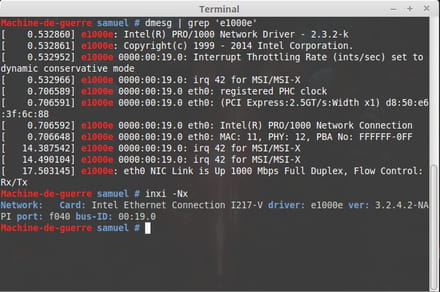
Here it is
-
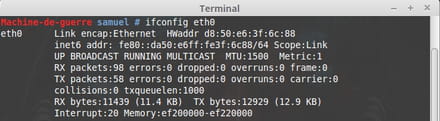
No, I still don't have a connection, but it's strange because sometimes about one restart out of five it tells me that there's a connection, but when I try to go on the Internet or on a network I can't.
-
ContributorYou said strange, how strange... ;-))
Jokes aside, your thing is really weird ;-\
You should start on a Live CD (or USB) and test if you have a connection or not in a Live session, so we can determine if it's a hardware issue related to the installed distro or a problem specifically related to the installed distribution itself.
-
-
So, I started on 3 different USB sticks: the first one with Linux Mint 17.2 Cinnamon had no internet, the second one with Xubuntu had the same problem, and the third one with Ubuntu—miraculously it worked. So I removed the USB stick and went back to my normal Linux Mint, and everything worked—' I don't think I'll ever understand the logic of computing. Let's hope it stays that way!
-
-
@zipe31I just turned on my PC running Linux and there's no internet --' I boot into Ubuntu and still no internet, I boot into Xubuntu and it works again... ;(
-
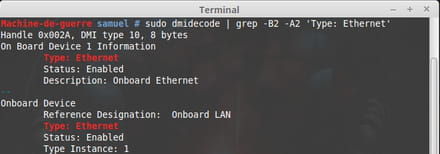
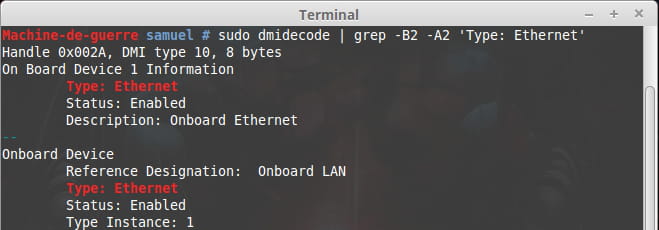
Contributor@Samuel le DXBased on the different boots, can you see what the command returns:
sudo dmidecode | grep -B2 -A2 'Type: Ethernet'
-
-
I couldn't restart with the internet.