How to prevent my Facebook comments from being posted on my friends' news feed?
Solved
artiste11
Posted messages
40
Status
Member
-
Radinoz Posted messages 7368 Registration date Status Contributor Last intervention -
Radinoz Posted messages 7368 Registration date Status Contributor Last intervention -
Hello,
so I noticed that every time I post a comment on a page or elsewhere, my friends automatically see it on their news feed. Is there a way to prevent them from seeing my comments?
thank you in advance for your reply
Configuration: Windows 7 / Chrome 43.0.2357.124
so I noticed that every time I post a comment on a page or elsewhere, my friends automatically see it on their news feed. Is there a way to prevent them from seeing my comments?
thank you in advance for your reply
Configuration: Windows 7 / Chrome 43.0.2357.124
1 answer
-
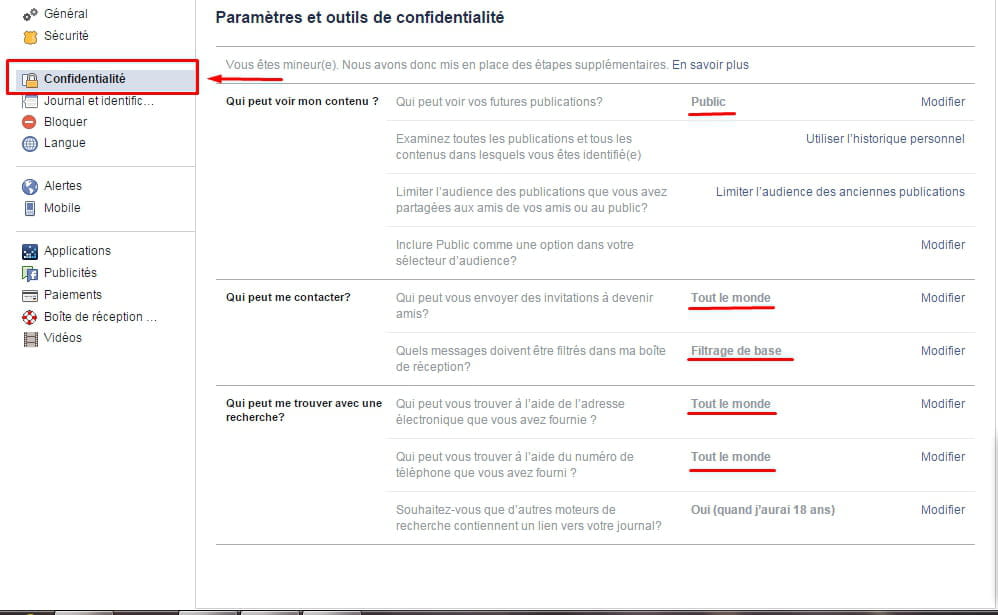
Hello, yes that’s enough in settings > privacy, and you set who can see, etc. There are plenty of things you can do, like not allowing others to post on my wall, making my photos private, etc... anyway, that’s it :)
Here's a small tutorial:
go here
then:
Finally, for each post (including comments), you can choose the visibility level: me only, friends, friends and their friends, etc.
Have a good day!-
-
-
Preventing your friends from seeing your activity on FB does not mean stopping them from reading your statuses and seeing your photos, but rather stopping them from tracking you wherever you go and reading your comments on other pages or groups that are not yours.
The only solution is to exclude them from your list or block them, and that is not what the person is asking for. -
-