
Enable Microsoft Office Live Preview
Naweex
Posted messages
3
Status
Member
-
piloute38 Posted messages 4 Status Member -
piloute38 Posted messages 4 Status Member -
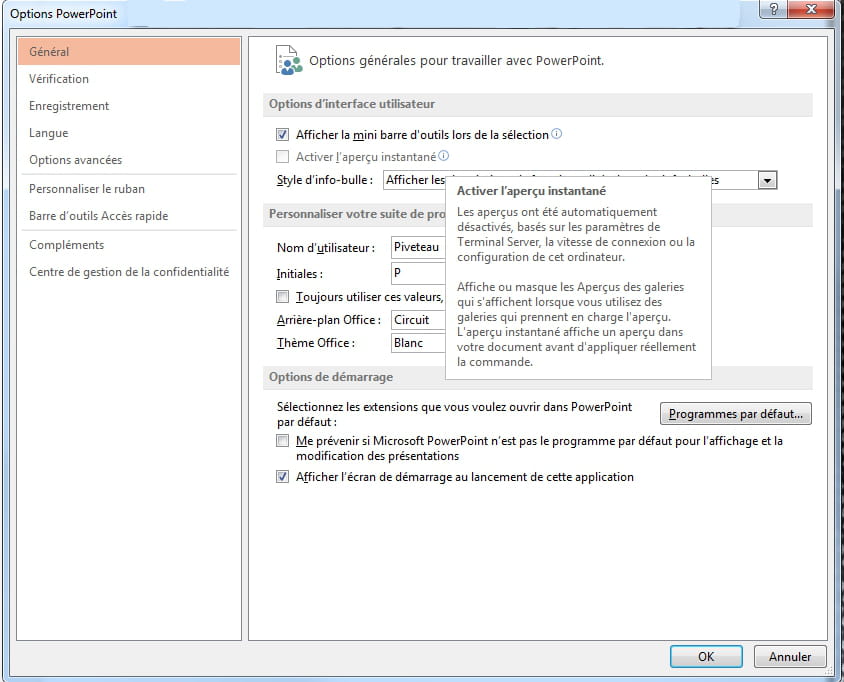
Hello, I can't activate the automatic preview in Microsoft Office because it is automatically disabled and the box is blocked (greyed out). Has anyone found a solution, please?
Thank you :)

Thank you :)
1 answer
-
Hello,
which version are you using?
It looks like the 2013 version, but according to the message displayed in the tooltip, it seems to be more of an online version.
--
C-Claire-
-
-
No, Office 365 is not for any particular use. It is the one I am using. It is identical to Office 2013, except that its usage right is by a renewable annual subscription (365 for 365 days of use).
This information indicating "Terminal Server" can be found just as clearly in Office 2007 or 2010.
Is your installation professional?
C-Claire -
I bought this version: https://www.microsoft.com/fr-fr/microsoft-365/p/microsoft-365-famille/cfq7ttc0k5dm?rtc=1
-
I have the same one in Family version.
But it is true that I don't use "Cloud" services. For example, I don't save anything online and the only connection is for updating the pack.
That said, I don't see what Terminal Server has to do with it, since the software is physically on your machine and usable without any connection.
Are you networked? Did you do a standard installation?
Still, try to start PowerPoint or Word in safe mode: hold down the CTRL key and launch Word or PowerPoint. Go back to the options and see if you still have that limit for the print preview.
C-Claire
-