Mail: what's "on my Mac"

Mango82
Posted messages
10
Status
Member
-
Mango82 Posted messages 10 Status Member -
Mango82 Posted messages 10 Status Member -
Good evening,
I am new on MAC and (like apparently many when starting out) I am a bit - a lot - lost.
I managed to create the email boxes for my 2 addresses, but a section "on my mac" (deleted messages and drafts) has intruded on one of my email addresses and I don't know what it's for, and it forces me to delete emails from my trash twice every time.
It's honestly annoying.
Your advice would be welcome :)
I am new on MAC and (like apparently many when starting out) I am a bit - a lot - lost.
I managed to create the email boxes for my 2 addresses, but a section "on my mac" (deleted messages and drafts) has intruded on one of my email addresses and I don't know what it's for, and it forces me to delete emails from my trash twice every time.
It's honestly annoying.
Your advice would be welcome :)
11 answers
-
Re.... I forgot,
to delete all the deleted messages at once:

--
To get an appropriate response, always indicate your exact system configuration.
Have a nice day :-) - Francis -
Hello,
You have probably created IMAP-type addresses.
IMAP mailboxes manage messages on the mail server itself. This is convenient for syncing across multiple devices. Anything deleted or read on one computer will be marked as such on another.
A POP account works differently. Received messages are downloaded to the computer, which then manages your mail locally.
That's the basic functionality, but we can modify this behavior to some extent. See here for more details:
https://netoxygen.ch/faqs/quelle-difference-entre-pop-et-imap/
On an IMAP account, you see the existing mailboxes on your mail server on your computer, and these mailboxes are often named "deleted messages" for "Messages supprimés", "Drafts" for "Brouillons", "Sent" for "Messages envoyés", "Inbox" for "Réception", etc.
These mailboxes, or BAL for Boîtes Aux Lettres, that you see are a reflection of what exists on the server, allowing you to manage them without going to the server's web page, such as Yahoo, Gmail, etc.
Don’t try to delete them; the server will rebuild them since it needs them.
To get started on Mac, here are a few useful links (hoping they are all still valid :))
Basics of Mac
https://support.apple.com/fr-fr/mac
Quick Assistant
https://support.apple.com/fr-fr/mac
Finder
https://support.apple.com/fr-fr/HT201732
Windows
http://support.apple.com/kb/PH13896?viewlocale=fr_FR
Desktop
https://support.apple.com/fr-fr/guide/mac-help/mh40612/mac
Dock
https://support.apple.com/fr-fr/guide/mac-help/mh35859/mac
System Preferences
https://support.apple.com/fr-fr/guide/mac-help/mh15217/mac
Dashboard
http://support.apple.com/kb/HT2492?viewlocale=fr_FR
Internet
https://support.apple.com/fr-fr/HT201735
Launchpad / Applications
https://support.apple.com/fr-fr/HT2476
Mail
https://support.apple.com/fr-fr/HT204093
Safari
http://support.apple.com/kb/HT5364?viewlocale=fr_FR
http://support.apple.com/kb/VI23?viewlocale=fr_FR
iTunes
https://support.apple.com/fr-fr/itunes
iPhoto
https://support.apple.com/kb/index?page=search&src=support_site.globalheader.search&locale=fr_FR&q=iPhoto
Preview - software that reads all images and PDFs
https://support.apple.com/fr-fr/HT201740
TextEdit - word processing software included on Mac
https://support.apple.com/fr-fr/HT2523
Next Steps - More Advanced Help
https://support.apple.com/kb/TA24076?locale=en_US&viewlocale=fr_FR
Time Machine
https://support.apple.com/fr-fr/HT201250
Transition aids from Windows to Mac OS.
Switching from Windows to Mac OS
https://support.apple.com/fr-fr/HT204216
Migrating files from Windows to Mac
https://support.apple.com/fr-fr/HT204087
Changing habits from PC to Mac
https://support.apple.com/fr-fr/mac
Importing emails from Windows
http://support.apple.com/kb/HT1534?viewlocale=fr_FR
An excellent site with downloadable video tutorials:
http://www.debutersurmac.com/tutoriels/accueil.html
Best regards.
--
To receive an appropriate response, always indicate your exact system configuration.
Have a great day :-) - Francis -
@*_Francis_*
Thank you very much for this response that enlightens me a bit.
Indeed, when I created the email accounts in "system preferences", it automatically set them to "IMAP".
But that's the case for both addresses. So why did it create these "on my Mac" folders only for one of the two addresses? -
So why did he create these "on my mac" folders only for one of the 2
addresses?
Good evening,
One lead: I don’t know if this is the case, but assuming you have a main account with Yahoo, or another service for that matter, and from that main account you have created 2 linked aliases, you will actually only have one instance of the indicated folders on the server, since these folders are linked to the main address.
@+
--
To get an appropriate response, always indicate your exact system configuration.
Have a good day :-) - Francis -
Hmm .. no, I don't think so.
In fact, these are 2 Hotmail addresses (live.fr), created at two very different intervals. Neither is linked to the other. -
I don't know if I'm expressing myself poorly, or if I really don't understand anything.
So nothing better than a screenshot:

What bothers me is the whole part surrounded in red.
That's what I don't understand, because basically, I have 5 bins, 3 of which are for the same email address and 4 drafts (2 times for each... because there are still some elements below that I couldn't capture)
I feel like it comes from the "smart mailbox" .. maybe I did something wrong? -
I see...
- Smart folders are folders that show you messages that meet selected criteria, but in which there are actually no messages, only a visualization of those messages that remain in their places. Normally, the "Smart Mailboxes" line can be expanded and collapsed thanks to a small arrow placed to its right. You cannot have made any false manipulation on this side. You can even delete any smart folder without risk of losing anything.
- As for the rest, this may be due to the fact that you have created folders directly on the mail server, and also because certain options are selected on this server regarding the retrieval of messages locally, or even choices in Mail, depending on whether these boxes are checked or not... (these are leads to check...)

--
To receive an appropriate answer, always indicate your exact system configuration.
Have a good day :-) - Francis -
So, concretely, how do I delete everything I've highlighted in red?
Because it's not so much the explanation of the "why" that interests me but rather the "how" to solve the problem. -
Hello,
Because it's not so much the explanation of "why" that interests me but rather the "how" to solve the problem.
As far as I'm concerned, the why always interests me, because precisely it's what allows me to understand the how...
In simple reasoning, what is on the Yahoo, Gmail, iCloud, Orange servers, etc. will appear on your Mac every time an email account is of the IMAP type. This allows access to these documents from any computer or mobile device.
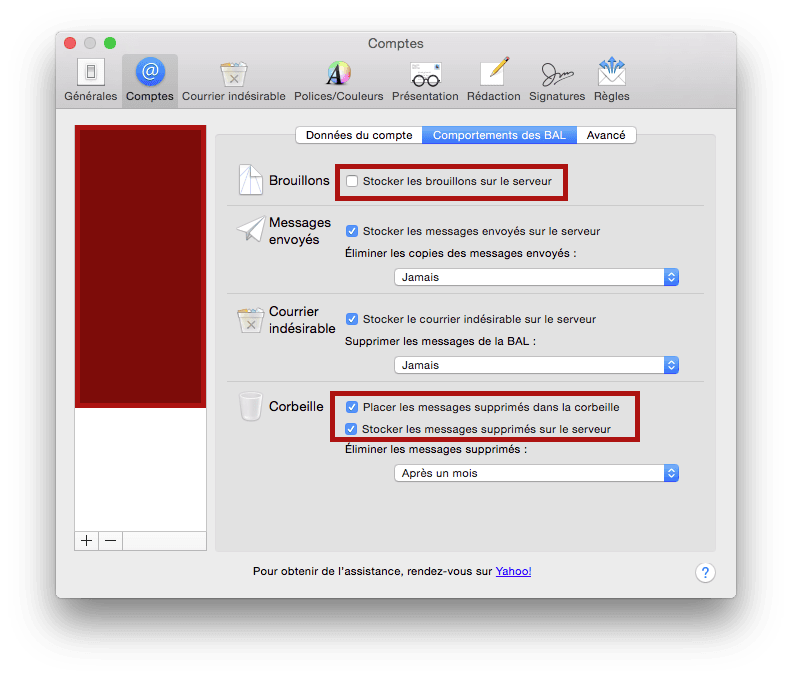
To prevent stored messages from appearing on the server (Drafts, Sent, etc.), there shouldn't be any messages on the server. So uncheck all relevant boxes and check the box "Place deleted messages in the trash," to avoid the intermediate folder "Deleted messages."
Basically like this:

Then, you should be able to permanently delete all the relevant folders in the "On My Mac" section. Not all in the server sections, because in some mail services, these folders may be considered essential on the server.
Your folders like "Job Search" or "Confidential" are shown as being part of the server in mail 1 (you must have created them directly on the server and not locally), you can perfectly create equivalent folders locally (On My Mac), transfer the contents there, and then delete the ones from the server...
Obviously, what is not or no longer on the server will no longer be accessible from another computer. It's a personal choice...
Best regards
--
To obtain an appropriate response, always indicate your exact system configuration.
Have a good day :-) - Francis -
Hello,
Like all of us, we were all a bit lost when we arrived on Mac, but it's not a big deal; we just need to understand that everything is simplified and we have to forget our usual Windows references.
And especially take a look at this site:
http://www.debutersurmac.com/tutoriels/accueil.html
Best regards, David R.
--
Test www.google.fr and the search section of the site before asking a question.
/!\ Don’t forget to mark it as "resolved" once you have your answer. /!\-
-
-
You think he's going to go through all these links to learn how to use a Mac when it's much easier to just get hands-on and then deepen his knowledge.
The exact link mentioned is also provided in my first message, but since quite a few things have significantly evolved since the tutorials on this excellent site, I preferred to put the current help links before the site debutersurmac.
@+
-
-
Thank you both (*_Francis_* and GoAtRom) for your advice, I will take a look at these links and study all of that...