Probleme de virus meteroid
Résolu
Bonjour,
alors voila mon gros probleme j'aarive pas a venir a bout du programe (virus) meteroid j'ai fait un scan adw cleaner ca marche pas et j'ai l'impression que ca m'installe d'autre truc en plus et je ne peux plus ouvrir mon norton internet security par la meme occaz !
ça m'ouvre plein de pub la ca me saoule !!! help me s'il vous plaiiit je suis desespérée !!!
alors voila mon gros probleme j'aarive pas a venir a bout du programe (virus) meteroid j'ai fait un scan adw cleaner ca marche pas et j'ai l'impression que ca m'installe d'autre truc en plus et je ne peux plus ouvrir mon norton internet security par la meme occaz !
ça m'ouvre plein de pub la ca me saoule !!! help me s'il vous plaiiit je suis desespérée !!!
17 réponses
-
Hello :) ,
Nous allons éffectuer un diagnostic de ton ordinateur.
# Télécharge ZHPDiag de Nicolas Coolman et enregistre-le sur ton Bureau.
# Installe le logiciel.
# Sous Windows Vista et Windows 7, il faut lancer le fichier par clic-droit -> Exécuter en tant qu'administrateur.
# N'oublie pas de cocher la case qui permet de mettre un raccourci sur le Bureau.
# L'outil a créé 2 icônes ZHPDiag et ZHPFix sur le Bureau.
# Double-clique sur ZHPDiag pour lancer l'exécution.
# Clic sur Complet .
# Tu patientes jusqu'à ce que le scan affiche 100%.
-> http://upload.sosvirus.net/images/2014/04/16/ZHPDiagc82cd.png
# Le rapport est sauvegardé sur le bureau.
# Ferme ZHPDiag.
# Héberger et transmettre un rapport.
# Rend toi sur SosUpload.
# Clique sur Parcourir et cherche le rapport de ZHPDiag sur ton bureau
# Clique ensuite sur Envoyer le fichier.
# Tu obtiendras un lien de téléchargement du rapport.
# Transmet ce lien dans ta prochaine réponse stp.
-
voila j'ai fait tout ce qui est indiqué
voici le lien : http://upload.sosvirus.net/www/?a=d&i=gHM8eBKSB6
jespere que ca va s'arranger... -
# Copie tout le texte présent ci-dessous ( clic sur doit ("Tout sélectionner") / Clique droit ("copier").
Script ZHPFix
O2 - BHO: Lync Click to Call BHO [64Bits] - {31D09BA0-12F5-4CCE-BE8A-2923E76605DA} Clé orpheline
O2 - BHO: (no name) [64Bits] - {D0498E0A-45B7-42AE-A9AA-ABA463DBD3BF} Clé orpheline
O3 - Toolbar\WebBrowser: (no name) - [HKCU]{7FEBEFE3-6B19-4349-98D2-FFB09D4B49CA} Clé orpheline
O4 - HKLM\..\Run: [SynTPEnh] C:\Program Files (x86)\Synaptics\SynTP\SynTPEnh.exe (.not file.)
O21 - SSODL: WebCheck - {E6FB5E20-DE35-11CF-9C87-00AA005127ED} - CLSID or File not found.
O23 - Service: DoypZWkHT (DoypZWkHT) . (.Acute Angle Solutions - Meteoroids Service.) - C:\ProgramData\BabQgKoVMSR\DoypZWkHT.exe  =>PUP.Meteoroids
[MD5.00000000000000000000000000000000] [APT] [{D7FEDD64-5396-459B-8F9B-DAE41EC99BD7}] (...) -- C:\Users\sandra\Downloads\Setup\Setup.exe (.not file.)   [0]
O43 - CFD: 04/12/2013 - 13:49:26 - [] ----D C:\ProgramData\34BE82C4-E596-4e99-A191-52C6199EBF69
O43 - CFD: 30/10/2014 - 13:01:36 - [] ----D C:\ProgramData\BabQgKoVMSR
C:\ProgramData\BabQgKoVMSR
O43 - CFD: 22/03/2013 - 12:12:28 - [] ----D C:\ProgramData\{9BF4D58B-C6D6-467B-BC5A-FD0C1278F4AF}
O43 - CFD: 30/10/2014 - 12:20:01 - [] ----D C:\Users\sandra\AppData\Local\Meteoroids  =>PUP.Meteoroids
[HKLM\SYSTEM\CurrentControlSet\Services\DoypZWkHT]   =>PUP.Meteoroids^
[HKLM\Software\Microsoft\Windows\CurrentVersion\Uninstall\ividi]   =>PUP.Ividi^
C:\Program Files (x86)\iVIDI.org plugin   =>PUP.Ividi^
C:\Users\sandra\AppData\Local\Software   =>Adware.Boxore
[HKCU\Software\BitTorrent]   =>P2P.BitTorrent^
[HKCU\Software\iVIDI.org]   =>PUP.Ividi^
C:\Windows\Installer\1163fbbb.msi   =>Adware.Boxore^
EmptyTemp
EmptyFlash
EMPTYCLSID
# Lance ZHPFix à partir du raccourci sur ton Bureau (si tu es sous Windows Vista ou 7, fais un clic-droit -> Exécuter en temps qu'administrateur).
# Clique sur Importer
# Les lignes précedemment copiées doivent être collées dans le cadre
# Si c'est le cas, Clic sur GO


# Confirmes les nettoyages des données en cliquant sur "Oui"
# Une fois le scan terminé rends toi sur le bureau, le fichier[b] ZHPFixReport /bà été crée.
# Héberge le rapport ZHPFixReport sur SosUpload, puis copie/colle le lien fourni dans ta prochaine réponse.
# Attention : Ce script a été spécialement fait pour ce PC . Toute réutilisation peut endommager sévèrement votre système.
-
et voila le nouveau rapport !
http://upload.sosvirus.net/www/?a=d&i=mHeV4LGtsd
:) -
:)
Ca doit déjà allez mieux je pense.
# Télécharge MalwareBytes
# Procède à l'installation de celui çi (Décocher "Activer l'essai gratuit de Malwarebytes Anti-Malware Premium")
# Clic sur Mettre à jour (à droite, au centre)
# Clic sur Examen (en haut)
# Sélectionne Examen "Menaces"
# Clic sur Examiner maintenant

# A la fin du scan clic sur Tout mettre en quarantaine !
# Clic sur Copier dans le Presse-papiers
# Un rapport va s'ouvrir. Copie/Colle son contenue dans ta prochaine réponse.
-
mouai... je sais qu'il est encore la car par exemple quand je vais un site de magasin ca me met une pub proposé par meteroids...
-
mouai... je sais qu'il est encore la car par exemple quand je vais un site de magasin ca me met une pub proposé par meteroids...
Ok, passe à malwarebyte's stp :)
-
mince j'ai pas eu le temps de coller dans le presse papier car ca m'a demandé de redemarer... je sais pas comment on fait la.. je refait une analyse ?
-
Malwarebytes Anti-Malware
www.malwarebytes.org
Protection, 30/10/2014 15:10:48, SYSTEM, PCSANDRA, Protection, Malware Protection, Starting,
Protection, 30/10/2014 15:10:48, SYSTEM, PCSANDRA, Protection, Malware Protection, Started,
Protection, 30/10/2014 15:10:48, SYSTEM, PCSANDRA, Protection, Malicious Website Protection, Starting,
Protection, 30/10/2014 15:10:48, SYSTEM, PCSANDRA, Protection, Malicious Website Protection, Started,
Update, 30/10/2014 15:11:06, SYSTEM, PCSANDRA, Manual, Rootkit Database, 2014.9.18.1, 2014.10.22.1,
Detection, 30/10/2014 15:11:06, SYSTEM, PCSANDRA, Protection, Malware Protection, File, PUP.Optional.Meteroids.A, C:\ProgramData\BabQgKoVMSR\dat\PtcLubkMbJ.exe, Quarantine Failed, 303, Queued for removal on reboot, [a0e1856afb80d85e75957432679ac63a]
Update, 30/10/2014 15:11:26, SYSTEM, PCSANDRA, Manual, Malware Database, 2014.9.19.5, 2014.10.30.8,
Protection, 30/10/2014 15:11:26, SYSTEM, PCSANDRA, Protection, Refresh, Starting,
Protection, 30/10/2014 15:11:26, SYSTEM, PCSANDRA, Protection, Malicious Website Protection, Stopping,
Protection, 30/10/2014 15:11:26, SYSTEM, PCSANDRA, Protection, Malicious Website Protection, Stopped,
Protection, 30/10/2014 15:11:31, SYSTEM, PCSANDRA, Protection, Refresh, Success,
Protection, 30/10/2014 15:11:32, SYSTEM, PCSANDRA, Protection, Malicious Website Protection, Starting,
Protection, 30/10/2014 15:11:32, SYSTEM, PCSANDRA, Protection, Malicious Website Protection, Started,
Detection, 30/10/2014 15:19:41, SYSTEM, PCSANDRA, Protection, Malware Protection, File, PUP.Optional.Meteroids.A, C:\ProgramData\BabQgKoVMSR\dat\PtcLubkMbJ.exe, Quarantine Failed, 303, Queued for removal on reboot, [6e72cb4f69136bcb163edfcd3ac79769]
Detection, 30/10/2014 15:29:48, SYSTEM, PCSANDRA, Protection, Malware Protection, File, PUP.Optional.Meteroids.A, C:\ProgramData\BabQgKoVMSR\dat\PtcLubkMbJ.exe, Quarantine Failed, 303, Queued for removal on reboot, [6e72cb4f69136bcb163edfcd3ac79769]
Detection, 30/10/2014 16:25:38, SYSTEM, PCSANDRA, Protection, Malware Protection, File, PUP.Optional.Meteroids.A, C:\ProgramData\BabQgKoVMSR\dat\PtcLubkMbJ.exe, Quarantine Failed, 303, Queued for removal on reboot, [6e72cb4f69136bcb163edfcd3ac79769]
Detection, 30/10/2014 16:25:49, SYSTEM, PCSANDRA, Protection, Malware Protection, File, PUP.Optional.Meteroids.A, C:\ProgramData\BabQgKoVMSR\dat\PtcLubkMbJ.exe, Quarantine Failed, 303, Queued for removal on reboot, [6e72cb4f69136bcb163edfcd3ac79769]
Scan, 30/10/2014 16:26:05, SYSTEM, PCSANDRA, Manual, Départ: % 1 30/10/2014, Durée: % 1 minutes 19 secondes, Examen "Menaces", Terminé, Détection de programmes malveillants de 0, Détection de non-programmes malveillants de 18,
Protection, 30/10/2014 16:28:03, SYSTEM, PCSANDRA, Protection, Malware Protection, Starting,
Protection, 30/10/2014 16:28:03, SYSTEM, PCSANDRA, Protection, Malware Protection, Started,
Protection, 30/10/2014 16:28:03, SYSTEM, PCSANDRA, Protection, Malicious Website Protection, Starting,
Protection, 30/10/2014 16:28:04, SYSTEM, PCSANDRA, Protection, Malicious Website Protection, Started,
(end)
je crois que c'est ca ! -
Re ,
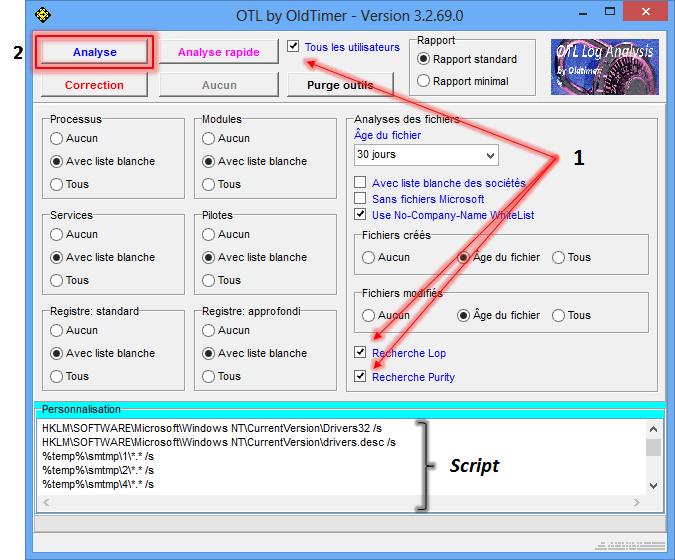
Télécharge OTL de Old_Timer et enregistre le sur le Bureau
Ferme toutes les autres fenêtres et double-clique sur OTL.exe
Sous Vista et Windows 7, il faut lancer le fichier par clic-droit-> Exécuter en tant qu'adminsitrateur.
Vérifie que les cases Tous les utilisateurs, Recherche Lop et Recherche Purity] soient cochées.
Dans le cadre Personnalisation, copie-colle l'intégralité de ce qui suit :
netsvcs
msconfig
safebootminimal
safebootnetwork
activex
drivers32
%ALLUSERSPROFILE%\Application Data\*.
%ALLUSERSPROFILE%\Application Data\*.exe /s
%APPDATA%\*.
%APPDATA%\*.exe /s
%temp%\*.exe /s
%SYSTEMDRIVE%\*.exe
%systemroot%\*. /mp /s
%systemroot%\system32\consrv.dll
%systemroot%\system32\*.dll /lockedfiles
%windir%\Tasks\*.job /lockedfiles
%systemroot%\system32\drivers\*.sys /lockedfiles
%systemroot%\System32\config\*.sav
/md5start
explorer.exe
winlogon.exe
services.exe
wininit.exe
/md5stop
HKEY_CLASSES_ROOT\CLSID\{F3130CDB-AA52-4C3A-AB32-85FFC23AF9C1}\InprocServer32 /s
HKEY_LOCAL_MACHINE\SYSTEM\SYSTEM\CurrentControlSet\Services\lanmanserver\parameters /s
HKEY_LOCAL_MACHINE\SYSTEM\CurrentControlSet\Control\Session Manager\SubSystems /s
HKEY_LOCAL_MACHINE\SYSTEM\CurrentControlSet\Control\Session Manager\AppCertDlls /s
HKEY_LOCAL_MACHINE\SOFTWARE\Microsoft\Windows NT\CurrentVersion\ProfileList /s
HKEY_LOCAL_MACHINE\Software\Microsoft\Command Processor /s
HKEY_CURRENT_USER\Software\Microsoft\Command Processor /s
CREATERESTOREPOINT
nslookup https://www.google.fr/?gws_rd=ssl /c
hklm\software\clients\startmenuinternet|command /rs
hklm\software\clients\startmenuinternet|command /64 /rs
CREATERESTOREPOINT
SAVEMBR:0
Clique ensuite sur Analyse et patiente le temps du scan.

A la fin de l'analyse, les rapports OTL.txtet Extras.txt s'affichent.
Les rapports étant trop longs pour le forum, héberge-les sur SosUpload et indique les liens fournis dans ta réponse.
Les rapports sont sauvegardés sur le Bureau.
-
http://upload.sosvirus.net/www/?a=d&i=eiHS9AcF0i
http://upload.sosvirus.net/www/?a=d&i=A1E2doCSLR
voila :)) ca a l'air d'avoir marché car je ne vois plus de pub !! -
Oui, il reste juste un résidu :)
# Télécharge OTM de OldTimer sur ton bureau.
# Double-clique sur OTM.exe pour le lancer.
# Sous Vista/Seven/8 , clic droit -> lancer en tant qu'administrateur
# Copie la liste ci-dessous et colle-la dans le cadre de gauche de OTM sous Paste Instructions for Items to be Moved.

:files
C:\ProgramData\BabQgKoVMSR
:commands
[emptytemp]
# Clique sur "MoveIt!" .
# Si un fichier ou dossier ne peut pas être supprimé immédiatement, le logiciel te demanderas de redémarrer l'ordinateur.
# Si c'est le cas, accepte en cliquant sur "YES".
# Post le rapport dans ta prochaine réponse.
# Le rapport est situé dans C:\_OTM\MovedFiles (Le nom du rapport correspond au moment de sa création : date_heure.log).
#######
Pour supprimer les outils de désinfections utilisés :
Télécharges DelFix par Xplode sur ton Bureau.
Lance DelFix, exécuter en tant qu'administrateur sous Windows : 7/8 et Vista
Coche les cases suivantes :
Supprimer les outils de désinfection
Purger la restauration système

-
rapport OTM
All processes killed
========== FILES ==========
C:\ProgramData\BabQgKoVMSR\dat folder moved successfully.
C:\ProgramData\BabQgKoVMSR folder moved successfully.
========== COMMANDS ==========
[EMPTYTEMP]
User: All Users
User: Default
->Temp folder emptied: 0 bytes
->Temporary Internet Files folder emptied: 0 bytes
->Flash cache emptied: 57472 bytes
User: Default User
->Temp folder emptied: 0 bytes
->Temporary Internet Files folder emptied: 0 bytes
->Flash cache emptied: 0 bytes
User: Default.migrated
User: dub_cm_auto
User: Public
User: sandra
->Temp folder emptied: 39648 bytes
->Temporary Internet Files folder emptied: 6183548 bytes
->Java cache emptied: 0 bytes
->Google Chrome cache emptied: 292517422 bytes
->Flash cache emptied: 58620 bytes
%systemdrive% .tmp files removed: 0 bytes
%systemroot% .tmp files removed: 0 bytes
%systemroot%\System32 .tmp files removed: 0 bytes
%systemroot%\System32 (64bit) .tmp files removed: 0 bytes
%systemroot%\System32\drivers .tmp files removed: 0 bytes
Windows Temp folder emptied: 13720044 bytes
RecycleBin emptied: 2820699231 bytes
Total Files Cleaned = 2 988,00 mb
OTM by OldTimer - Version 3.1.21.0 log created on 10302014_210036
Files moved on Reboot...
C:\Users\sandra\AppData\Local\Temp\FXSAPIDebugLogFile.txt moved successfully.
C:\Users\sandra\AppData\Local\Microsoft\Windows\INetCache\counters.dat moved successfully.
File C:\WINDOWS\temp\officeclicktorun.exe_c2ruidll(201410301627496FC).log not found!
File C:\WINDOWS\temp\officeclicktorun.exe_streamserver(201410301627506FC).log not found!
C:\WINDOWS\temp\PCSANDRA-20141030-1627.log moved successfully.
Registry entries deleted on Reboot... -
rapport DELFIX
# DelFix v10.8 - Rapport créé le 30/10/2014 à 21:08:38
# Mis à jour le 29/07/2014 par Xplode
# Nom d'utilisateur : sandra - PCSANDRA
# Système d'exploitation : Windows 8.1 (64 bits)
~ Suppression des outils de désinfection ...
Supprimé : C:\_OTM
Supprimé : C:\AdwCleaner
Supprimé : C:\Users\sandra\AppData\Roaming\ZHP
Supprimé : C:\ProgramData\Microsoft\Windows\Start Menu\Programs\ZHP
Supprimé : C:\Program Files (x86)\ZHPDiag
Supprimé : C:\PhysicalDisk0_MBR.bin
Supprimé : C:\Users\sandra\Desktop\ZHPDiag.lnk
Supprimé : C:\Users\sandra\Desktop\ZHPDiag.txt
Supprimé : C:\Users\sandra\Desktop\ZHPFix.lnk
Supprimé : C:\Users\sandra\Desktop\ZHPFixReport.txt
Supprimé : C:\Users\sandra\Downloads\JRT.exe
Supprimé : C:\Users\sandra\Downloads\OTM.exe
Supprimé : C:\Users\sandra\Downloads\ZHPDiag.txt
Supprimé : C:\Users\sandra\Downloads\ZHPDiag2.exe
Supprimée : HKLM\SOFTWARE\OldTimer Tools
Supprimée : HKLM\SOFTWARE\AdwCleaner
Supprimée : HKLM\SOFTWARE\Microsoft\Windows\CurrentVersion\Uninstall\ZHPDiag_is1
~ Purge de la restauration système ...
Supprimé : RP #57 [Windows Update | 10/15/2014 19:42:15]
Supprimé : RP #58 [Installed Java 7 Update 71 | 10/20/2014 07:40:06]
Supprimé : RP #59 [Installed HP Update. | 10/22/2014 08:41:44]
Supprimé : RP #60 [Microsoft Visual C++ 2013 Redistributable (x86) - 12.0.21005 | 10/27/2014 16:46:25]
Supprimé : RP #61 [Opération de restauration | 10/30/2014 11:27:01]
Nouveau point de restauration créé !
########## - EOF - ########## -
Ok Sandra, on en a terminé, tu vas pouvoir passer ton sujet en résolu.
Bonne soirée :)
-
olala merci merci merci !!!
j'aurai jamais pu faire ca toute seule c'est vraiment cool de ta part merci !!
passe une bone soiree -
De rien Sandra,
Bonne soirée également : )