
Error code 19 no sound anymore
lesckrank
Posted messages
19
Status
Member
-
DenJee7 -
DenJee7 -
Hello,
It's been several days since I haven't . Windows indicates that no devices are installed. When I tried to reinstall the drivers, I got an error code 19 indicating that there is a registry error. I hope someone can help me! I'm not really sure what information you need, so feel free to ask.
Configuration: Windows 8 / Firefox 31.0
It's been several days since I haven't . Windows indicates that no devices are installed. When I tried to reinstall the drivers, I got an error code 19 indicating that there is a registry error. I hope someone can help me! I'm not really sure what information you need, so feel free to ask.
Configuration: Windows 8 / Firefox 31.0
25 answers
- 1
- 2
Next
-
Good evening,
Which computer?
Windows 8 32 or 64 bits?
Best regards.
--
The one that doesn’t please upon arrival always pleases upon departure!
Breizh a tao -
-
-
non celui-ci : https://www.acer.com/ac/fr/FR/content/model/DT.SJPEF.007
-
-
This driver is provided for Windows 7 64-bit, on the Acer site I do not see the driver for Windows 8 64-bit!
Try installing Audio_Realtek_6.0.1.6299_W7x86W7x64_A.zip.
-
-
I downloaded and installed the driver you mentioned and then restarted my PC... and there are no changes :(
Any other ideas? -
Hello,
For code 19:
Download -->> this <<--
and place it on the desktop.
Right-click on the file
Choose --> Install
Restart the pc.
Reinstall the audio driver.
--
Humans are at their best when things are at their worst. -
I installed your file, restarted my computer, uninstalled the driver, restarted my computer, installed the driver, restarted my computer... And still nothing. Do you have any other ideas?
-
Go to Device Manager
Check if there are any question marks and which ones?
If there are, provide the hardware ID number.
Look -->> here <<--
Also, provide the list displayed under audio controllers.
Human beings are at their best when things are at their worst. -
Here is the list of devices:
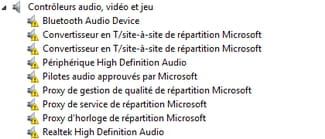
All have the exact same error:
Windows cannot start this hardware device because its configuration information (in the Registry) is incomplete or damaged. (Code 19)
For the identifiers:
Bluetooth Audio Device =
BTHENUM\{61118058-486c-4bb0-b4b8-ace4dcadec44}_LOCALMFG&0000
Microsoft Site-to-Site T Converter = SW\{cfd669f1-9bc2-11d0-8299-0000f822fe8a}
Microsoft Site-to-Site T Converter = SW\{cfd669f1-9bc2-11d0-8299-0000f822fe8a}
(identical to the one above... at least I think)
High Definition Audio Device = HDAUDIO\FUNC_01&VEN_10DE&DEV_0040&SUBSYS_174B2260&REV_1001
Microsoft Signed Audio Drivers =
SW\{eec12db6-ad9c-4168-8658-b03daef417fe}
Microsoft Distribution Quality Management Proxy =
SW\{96e080c7-143c-11d1-b40f-00a0c9223196}
Microsoft Distribution Service Proxy =
SW\{96e080c7-143c-11d1-b40f-00a0c9223196}
Microsoft Distribution Clock Proxy =
SW\{97ebaacc-95bd-11d0-a3ea-00a0c9223196}
Realtek High Definition Audio =
HDAUDIO\FUNC_01&VEN_10EC&DEV_0662&SUBSYS_10258100&REV_1003
That's all, I believe! -
For code 19, did you right-click on the .inf file and clicked on --> Install?
Go to the control panel
Programs and features
Uninstall Realtek audio, if present.
Go to the device manager
Audio controllers
Right-click on Realtek High Definition Audio
Uninstall it
Restart the pc.
Install these 2 drivers:
--> Realtek
--> Audio HDMI
--
Humans are at their best when things are at their worst. -
-
I installed everything successfully and... Nothing! But what’s happening with this sound?
-
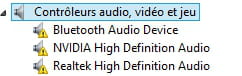
What does it look like in audio controllers for these 2 devices?
--> High Definition Audio Device
--> Realtek High Definition Audio
--
Human beings are at their best when things are at their worst. -
-
For code 19, did you right-click on the .inf file and clicked on --> Install?
--
Human beings are at their best when things are at their worst. -
-
Start
In the search bar, type --> cmd.exe
Right-click on cmd.exe
Choose --> run as administrator and confirm
Type --> sfc /scannow and enter
A system file check will take place.
--
Human beings are at their best when things are at their worst. -
I did what you told me and it returns:
Another processing or repair operation is in progress. Wait for it to finish and re-run sfc. -
I restarted my computer and a Windows update took 2 hours.
I tried your command again right after and the verification is in progress.


- 1
- 2
Next