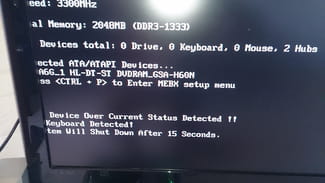
My computer starts and shuts down after 15 seconds
ptipat
-
ptipat Posted messages 36 Status Member -
ptipat Posted messages 36 Status Member -
Hello, here’s my problem as best as I can explain it:
I just changed my motherboard on my tower because it was faulty. I reconnected everything properly, and to my surprise, my PC starts up well, the hard drives and drives are recognized in the message that displays, and at the bottom, there's a little message saying that after 15 seconds, it will shut down, and indeed, it does shut down.
So, I removed all the hardware connected to it—graphics card and RAM. Now the PC doesn’t shut down, but there’s no display, which is logical. I put the graphics card back in, and the same thing happens; the PC stays on, but still no image since I haven't reinstalled the RAM. Then I put the RAM back, and again my PC starts, I see the black startup screen with the peripherals recognized, and there's still that little message that it’s going to shut down, and it shuts down.
Do you have any idea where the problem might come from?
Thank you.
I just changed my motherboard on my tower because it was faulty. I reconnected everything properly, and to my surprise, my PC starts up well, the hard drives and drives are recognized in the message that displays, and at the bottom, there's a little message saying that after 15 seconds, it will shut down, and indeed, it does shut down.
So, I removed all the hardware connected to it—graphics card and RAM. Now the PC doesn’t shut down, but there’s no display, which is logical. I put the graphics card back in, and the same thing happens; the PC stays on, but still no image since I haven't reinstalled the RAM. Then I put the RAM back, and again my PC starts, I see the black startup screen with the peripherals recognized, and there's still that little message that it’s going to shut down, and it shuts down.
Do you have any idea where the problem might come from?
Thank you.
8 answers
-
Well, there's some improvement; I reset the BIOS, no more messages, the PC doesn't shut down anymore, just a black screen now, and I have access to the BIOS.
-- -
Start Windows in safe mode and install the drivers for your new motherboard.
-
Hello,
<<this little message saying that it will turn off, and it turns off>>
What exactly does this message say? This could indicate the way to proceed.
--
"I say that the strongest among the hippopotamus and the elephant is still the rhinoceros!" -
The system will shut down after 15 seconds.
At first, I try to enter the BIOS by pressing F2 or Delete, but nothing happens. -
Hello,
@ait namane, you read well, it can't even start, how do you expect it to boot in safe mode? by miracle
Try to give us a bit more explanation about your setup?
What are your components and how did you assemble them? -
-
Yes, I tried to boot from both hard drives and attempted to repair the startup, but nothing worked, so I launched a fresh installation by booting from the DVD drive.
-- -
Thank you all for your help, everything is back in order :)
--