
Infecté puis fraude
Résolubuckhulk Messages postés 14914 Statut Contributeur -
Je viens chercher un peu d'aide sur ce forum car avg m'a récemment détecté un cheval de troie (downloader.generic.13) qui me l'a placé en quarantaine et je voudrais savoir si il a bien été supprimé de mon PC.
De plus j'ai récemment été victime d'une fraude bancaire, certainement suite a ce cheval de troie.
Si quelqu'un pouvait m'aider afin de ne pas me refaire pirater ma nouvelle carte bleue lors de mon prochain achat sur le net ce serait génial ;)
Merci d'avance et à bientôt.
Alex
30 réponses
- 1
- 2
L'échange porte sur une détection par AVG d'un cheval de troie downloader.generic.13 et sur des inquiétudes liées à une fraude bancaire lors d'achats en ligne. Des solutions de diagnostic et de nettoyage sont proposées, notamment Malwarebytes Anti-Malware, un balayage approfondi et la mise en quarantaine des éléments détectés, avec import et exécution prudente des rapports. En parallèle, des guides préconisent ZHPDiag et ZHPFix pour nettoyer le système et produire des rapports à partager, avec prudence quant à l’emploi de scripts personnalisés. D'autres échanges évoquent la sécurité du réseau wifi domestique et la nécessité de changer les mots de passe, d’analyser les accès réseau et de sécuriser les futures transactions en ligne.
-
Hello
Pour voir
Télécharge Malwaresbytes anti malware ici
https://www.commentcamarche.net/telecharger/securite/14361-malwarebytes-anti-malware/
* Installe le (choisis bien français ; ne modifie pas les paramètres d'installe
* Décoche la case Activer l'essai gratuit de Malwarebytes Anti-Malware Premium à la fin de l'installation
* /!\ Utilisateurs de Vista/7/8/8.1 : faire un clic droit sur le raccourci de MalwareBytes' Anti-Malware et choisir Exécuter en tant qu'administrateur
* Clique sur Mettre à jour dans le Tableau de bord afin de mettre à jour la base de données.
* Dans l'onglet Examen, sélectionnez Examen Menaces puis clique sur Examiner maintenant.
* Une fois le scan terminé, clique sur Tout mettre en quarantaine puis sur Appliquez les actions
* (Si un message demande de redémarrer le PC pour terminer la suppression, accepte)
* Le rapport est disponible dans Historique > Journaux de l'application. (Choisis bien le dernier en date
* Tu sélectionnes le fichier et tu demandes l'affichage
* En bas à gauche un bouton exporter ; tu cliques dessus et tu choisis fichier texte et tu choisis ensuite ou l'enregistrer pour ensuite pouvoir le poster dans ta prochaine réponse en l'hébergeant sur cjoint
* Pour t'aider https://www.commentcamarche.net/faq/29493-utiliser-cjoint-pour-heberger-des-fichiers
-
Salut lilidurhone,
alors merci beaucoup de m'aider et de me répondre aussi vite, voici le rapport, effectivement je crois qu'il restait encore quelques trucs ;)
Malwarebytes Anti-Malware
www.malwarebytes.org
Protection, 03/06/2014 18:44:25, SYSTEM, IBIZALEX-PC, Protection, Malware Protection, Starting,
Protection, 03/06/2014 18:44:25, SYSTEM, IBIZALEX-PC, Protection, Malware Protection, Started,
Protection, 03/06/2014 18:44:27, SYSTEM, IBIZALEX-PC, Protection, Malicious Website Protection, Starting,
Protection, 03/06/2014 18:44:33, SYSTEM, IBIZALEX-PC, Protection, Malicious Website Protection, Started,
Update, 03/06/2014 18:44:43, SYSTEM, IBIZALEX-PC, Manual, Rootkit Database, 2014.2.20.1, 2014.6.2.1,
Protection, 03/06/2014 18:45:39, SYSTEM, IBIZALEX-PC, Protection, Malicious Website Protection, Stopping,
Protection, 03/06/2014 18:45:39, SYSTEM, IBIZALEX-PC, Protection, Malicious Website Protection, Stopped,
Protection, 03/06/2014 18:45:39, SYSTEM, IBIZALEX-PC, Protection, Malware Protection, Stopping,
Protection, 03/06/2014 18:45:39, SYSTEM, IBIZALEX-PC, Protection, Malware Protection, Stopped,
Protection, 03/06/2014 18:47:12, SYSTEM, IBIZALEX-PC, Protection, Malware Protection, Starting,
Protection, 03/06/2014 18:47:12, SYSTEM, IBIZALEX-PC, Protection, Malware Protection, Started,
Protection, 03/06/2014 18:47:12, SYSTEM, IBIZALEX-PC, Protection, Malicious Website Protection, Starting,
Protection, 03/06/2014 18:47:13, SYSTEM, IBIZALEX-PC, Protection, Malicious Website Protection, Started,
Update, 03/06/2014 18:47:24, SYSTEM, IBIZALEX-PC, Manual, Rootkit Database, 2014.2.20.1, 2014.6.2.1,
Update, 03/06/2014 18:48:04, SYSTEM, IBIZALEX-PC, Manual, Malware Database, 2014.3.4.9, 2014.6.3.5,
Protection, 03/06/2014 18:48:06, SYSTEM, IBIZALEX-PC, Protection, Refresh, Starting,
Protection, 03/06/2014 18:48:06, SYSTEM, IBIZALEX-PC, Protection, Malicious Website Protection, Stopping,
Protection, 03/06/2014 18:48:06, SYSTEM, IBIZALEX-PC, Protection, Malicious Website Protection, Stopped,
Protection, 03/06/2014 18:48:14, SYSTEM, IBIZALEX-PC, Protection, Malware Protection, Stopping,
Protection, 03/06/2014 18:48:15, SYSTEM, IBIZALEX-PC, Protection, Refresh, Success,
Protection, 03/06/2014 18:48:17, SYSTEM, IBIZALEX-PC, Protection, Malware Protection, Stopped,
Protection, 03/06/2014 18:50:29, SYSTEM, IBIZALEX-PC, Protection, Malware Protection, Starting,
Protection, 03/06/2014 18:50:29, SYSTEM, IBIZALEX-PC, Protection, Malware Protection, Started,
Protection, 03/06/2014 18:50:29, SYSTEM, IBIZALEX-PC, Protection, Malicious Website Protection, Starting,
Protection, 03/06/2014 18:50:32, SYSTEM, IBIZALEX-PC, Protection, Malicious Website Protection, Started,
Update, 03/06/2014 18:50:32, SYSTEM, IBIZALEX-PC, Manual, Rootkit Database, 2014.2.20.1, 2014.6.2.1,
Update, 03/06/2014 18:51:21, SYSTEM, IBIZALEX-PC, Manual, Malware Database, 2014.3.4.9, 2014.6.3.5,
Protection, 03/06/2014 18:52:13, SYSTEM, IBIZALEX-PC, Protection, Refresh, Starting,
Protection, 03/06/2014 18:52:13, SYSTEM, IBIZALEX-PC, Protection, Malicious Website Protection, Stopping,
Protection, 03/06/2014 18:52:13, SYSTEM, IBIZALEX-PC, Protection, Malicious Website Protection, Stopped,
Protection, 03/06/2014 18:52:19, SYSTEM, IBIZALEX-PC, Protection, Refresh, Success,
Protection, 03/06/2014 18:52:19, SYSTEM, IBIZALEX-PC, Protection, Malicious Website Protection, Starting,
Protection, 03/06/2014 18:52:19, SYSTEM, IBIZALEX-PC, Protection, Malicious Website Protection, Started,
Detection, 03/06/2014 18:58:11, SYSTEM, IBIZALEX-PC, Protection, Malware Protection, File, PUP.Optional.Speedial.A, C:\Users\ibizalex\AppData\Roaming\Speedial\UpdateProc\UpdateTask.exe, Quarantine, [a46ddc98a6d58ea888dff09e32d05da3]
Update, 03/06/2014 19:37:20, SYSTEM, IBIZALEX-PC, Scheduler, Malware Database, 2014.6.3.5, 2014.6.3.6,
Protection, 03/06/2014 19:37:50, SYSTEM, IBIZALEX-PC, Protection, Refresh, Starting,
Protection, 03/06/2014 19:37:51, SYSTEM, IBIZALEX-PC, Protection, Malicious Website Protection, Stopping,
Protection, 03/06/2014 19:37:55, SYSTEM, IBIZALEX-PC, Protection, Malicious Website Protection, Stopped,
Protection, 03/06/2014 19:41:35, SYSTEM, IBIZALEX-PC, Protection, Refresh, Success,
Protection, 03/06/2014 19:41:36, SYSTEM, IBIZALEX-PC, Protection, Malicious Website Protection, Starting,
Protection, 03/06/2014 19:41:56, SYSTEM, IBIZALEX-PC, Protection, Malicious Website Protection, Started,
Protection, 03/06/2014 19:56:00, SYSTEM, IBIZALEX-PC, Protection, Malware Protection, Starting,
Protection, 03/06/2014 19:56:07, SYSTEM, IBIZALEX-PC, Protection, Malware Protection, Started,
Protection, 03/06/2014 19:56:10, SYSTEM, IBIZALEX-PC, Protection, Malicious Website Protection, Starting,
Protection, 03/06/2014 19:57:05, SYSTEM, IBIZALEX-PC, Protection, Malicious Website Protection, Started,
(end) -
Pas le bon rapport...
On continue après manger
-
-
est-ce celui-ci ?
Malwarebytes Anti-Malware
www.malwarebytes.org
Protection, 03/06/2014 18:44:25, SYSTEM, IBIZALEX-PC, Protection, Malware Protection, Starting,
Protection, 03/06/2014 18:44:25, SYSTEM, IBIZALEX-PC, Protection, Malware Protection, Started,
Protection, 03/06/2014 18:44:27, SYSTEM, IBIZALEX-PC, Protection, Malicious Website Protection, Starting,
Protection, 03/06/2014 18:44:33, SYSTEM, IBIZALEX-PC, Protection, Malicious Website Protection, Started,
Update, 03/06/2014 18:44:43, SYSTEM, IBIZALEX-PC, Manual, Rootkit Database, 2014.2.20.1, 2014.6.2.1,
Protection, 03/06/2014 18:45:39, SYSTEM, IBIZALEX-PC, Protection, Malicious Website Protection, Stopping,
Protection, 03/06/2014 18:45:39, SYSTEM, IBIZALEX-PC, Protection, Malicious Website Protection, Stopped,
Protection, 03/06/2014 18:45:39, SYSTEM, IBIZALEX-PC, Protection, Malware Protection, Stopping,
Protection, 03/06/2014 18:45:39, SYSTEM, IBIZALEX-PC, Protection, Malware Protection, Stopped,
Protection, 03/06/2014 18:47:12, SYSTEM, IBIZALEX-PC, Protection, Malware Protection, Starting,
Protection, 03/06/2014 18:47:12, SYSTEM, IBIZALEX-PC, Protection, Malware Protection, Started,
Protection, 03/06/2014 18:47:12, SYSTEM, IBIZALEX-PC, Protection, Malicious Website Protection, Starting,
Protection, 03/06/2014 18:47:13, SYSTEM, IBIZALEX-PC, Protection, Malicious Website Protection, Started,
Update, 03/06/2014 18:47:24, SYSTEM, IBIZALEX-PC, Manual, Rootkit Database, 2014.2.20.1, 2014.6.2.1,
Update, 03/06/2014 18:48:04, SYSTEM, IBIZALEX-PC, Manual, Malware Database, 2014.3.4.9, 2014.6.3.5,
Protection, 03/06/2014 18:48:06, SYSTEM, IBIZALEX-PC, Protection, Refresh, Starting,
Protection, 03/06/2014 18:48:06, SYSTEM, IBIZALEX-PC, Protection, Malicious Website Protection, Stopping,
Protection, 03/06/2014 18:48:06, SYSTEM, IBIZALEX-PC, Protection, Malicious Website Protection, Stopped,
Protection, 03/06/2014 18:48:14, SYSTEM, IBIZALEX-PC, Protection, Malware Protection, Stopping,
Protection, 03/06/2014 18:48:15, SYSTEM, IBIZALEX-PC, Protection, Refresh, Success,
Protection, 03/06/2014 18:48:17, SYSTEM, IBIZALEX-PC, Protection, Malware Protection, Stopped,
Protection, 03/06/2014 18:50:29, SYSTEM, IBIZALEX-PC, Protection, Malware Protection, Starting,
Protection, 03/06/2014 18:50:29, SYSTEM, IBIZALEX-PC, Protection, Malware Protection, Started,
Protection, 03/06/2014 18:50:29, SYSTEM, IBIZALEX-PC, Protection, Malicious Website Protection, Starting,
Protection, 03/06/2014 18:50:32, SYSTEM, IBIZALEX-PC, Protection, Malicious Website Protection, Started,
Update, 03/06/2014 18:50:32, SYSTEM, IBIZALEX-PC, Manual, Rootkit Database, 2014.2.20.1, 2014.6.2.1,
Update, 03/06/2014 18:51:21, SYSTEM, IBIZALEX-PC, Manual, Malware Database, 2014.3.4.9, 2014.6.3.5,
Protection, 03/06/2014 18:52:13, SYSTEM, IBIZALEX-PC, Protection, Refresh, Starting,
Protection, 03/06/2014 18:52:13, SYSTEM, IBIZALEX-PC, Protection, Malicious Website Protection, Stopping,
Protection, 03/06/2014 18:52:13, SYSTEM, IBIZALEX-PC, Protection, Malicious Website Protection, Stopped,
Protection, 03/06/2014 18:52:19, SYSTEM, IBIZALEX-PC, Protection, Refresh, Success,
Protection, 03/06/2014 18:52:19, SYSTEM, IBIZALEX-PC, Protection, Malicious Website Protection, Starting,
Protection, 03/06/2014 18:52:19, SYSTEM, IBIZALEX-PC, Protection, Malicious Website Protection, Started,
Detection, 03/06/2014 18:58:11, SYSTEM, IBIZALEX-PC, Protection, Malware Protection, File, PUP.Optional.Speedial.A, C:\Users\ibizalex\AppData\Roaming\Speedial\UpdateProc\UpdateTask.exe, Quarantine, [a46ddc98a6d58ea888dff09e32d05da3]
Update, 03/06/2014 19:37:20, SYSTEM, IBIZALEX-PC, Scheduler, Malware Database, 2014.6.3.5, 2014.6.3.6,
Protection, 03/06/2014 19:37:50, SYSTEM, IBIZALEX-PC, Protection, Refresh, Starting,
Protection, 03/06/2014 19:37:51, SYSTEM, IBIZALEX-PC, Protection, Malicious Website Protection, Stopping,
Protection, 03/06/2014 19:37:55, SYSTEM, IBIZALEX-PC, Protection, Malicious Website Protection, Stopped,
Protection, 03/06/2014 19:41:35, SYSTEM, IBIZALEX-PC, Protection, Refresh, Success,
Protection, 03/06/2014 19:41:36, SYSTEM, IBIZALEX-PC, Protection, Malicious Website Protection, Starting,
Protection, 03/06/2014 19:41:56, SYSTEM, IBIZALEX-PC, Protection, Malicious Website Protection, Started,
Protection, 03/06/2014 19:56:00, SYSTEM, IBIZALEX-PC, Protection, Malware Protection, Starting,
Protection, 03/06/2014 19:56:07, SYSTEM, IBIZALEX-PC, Protection, Malware Protection, Started,
Protection, 03/06/2014 19:56:10, SYSTEM, IBIZALEX-PC, Protection, Malicious Website Protection, Starting,
Protection, 03/06/2014 19:57:05, SYSTEM, IBIZALEX-PC, Protection, Malicious Website Protection, Started,
(end)
Bon appetit
-
-
Vous n’avez pas trouvé la réponse que vous recherchez ?
Posez votre question -
Non toujours pas
-
désolé j'ai un peu fait le boulet sur ce coup là, le voici :
Malwarebytes Anti-Malware
www.malwarebytes.org
Date de l'examen: 03/06/2014
Heure de l'examen: 18:53:14
Fichier journal:
Administrateur: Oui
Version: 2.00.2.1012
Base de données Malveillants: v2014.06.03.05
Base de données Rootkits: v2014.06.02.01
Licence: Essai
Protection contre les malveillants: Activé(e)
Protection contre les sites Web malveillants: Activé(e)
Self-protection: Désactivé(e)
Système d'exploitation: Windows 7
Processeur: x86
Système de fichiers: NTFS
Utilisateur: ibizalex
Type d'examen: Examen "Menaces"
Résultat: Terminé
Objets analysés: 257381
Temps écoulé: 52 min, 5 sec
Mémoire: Activé(e)
Démarrage: Activé(e)
Système de fichiers: Activé(e)
Archives: Activé(e)
Rootkits: Désactivé(e)
Heuristics: Activé(e)
PUP: Activé(e)
PUM: Activé(e)
Processus: 0
(No malicious items detected)
Modules: 0
(No malicious items detected)
Clés du Registre: 22
PUP.Optional.Iminent.A, HKLM\SOFTWARE\CLASSES\APPID\{0E4B2CAB-B859-4C57-B96E-63DDEC692BC4}, Mis en quarantaine, [23ee1c580576ee48ef5d6acf50b2956b],
PUP.Optional.Delta.A, HKLM\SOFTWARE\CLASSES\APPID\{C26644C4-2A12-4CA6-8F2E-0EDE6CF018F3}, Mis en quarantaine, [eb26acc8a1da96a0c5a6f578d82ae51b],
Adware.Superweb, HKU\S-1-5-21-1614480247-2128014499-518423607-1001-{ED1FC765-E35E-4C3D-BF15-2C2B11260CE4}-0\SOFTWARE\MICROSOFT\WINDOWS\CURRENTVERSION\EXT\SETTINGS\{73AD5D47-66E5-4127-80CA-C0EEDABAFBCC}, Mis en quarantaine, [bd54f67e5e1d46f05d60551944befa06],
Adware.Superweb, HKU\S-1-5-21-1614480247-2128014499-518423607-1001-{ED1FC765-E35E-4C3D-BF15-2C2B11260CE4}-0\SOFTWARE\MICROSOFT\WINDOWS\CURRENTVERSION\EXT\STATS\{73AD5D47-66E5-4127-80CA-C0EEDABAFBCC}, Mis en quarantaine, [bd54f67e5e1d46f05d60551944befa06],
PUP.Optional.Iminent.A, HKLM\SOFTWARE\MICROSOFT\INTERNET EXPLORER\LOW RIGHTS\ELEVATIONPOLICY\{68B81CCD-A80C-4060-8947-5AE69ED01199}, Mis en quarantaine, [42cf94e0c1ba85b1377a9ad31fe32dd3],
PUP.Optional.Iminent.A, HKLM\SOFTWARE\MICROSOFT\INTERNET EXPLORER\LOW RIGHTS\ELEVATIONPOLICY\{E6B969FB-6D33-48d2-9061-8BBD4899EB08}, Mis en quarantaine, [bf5283f17efda98d2b874b22639f946c],
PUP.Optional.SoftwareUpdater.A, HKLM\SOFTWARE\MICROSOFT\WINDOWS\CURRENTVERSION\UNINSTALL\SoftwareUpdater, Mis en quarantaine, [e22fbfb52e4d2e0885c220a7b05319e7],
PUP.Optional.DataMangr.A, HKLM\SOFTWARE\DataMngr, Mis en quarantaine, [6fa23242fa810a2cd2f3257018ea8977],
PUP.Optional.Iminent.A, HKLM\SOFTWARE\Iminent, Mis en quarantaine, [28e92b497b003600edf10fa58c7630d0],
PUP.Optional.Speedial.A, HKLM\SOFTWARE\INSTALLCORE\Speedial, Mis en quarantaine, [aa67adc7bfbc5fd7089e1e7e966c36ca],
PUP.Optional.SoftwareUpdater.A, HKLM\SOFTWARE\SOFTWAREUPDATER, Mis en quarantaine, [2fe2353fcdae79bdf25e11badf24e719],
PUP.Optional.BundleInstaller.A, HKLM\SOFTWARE\VITTALIA\AxtanInstaller, Mis en quarantaine, [fb1680f45a21de587af607aa6e942ed2],
PUP.Optional.1ClickDownload.A, HKU\S-1-5-21-1614480247-2128014499-518423607-1001-{ED1FC765-E35E-4C3D-BF15-2C2B11260CE4}-0\SOFTWARE\1ClickDownload, Mis en quarantaine, [4cc52252bcbf7db97ad2af1c36cd02fe],
PUP.Optional.DataMngr.A, HKU\S-1-5-21-1614480247-2128014499-518423607-1001-{ED1FC765-E35E-4C3D-BF15-2C2B11260CE4}-0\SOFTWARE\DataMngr, Mis en quarantaine, [3dd46113b9c20b2bbe11a326ae55ba46],
PUP.Optional.DataMngr.A, HKU\S-1-5-21-1614480247-2128014499-518423607-1001-{ED1FC765-E35E-4C3D-BF15-2C2B11260CE4}-0\SOFTWARE\DataMngr_Toolbar, Mis en quarantaine, [828fdd97304bcc6a4c82e7e27c878878],
PUP.Optional.Speedial.A, HKU\S-1-5-21-1614480247-2128014499-518423607-1001-{ED1FC765-E35E-4C3D-BF15-2C2B11260CE4}-0\SOFTWARE\speedial, Mis en quarantaine, [f31e74005427aa8c5d4d910bcd353ac6],
PUP.Optional.Babylon.A, HKU\S-1-5-21-1614480247-2128014499-518423607-1001-{ED1FC765-E35E-4C3D-BF15-2C2B11260CE4}-0\SOFTWARE\BABSOLUTION\Updater, Mis en quarantaine, [10014133413a1e188550c109ab5818e8],
PUP.Optional.InstallCore.A, HKU\S-1-5-21-1614480247-2128014499-518423607-1001-{ED1FC765-E35E-4C3D-BF15-2C2B11260CE4}-0\SOFTWARE\INSTALLCORE\1I1T1Q1S, Mis en quarantaine, [79984b296f0c5ed847a007ac15ed748c],
PUP.Optional.Speedial.A, HKU\S-1-5-21-1614480247-2128014499-518423607-1001-{ED1FC765-E35E-4C3D-BF15-2C2B11260CE4}-0\SOFTWARE\INSTALLCORE\Speedial, Mis en quarantaine, [937e77fdcab13501584f2e6ed62cbc44],
PUP.Optional.InstallCore.A, HKU\S-1-5-21-1614480247-2128014499-518423607-1001-{ED1FC765-E35E-4C3D-BF15-2C2B11260CE4}-0\SOFTWARE\INSTALLCORE, Mis en quarantaine, [e0310371ff7c30068a697752d033c838],
PUP.Optional.Softonic.A, HKU\S-1-5-21-1614480247-2128014499-518423607-1001-{ED1FC765-E35E-4C3D-BF15-2C2B11260CE4}-0\SOFTWARE\SOFTONIC\Universal Downloader, Mis en quarantaine, [d33e551f9cdf2016d1b48022f50d3ac6],
PUP.Optional.Speedial.A, HKLM\SOFTWARE\MICROSOFT\WINDOWS\CURRENTVERSION\UNINSTALL\Speedial, Mis en quarantaine, [e928c8acb9c282b44e1693fb946e6898],
Valeurs du Registre: 2
PUP.Optional.SoftwareUpdater.A, HKLM\SOFTWARE\SOFTWAREUPDATER|partner_keyword, TELECH, Mis en quarantaine, [2fe2353fcdae79bdf25e11badf24e719]
PUP.Optional.InstallCore.A, HKU\S-1-5-21-1614480247-2128014499-518423607-1001-{ED1FC765-E35E-4C3D-BF15-2C2B11260CE4}-0\SOFTWARE\INSTALLCORE|tb, 0S1S1N0A, Mis en quarantaine, [e0310371ff7c30068a697752d033c838]
Données du Registre: 3
PUP.Optional.Speedial.A, HKLM\SOFTWARE\MICROSOFT\INTERNET EXPLORER\ABOUTURLS|Tabs, http://speedial.com/?f=2&a=spd_tele_14_21_ie&cd=2XzuyEtN2Y1L1QzutDtDtBtCyC0BtC0EtA0BzzyCyEzy0BtDtN0D0Tzu0SzzyByEtN1L2XzutBtFtBtDtFtCyDtFtDtN1L1CzutCyEtDtAtDyD1V1TtN1L1G1B1V1N2Y1L1Qzu2StAyCyD0A0EtB0ByDtGyD0C0A0FtGzz0B0DyBtGyEtB0C0CtGyE0B0B0A0AtCyC0AtA0AyBzz2QtN1M1F1B2Z1V1N2Y1L1Qzu2SyEyB0EtDyDtCzztCtGyCtB0FzytG0AtDyEzytGtA0AtB0AtGyDyDyDtC0BtA0EyByD0DyEtD2Q&cr=1466537079&ir= Bon: (www.google.com), Mauvais: (http://speedial.com/?f=2&a=spd_tele_14_21_ie&cd=2XzuyEtN2Y1L1QzutDtDtBtCyC0BtC0EtA0BzzyCyEzy0BtDtN0D0Tzu0SzzyByEtN1L2XzutBtFtBtDtFtCyDtFtDtN1L1CzutCyEtDtAtDyD1V1TtN1L1G1B1V1N2Y1L1Qzu2StAyCyD0A0EtB0ByDtGyD0C0A0FtGzz0B0DyBtGyEtB0C0CtGyE0B0B0A0AtCyC0AtA0AyBzz2QtN1M1F1B2Z1V1N2Y1L1Qzu2SyEyB0EtDyDtCzztCtGyCtB0FzytG0AtDyEzytGtA0AtB0AtGyDyDyDtC0BtA0EyByD0DyEtD2Q&cr=1466537079&ir=),Remplacé[898899dbadce30061612b7a6659fa060]
PUP.Optional.Speedial.A, HKLM\SOFTWARE\MICROSOFT\INTERNET EXPLORER\MAIN|Start Page, http://speedial.com/?f=1&a=spd_tele_14_21_ie&cd=2XzuyEtN2Y1L1QzutDtDtBtCyC0BtC0EtA0BzzyCyEzy0BtDtN0D0Tzu0SzzyByEtN1L2XzutBtFtBtDtFtCyDtFtDtN1L1CzutCyEtDtAtDyD1V1TtN1L1G1B1V1N2Y1L1Qzu2StAyCyD0A0EtB0ByDtGyD0C0A0FtGzz0B0DyBtGyEtB0C0CtGyE0B0B0A0AtCyC0AtA0AyBzz2QtN1M1F1B2Z1V1N2Y1L1Qzu2SyEyB0EtDyDtCzztCtGyCtB0FzytG0AtDyEzytGtA0AtB0AtGyDyDyDtC0BtA0EyByD0DyEtD2Q&cr=1466537079&ir= Bon: (www.google.com), Mauvais: (http://speedial.com/?f=1&a=spd_tele_14_21_ie&cd=2XzuyEtN2Y1L1QzutDtDtBtCyC0BtC0EtA0BzzyCyEzy0BtDtN0D0Tzu0SzzyByEtN1L2XzutBtFtBtDtFtCyDtFtDtN1L1CzutCyEtDtAtDyD1V1TtN1L1G1B1V1N2Y1L1Qzu2StAyCyD0A0EtB0ByDtGyD0C0A0FtGzz0B0DyBtGyEtB0C0CtGyE0B0B0A0AtCyC0AtA0AyBzz2QtN1M1F1B2Z1V1N2Y1L1Qzu2SyEyB0EtDyDtCzztCtGyCtB0FzytG0AtDyEzytGtA0AtB0AtGyDyDyDtC0BtA0EyByD0DyEtD2Q&cr=1466537079&ir=),Remplacé[c948423288f360d6f82e3627f90b7b85]
PUP.Optional.Speedial.A, HKU\S-1-5-21-1614480247-2128014499-518423607-1001-{ED1FC765-E35E-4C3D-BF15-2C2B11260CE4}-0\SOFTWARE\MICROSOFT\INTERNET EXPLORER\MAIN|Start Page, http://speedial.com/?f=1&a=spd_tele_14_21_ie&cd=2XzuyEtN2Y1L1QzutDtDtBtCyC0BtC0EtA0BzzyCyEzy0BtDtN0D0Tzu0SzzyByEtN1L2XzutBtFtBtDtFtCyDtFtDtN1L1CzutCyEtDtAtDyD1V1TtN1L1G1B1V1N2Y1L1Qzu2StAyCyD0A0EtB0ByDtGyD0C0A0FtGzz0B0DyBtGyEtB0C0CtGyE0B0B0A0AtCyC0AtA0AyBzz2QtN1M1F1B2Z1V1N2Y1L1Qzu2SyEyB0EtDyDtCzztCtGyCtB0FzytG0AtDyEzytGtA0AtB0AtGyDyDyDtC0BtA0EyByD0DyEtD2Q&cr=1466537079&ir= Bon: (www.google.com), Mauvais: (http://speedial.com/?f=1&a=spd_tele_14_21_ie&cd=2XzuyEtN2Y1L1QzutDtDtBtCyC0BtC0EtA0BzzyCyEzy0BtDtN0D0Tzu0SzzyByEtN1L2XzutBtFtBtDtFtCyDtFtDtN1L1CzutCyEtDtAtDyD1V1TtN1L1G1B1V1N2Y1L1Qzu2StAyCyD0A0EtB0ByDtGyD0C0A0FtGzz0B0DyBtGyEtB0C0CtGyE0B0B0A0AtCyC0AtA0AyBzz2QtN1M1F1B2Z1V1N2Y1L1Qzu2SyEyB0EtDyDtCzztCtGyCtB0FzytG0AtDyEzytGtA0AtB0AtGyDyDyDtC0BtA0EyByD0DyEtD2Q&cr=1466537079&ir=),Remplacé[4dc4462e2c4f2b0b75b28ad38c78e61a]
Dossiers: 10
PUP.Optional.SoftwareUpdater.A, C:\Program Files\SoftwareUpdater, Mis en quarantaine, [e22fbfb52e4d2e0885c220a7b05319e7],
PUP.Optional.Delta.A, C:\Users\ibizalex\AppData\Roaming\BabSolution\Shared, Mis en quarantaine, [fd147ef65f1c95a153f401e7ba49768a],
PUP.Optional.Iminent.A, C:\Program Files\IminentToolbar, Mis en quarantaine, [b25fb2c2fb806ec88cd8433da65cce32],
PUP.Optional.FileScout.A, C:\Users\ibizalex\AppData\Roaming\File Scout, Mis en quarantaine, [fb16ed8790eb88aea1e48af644be847c],
PUP.Optional.Speedial.A, C:\Program Files\Speedial, Mis en quarantaine, [e928c8acb9c282b44e1693fb946e6898],
PUP.Optional.Speedial.A, C:\Program Files\Speedial\1.8.29.15, Mis en quarantaine, [e928c8acb9c282b44e1693fb946e6898],
PUP.Optional.Speedial.A, C:\Program Files\Speedial\1.8.29.15\bh, Mis en quarantaine, [e928c8acb9c282b44e1693fb946e6898],
PUP.Optional.Speedial.A, C:\Users\ibizalex\AppData\Roaming\Speedial, Mis en quarantaine, [759c1361146782b4c0a73a54e51dfe02],
PUP.Optional.Speedial.A, C:\Users\ibizalex\AppData\Roaming\Speedial\icons_2.20.15.0, Mis en quarantaine, [759c1361146782b4c0a73a54e51dfe02],
PUP.Optional.Speedial.A, C:\Users\ibizalex\AppData\Roaming\Speedial\UpdateProc, Mis en quarantaine, [759c1361146782b4c0a73a54e51dfe02],
Fichiers: 23
PUP.Optional.InstallCore, C:\Users\ibizalex\AppData\Local\Temp\ICReinstall_35.0.1916.114_chrome_installer[1].exe, Mis en quarantaine, [1df4e68ed3a85adc50e74615b64e37c9],
PUP.Optional.SoftwareUpdater.A, C:\Program Files\SoftwareUpdater\KeyGen.dll, Mis en quarantaine, [e22fbfb52e4d2e0885c220a7b05319e7],
PUP.Optional.SoftwareUpdater.A, C:\Program Files\SoftwareUpdater\AppsUpdater.exe, Mis en quarantaine, [e22fbfb52e4d2e0885c220a7b05319e7],
PUP.Optional.SoftwareUpdater.A, C:\Program Files\SoftwareUpdater\AppsUpdater.exe.config, Mis en quarantaine, [e22fbfb52e4d2e0885c220a7b05319e7],
PUP.Optional.SoftwareUpdater.A, C:\Program Files\SoftwareUpdater\config.xml, Mis en quarantaine, [e22fbfb52e4d2e0885c220a7b05319e7],
PUP.Optional.SoftwareUpdater.A, C:\Program Files\SoftwareUpdater\Interop.Shell32.dll, Mis en quarantaine, [e22fbfb52e4d2e0885c220a7b05319e7],
PUP.Optional.SoftwareUpdater.A, C:\Program Files\SoftwareUpdater\translations.xml, Mis en quarantaine, [e22fbfb52e4d2e0885c220a7b05319e7],
PUP.Optional.SoftwareUpdater.A, C:\Program Files\SoftwareUpdater\uninstall.exe, Mis en quarantaine, [e22fbfb52e4d2e0885c220a7b05319e7],
PUP.Optional.Delta.A, C:\Users\ibizalex\AppData\Roaming\BabSolution\Shared\Delta.ico, Mis en quarantaine, [fd147ef65f1c95a153f401e7ba49768a],
PUP.Optional.Delta.A, C:\Users\ibizalex\AppData\Roaming\BabSolution\Shared\BUSolution.dll, Mis en quarantaine, [fd147ef65f1c95a153f401e7ba49768a],
PUP.Optional.Delta.A, C:\Users\ibizalex\AppData\Roaming\BabSolution\Shared\chu.js, Mis en quarantaine, [fd147ef65f1c95a153f401e7ba49768a],
PUP.Optional.Delta.A, C:\Users\ibizalex\AppData\Roaming\BabSolution\Shared\GUninstaller.exe, Mis en quarantaine, [fd147ef65f1c95a153f401e7ba49768a],
PUP.Optional.Delta.A, C:\Users\ibizalex\AppData\Roaming\BabSolution\Shared\SetupParams.ini, Mis en quarantaine, [fd147ef65f1c95a153f401e7ba49768a],
PUP.Optional.Delta.A, C:\Users\ibizalex\AppData\Roaming\BabSolution\Shared\sqlite3.dll, Mis en quarantaine, [fd147ef65f1c95a153f401e7ba49768a],
PUP.Optional.FileScout.A, C:\Users\ibizalex\AppData\Roaming\File Scout\uninst.exe, Mis en quarantaine, [fb16ed8790eb88aea1e48af644be847c],
PUP.Optional.Speedial.A, C:\Program Files\Speedial\1.8.29.15\FavIcon.ico, Mis en quarantaine, [e928c8acb9c282b44e1693fb946e6898],
PUP.Optional.Speedial.A, C:\Program Files\Speedial\1.8.29.15\Sqlite3.dll, Mis en quarantaine, [e928c8acb9c282b44e1693fb946e6898],
PUP.Optional.Speedial.A, C:\Program Files\Speedial\1.8.29.15\uninst.dat, Mis en quarantaine, [e928c8acb9c282b44e1693fb946e6898],
PUP.Optional.Speedial.A, C:\Program Files\Speedial\1.8.29.15\uninstall.exe, Mis en quarantaine, [e928c8acb9c282b44e1693fb946e6898],
PUP.Optional.Speedial.A, C:\Users\ibizalex\AppData\Roaming\Speedial\UpdateProc\config.dat, Mis en quarantaine, [759c1361146782b4c0a73a54e51dfe02],
PUP.Optional.Speedial.A, C:\Users\ibizalex\AppData\Roaming\Speedial\UpdateProc\info.dat, Mis en quarantaine, [759c1361146782b4c0a73a54e51dfe02],
PUP.Optional.Speedial.A, C:\Users\ibizalex\AppData\Roaming\Speedial\UpdateProc\STTL.DAT, Mis en quarantaine, [759c1361146782b4c0a73a54e51dfe02],
PUP.Optional.Speedial.A, C:\Users\ibizalex\AppData\Roaming\Speedial\UpdateProc\TTL.DAT, Mis en quarantaine, [759c1361146782b4c0a73a54e51dfe02],
Secteurs physiques: 0
(No malicious items detected)
(end) -
Juste te prévenir que quelqu'un va prendre le relais rassure toi :)
Ton sujet reste dans mes suivis mais je n'interviendrai plus pour l'instant
En effet je vais étudier d'autres outils de diagnostics -
-
-
-
bonjour ibizalex75
c'est moi qui vais reprendre la suite si tu veux bien .
on va commencer par un diagnostique car il me semble qu'il en a pas été fait :
ZHPDiag
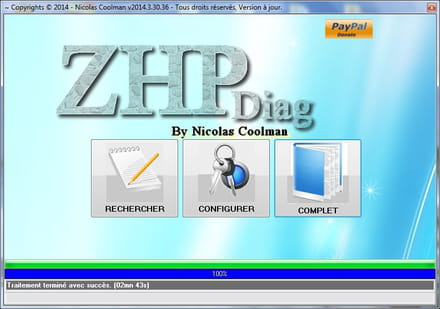
suis bien les instructions
1) * Télécharge ZHPDiag (de Nicolas coolman) sur ton bureau !!
>> ZHPDiag officiel
ZHPDiag (de Nicolas coolman)
Mirroir
Si ton système d'exploitation est Vista ou Win7/8, lance les logiciels par simple clic droit et choisis "exécuter en tant qu'administrateur"
a) * Une fois le téléchargement achevé,
b) * double clique (ou clic droit pour seven , vista et 8 <ital>exécuter en tant qu'administrateur<:ital>) sur ZHPDiag2.exe et suis les instructions.
c) * L'outil va créer 2 icônes de racourcis : ZHPDiag >> ZHPFix
d) * Clique Droit sur l'icone en forme de parchemin
e) *A l'ouverture le programme te proposes "Rechercher" , "Configurer" , "Complet" -
<ital>Clique sur "Complet" le scan démarre ....le rapport s'affiche
Si tu cliques sur configurer
* Des icônes apparaissent en bas de la fenêtre.
* Clique sur le tournevis en bas à droite et choisis "Tous" puis "OK"
2 ) * si tu as choisi configurer, maintenant clique sur "Rechercher".
* Important >> Pendant l analyse de ton PC par ZHPDIag ne touche à plus rien !!
* Laisse l'outil travailler, il peut être assez long
une fenêtre peut s'ouvrir à la fin de la recherche :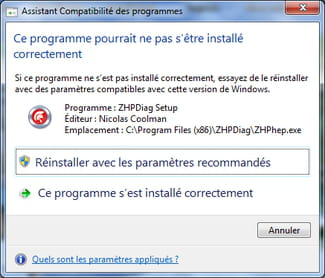
Il suffit de cliquer sur :
le programme s'est installé correctement
3) * Le rapport s'affiche sur ton Bureau une fois terminé !Tu peux fermer ZHPDiag
IMPORTANT
les rapports étant trop long, les héberger :
Rappel des dépôts
1 cjoint >> Explication
2 SoSVirus Upload
3 pjoint
3 up2share
4 FEC
-
-
tu vas déjà passer Roguekiller et ensuite l'option RAZ de Roguekiller
puis Adwcleaner, puis JRT , Shortcut_Module et enfin Malwarebytes avant de me refaire un ZHPDiag s'il te plait :
Roguekiller
RogueKiller est un outil (créé par Tigzy) permettant de tuer les processus appartenant à des rogues de manière automatique. Dans la mesure où certaines infections empêchent l'exécution des scans antivirus/antimalware habituels, cet outil est un outil préliminaire à un processus complet de désinfection.
Téléchargement :Roguekiller officiel
Attention, afin d'éviter tout désagrément dû aux anciennes versions de Roguekiller, il est fortement recommandé d'utiliser le lien de téléchargement officiel de Roguekiller
bien choisir sa version :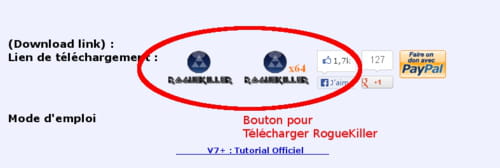
1/ Quitter tous les programmes en cours.
2/ Sous Vista/Seven, clique droit => Éxécuter en tant qu'administrateur
3/ Sinon lancer simplement RogueKiller.exe
Si Roguekiller ne se lance pas, il ne faut pas hésiter à le renommer en Winlogon.
4/ Cliquer sur Scan .
5/ Attendre la fin du scan. A ce stade aucune modification n'a été apportée au système
à la demande relancer Roguekiller et
6/ Cliquer sur le bouton Suppression.
A l'inverse du bouton Scan, ce bouton supprime les infections de type rogue et modifie donc le système.
Le rapport a été généré sur le bureau.
7/ Poster le rapport :(CTRL+A Pour tout sélectionner , CTRL+C pour copier et CTRL+V pour coller)
Important : Pour quitter l'outil
Il faut passer par le bouton Fichier -> Quitter.
Ce mode est le moyen de fermer l'outil correctement. En effet, si l'on ferme RogueKiller sans avoir utilisé ce mode, le driver créé par l'outil ne sera pas supprimé.
Important : Toute sorte de manipulation avec un logiciel de désinfection peut planter le PC.
Si vous utilisez seul un logiciel, c'est à vos risques et périls
tutoriel officiel
ICI
________________________________________________AdwCleaner
: Logiciel très simple d'utilisation

1 - Téléchargez AdwCleaner et lance son exécution.
>>>ICI<<<
Mirror
2 - L'interface du programme va s'ouvrir.
Cliques sur le bouton Scanner afin de lancer la détection, celle-ci ne prendra que quelques secondes, patientes.
Le rapport est automatiquement enregistré à la racine de votre disque dur principal, en général C:
3 - Fermes le rapport puis cliques sur le bouton NettoyerSI
AdwCleaner a trouvé des choses dans les différents onglets
4 - Dès la suppression effective, le logiciel demande de redémarrer l'ordinateur, cliques sur Ok.
au redémarrage :
5 - Poste les deux rapports , recherche et suppression
(CTRL+A Pour tout sélectionner , CTRL+C pour copier et CTRL+V pour coller)
6 - Tu peux fermer AdwCleaner
----------------------------------------------------------------------------JRT

Téléchargement : JRT
1 - Enregistre-le sur ton bureau.
2 - Fermes toutes les applications en cours.
3 - Fais un clic droit => Exécuter en tant qu'administrateur
4 - Une fois le logiciel ouvert, appuis sur la touche Entrée.
5 - Patientes le temps que l'outil travaille (cela peut être assez long)
6 - le bureau va disparaître quelques instants, c'est tout à fait normal.
À la fin de l'analyse, un rapport nommé JRT.txt va s'ouvrir
Il va falloir que tu patientes ne touche à rien même si tu as l'impression que cela n'avance pas !
Poste le rapport
ne t'inquiète pas si tu as l'impression qu'il ne "travaille" pas !!
___________________________________________________
patiente !
Shortcut_Module
Shortcut_Module permet de nettoyer les raccourcis (et d'autres choses) qui peuvent avoir été modifiés par des programmes parasites afin de
forcer l'ouverture d'une page WEB au lancement du navigateur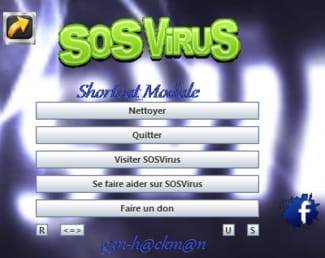
- Télécharge :
Shortcut_Module de de g3n-h@ckm@n
Note : Enregistrer votre travail avant de continuer !
- Lance Shortcut_Module, exécuter en tant qu'administrateur sous Windows : 7/8 et Vista
- Patiente le temps du scan
- Si l'outil détecte un proxy que tu ne connais pas clic sur : "Supprimer le proxy"
- Copie et colle le contenu du rapport
__________________________________________________________Malwarebytes
Nouvelle version
Toujours gratuite !
Toujours simple d'utilisation
Téléchargement >> Malwarebytes
ou bien mirroir
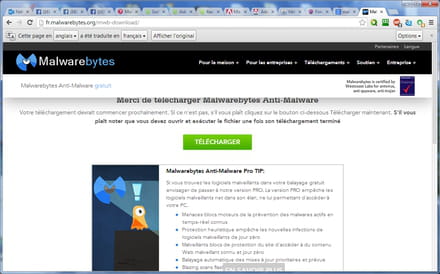
Il faut maintenant ouvrir le fichier , clic droit bien évidement :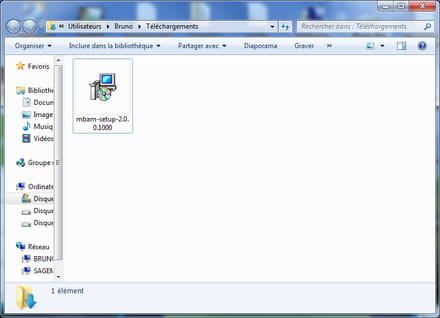
Instalation simple, choisir sa langue et se laisser guider ne pas oublier de décocher Activer l'essai gratuit de Malwarebytes Anti-Malware Premium
Au premier démarrage de Malwarebytes Anti-Malware, une popup en bas à droite vous informe que les définitions virales ne sont pas à jour.
- 1 Cliquez dessus mettre à jour maintenant
- 2 Puis cliquez sur Examen en haut.
- 3 Le scan se lance et les objets détectés sont énumérés, une fois le scan terminé, la liste des menaces apparaît.
- 4 Choisir mettre en quarantaine puis aller dans l'onglet quarantaine pour tout supprimer
Il est possible que Malwarebytes demande de redémarrer l'ordinateur, acceptez en cliquant sur Yes.
l'onglet Historique permet de retrouver les rapports afin de les poster sur le forum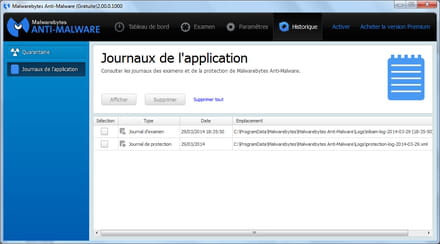
Á la deuxième utilisation (et les suivantes)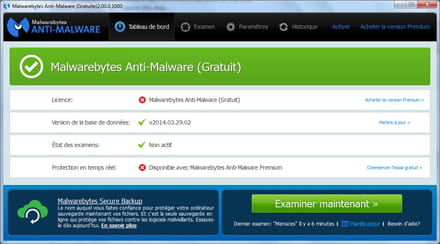
Cliquer sur l'onglet Examen , il faut que soit coché examen menaces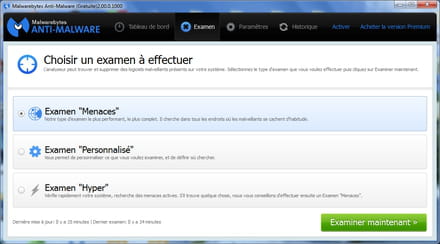
puis examiner maintenant
si rapport demandé , le poster sur le forum
donc 5 ou 6 rapports dans ton prochain message
Merci
-
alors apres avoir perdu le premier rapport roguekiller j ai refait un scan dont voici le rapport :
https://www.cjoint.com/?3FfxynoJ9w8-
et voici les rapport adware celaener
https://www.cjoint.com/?3FfxNWEB8OC
https://www.cjoint.com/?3FfxOMIHbPb -
-
-
-
-
donc pour Roguekiller , il faut sélectionner et faire suppression car regarde :
¤¤¤ Entrées de registre : 7 ¤¤¤
[PUP] HKEY_USERS\S-1-5-21-1614480247-2128014499-518423607-1001\Software\Microsoft\Windows\CurrentVersion\Run | cacaoweb : "C:\Users\ibizalex\AppData\Roaming\cacaoweb\cacaoweb.exe" -noplayer  -> NON SELECTIONNÉ
[Suspicious.Path] HKEY_LOCAL_MACHINE\System\CurrentControlSet\Services\mbr -> NON SELECTIONNÉ
[Suspicious.Path] HKEY_LOCAL_MACHINE\System\ControlSet001\Services\mbr -> NON SELECTIONNÉ
[PUM.Policies] HKEY_LOCAL_MACHINE\Software\Microsoft\Windows\CurrentVersion\Policies\System | EnableLUA : 0  -> NON SELECTIONNÉ
[PUM.Policies] HKEY_LOCAL_MACHINE\Software\Microsoft\Windows\CurrentVersion\Policies\System | ConsentPromptBehaviorAdmin : 0  -> NON SELECTIONNÉ
[PUM.DesktopIcons] HKEY_LOCAL_MACHINE\Software\Microsoft\Windows\CurrentVersion\Explorer\HideDesktopIcons\NewStartPanel | {20D04FE0-3AEA-1069-A2D8-08002B30309D} : 1  -> NON SELECTIONNÉ
[PUM.DesktopIcons] HKEY_LOCAL_MACHINE\Software\Microsoft\Windows\CurrentVersion\Explorer\HideDesktopIcons\NewStartPanel | {59031a47-3f72-44a7-89c5-5595fe6b30ee} : 1  -> NON SELECTIONNÉ
il faut relancer Roguekiller et faire l'option HOSTRAZ de Roguekiller
ok fait moi un nouveau ZHPDiag maintenant s'il te plait !
Merci
Les questions montrent l'étendue de l'esprit , les réponses , sa finesse
Il y a toujours quelqu'un qui sait ce que tu ne sais pas *Helper* *Contributeur/Sécurité* -
salutbuckhulk,
alors j ai fait ce que tu m'as dit mais j'ai l impression que ça n'a rien changé. Voici le rapport :
https://www.cjoint.com/?3Fhnh7BqVCc -
Tu n'as plus assez de ram : Total RAM: 3066 MB (16% free) => Seuil critique dépassé
OK donc : tu vas mettre à jour :
- Adobe Flash Player 10 ActiveX
- Adobe Reader XPour adobe reader :
- Adobe reader
(décocher mcAfee)
Pour Flash Player :
- Flash Player (vérification)
- Instalation (choisir sa version)
IMPORTANT : Ne prendre des téléchargements QUE sur le site Editeur
Pour les PUB il y a l'extension ABP plus sur google Chrome
Ensuite tu vas passer ce script :
ZHPFix
Script
ATTENTION !!! : Script personnalisé pour cette machine uniquement , ne pas reproduire !!/!\ Double Avertissement /!\
ce script est seulement valable pour ce pc, en cours de nettoyage, à ne pas utiliser sur un autre pc,
risque de plantage !
Ce script va cibler certains éléments à supprimer :
* Copie les lignes suivantes (surligner et copier) :
Script ZHPFix
ShortcutFix
O4 - HKCU\..\Run: [AdobeBridge] Clé orpheline => Orphean Key not necessary
O4 - HKUS\S-1-5-21-1614480247-2128014499-518423607-1001\..\Run: [AdobeBridge] Clé orpheline => Orphean Key not necessary
[MD5.00000000000000000000000000000000] [APT] [AdobeFlashPlayerUpdate] (...) -- C:\Windows\system32\FlashPlayerUpdateService.exe (.not file.) [0] => Trojan.Agent
[MD5.00000000000000000000000000000000] [APT] [AdobeFlashPlayerUpdate 2] (...) -- C:\Windows\system32\FlashPlayerUpdateService.exe (.not file.) [0] => Trojan.Agent
[MD5.00000000000000000000000000000000] [APT] [{A67B00E5-52C6-4377-8439-8B04708EE37D}] (...) -- E:\setup.exe (.not file.) [0] => Existe aussi en malware DELF-CA.Troj
[MD5.00000000000000000000000000000000] [APT] [{F024F5FF-4DA2-47D4-B8D8-44661D36C27B}] (...) -- E:\DV Toolkit Installer\DV Toolkit 6.1.1 Setup.exe (.not file.) [0] => Fichier absent
O42 - Logiciel: Adobe Flash Player 10 ActiveX - (.Adobe Systems, Inc..) [HKLM] -- {B7B3E9B3-FB14-4927-894B-E9124509AF5A} => Adobe Systems
HKLM\SOFTWARE\Microsoft\Tracing\qualitink_Setup_RASAPI32 =>Adware.Qualitink
HKLM\SOFTWARE\Microsoft\Tracing\qualitink_Setup_RASMANCS =>Adware.Qualitink
ProxyFix
EmptyPrefetch
EmptyFlash
SysRestore
FirewallRAZ
EmptyTemp
* Lance ZHPFix à partir du raccourci sur ton Bureau (si tu es sous Windows Vista ou Windows 7, fais le par un clic-droit --> Exécuter en temps qu'administrateur)
* Clique sur Importer, (vérifie) .Les lignes se collent automatiquement dans ZHPFix, sinon colle les lignes
* Avant toute opération, ZHPFix vide la corbeille cela peut durer jusqu'à plusieurs minutes (mais tu peux dire non )
* Clique sur le bouton « GO » pour lancer le nettoyage.
* Copie/colle la totalité du rapport dans ta prochaine réponse.
Tutoriels ZHPDiag & ZHPFix
-
-
-
ben si ça a changé par rapport à :
.salutbuckhulk,
alors j ai fait ce que tu m'as dit mais j'ai l impression que ça n'a rien changé. Voici le rapport :




- 1
- 2

