Merge two forms with Publisher
Solved
Hello,
I'm going to go crazy.
No Publisher alternative (Draw OpenOfdfice and LibreOffice) offers saving in Pub format, the format from Krosoft.
I absolutely need a layout in Publisher format (*.pub) and to merge two shapes in Publisher, but I can't find how! There are hundreds of options, but apparently no direct merge is possible! While the other free alternatives are so simple, not to mention Scribus, QuarkXPress, or InDesign...
I don't like messing around by importing pre-made shapes. But that's what I've had to do up until now (and the result is bad).
So my question is: How do you merge two shapes with this piece of crap Publisher???
Thank you very much in advance.
Quedza
Oh yes: I have Publisher 2007 (without the ribbon) and I only installed Publisher with the custom installation.
I wouldn't want to install another Microsoft Office software just to do the merge and copy the desired shape into Publisher...
Configuration: Windows 7 / Firefox 29.0
I'm going to go crazy.
No Publisher alternative (Draw OpenOfdfice and LibreOffice) offers saving in Pub format, the format from Krosoft.
I absolutely need a layout in Publisher format (*.pub) and to merge two shapes in Publisher, but I can't find how! There are hundreds of options, but apparently no direct merge is possible! While the other free alternatives are so simple, not to mention Scribus, QuarkXPress, or InDesign...
I don't like messing around by importing pre-made shapes. But that's what I've had to do up until now (and the result is bad).
So my question is: How do you merge two shapes with this piece of crap Publisher???
Thank you very much in advance.
Quedza
Oh yes: I have Publisher 2007 (without the ribbon) and I only installed Publisher with the custom installation.
I wouldn't want to install another Microsoft Office software just to do the merge and copy the desired shape into Publisher...
Configuration: Windows 7 / Firefox 29.0
3 answers
-
ContributorSo many constraints to follow!
And since you consider Publisher like a shit**, you shouldn’t use it; there are so many software out there!
When you say "merge," I suppose you mean "group"?
So it's exactly like in Word, Excel, and PowerPoint, you select the shapes together and click on Drawing Tools/Arrange/Group.
... or maybe I didn’t understand your question at all!
--
Retirement is great! Especially in the West Indies ... :-)
☻ Raymond ♂-
Thank you for your help.
It's true. I usually use QuarkXPress, but also InDesign and in open-source software, Scribus, Draw from OpenOffice, and LibreOffice.
But now, I have to send a document to a teacher who doesn't have any of these software except the Microsoft suite, including Publisher (if she asked me, I would be happy to install Open or LibreOffice).
And there's no way to save Draw documents from Open and Libre Office in Publisher format (*.pub), unlike Write from Open and Libre Office which offers the possibility to save in Word (*.doc).
I don't have "Drawing Tools" in Publisher. Does this function appear on the ribbon? I don't have the ribbon.
Generally, all roads lead to Rome (and to merging), but here, I can't find any way to merge...
This is the first time I’m really using Microsoft Publisher, and I expected Publisher to have the same functions as the other software in the office suite, but that doesn't seem to be the case for me.
I ended up installing the other software from the same version of Microsoft Office (2007), and I noticed that Word, Excel, and PowerPoint have the ribbon and the Management Tool.
At the moment, I'm still forced to merge two shapes in OpenOffice or LibreOffice, copy the result, and paste it into Publisher. It's a shape with a border that doesn't match the other figures created in Publisher, with Open and LibreOffice not being designed to create Publisher shapes. And I refuse to make ALL the shapes in OpenOffice to import them into Publisher (the printing quality is poor, not like if I print from OpenOffice a shape created in OpenOffice) or create the shapes with Photoshop, Illustrator, Gimp, or Inkscape. Publisher is not going to reduce me to slavery!
I am sure there is a merge option somewhere (but why buried, especially for such a layout software?) in Publisher.
I will try to do a merge with Word or PowerPoint and import the figure into Publisher, after reinstalling all Microsoft Office 2007... That I didn't pay for.
In version 2007, Word, Excel, and PowerPoint do have the ribbon, but not Publisher.
But in my opinion, the ribbon is just a showcase offering actions that can be done without the ribbon. Well, I thought... -
I just saw that where the ribbon is, under "Drawing Tools" and "Arrange," there's no way to merge. It's enough to make you cry. What's your version?
I don't have that: https://support.microsoft.com/fr-fr/office/cr%c3%a9er-une-image-en-combinant-et-en-fusionnant-des-formes-2c9ce121-7b28-46ed-aec9-eae20cdddb15?ocmsassetid=ha102749749&correlationid=70d990ac-cb0f-4ebe-ae15-6f8d08f7d94c&ui=fr-fr&rs=fr-fr&ad=fr (2013 version) -
-
-
ContributorMicrosoft Publisher does not have a Merge command; only the Group command is available; this can only be activated if at least two shapes are selected simultaneously
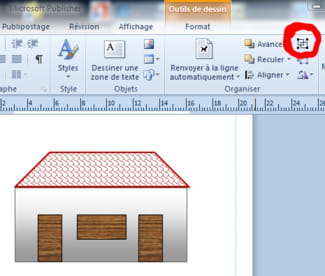 I currently have version 2010, but it seems that it was the same in version 2007 and even in version 2003.
.
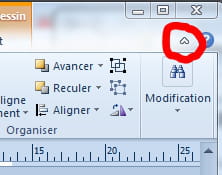 In all Microsoft Office software, the ribbon is hidden or displayed by clicking on the arrow on the right.
--
Retirement is great! Especially in the West Indies ... :-)
☻ Raymond ♂ -
Thank you.
Grouping is quite handy for moving two shapes, but it's not merging... I would like to create a shape with two shapes (for example, a square on one side and a circle on the other) AND THEN ENCLOSE THE RESULTING SHAPE... which requires a true merge. Grouping is not merging.
"Although Publisher is also moving to version 12.0, its interface unfortunately remains unchanged, and the Office ribbon is thus absent." (https://www.clubic.com/article-69853-11-microsoft-office-system-2007-dossier.html
Well, well, hello fiddling around. In fact, there is no problem. No big deal. I am aware ("Microsoft Publisher does not have a Merge command; only the Group command"... except for version 2013!).
I just simply don't like mixing tools to create something so simple.
Thanks again. I got the answer to what I was looking for! ;)