
Using the Windows Calculator
NeuNeu
-
laurent2m-l Posted messages 1515 Registration date Status Member Last intervention -
laurent2m-l Posted messages 1515 Registration date Status Member Last intervention -
Hello,
A silly question for the math enthusiasts among you:
I would like to know which key corresponds to "^" on the Windows calculator, considering that in scientific mode the "exp" key does not give me the same results.
Thank you :)
Configuration: Windows 7 / Safari 534.30
A silly question for the math enthusiasts among you:
I would like to know which key corresponds to "^" on the Windows calculator, considering that in scientific mode the "exp" key does not give me the same results.
Thank you :)
Configuration: Windows 7 / Safari 534.30
2 answers
-
Hello,
The ^ key (EXP on some calculators) normally corresponds to "power"
On the Windows scientific calculator, it will be x raised to the power of y (next to COS)
As for EXP, it actually corresponds to the logarithm with base 10 (log on some calculators) -
To err is human: EXP stands for the exponential and not the exponent.
As for the computer symbol ^, it is no longer used, as it has been replaced by the mathematical literal form for clarity.
The image below shows the equivalences: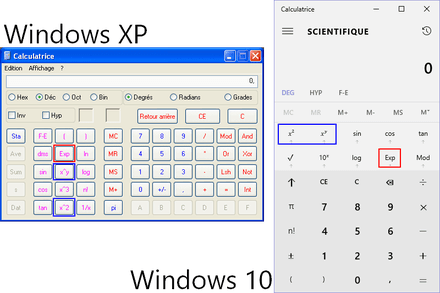
Error corrected.
--
Continue your research on your side. Stay patient, humble, and polite.

