
Pilote audio HD Realtek.
Solved
Hello, and happy new year.
Why is it so difficult to install the "Realtek HD Audio driver": I installed "InstallShield Wizard installs". Then I tried to get it running, but it always redirects me to "install"?
Configuration: Windows / Firefox 57.0
Why is it so difficult to install the "Realtek HD Audio driver": I installed "InstallShield Wizard installs". Then I tried to get it running, but it always redirects me to "install"?
Configuration: Windows / Firefox 57.0
21 answers
-
Hello
What is your initial problem?
1 issue in the device manager?
See you later
--
The radiation level is higher at the employment center than at Chernobyl.-
Thank you for replying. My initial concern? Downloading the "Realtek HD Audio Manager". My response may be silly, but I followed all the instructions, and when I try to open it, it just keeps loading. Maybe it's a driver issue, but I went to "alldrivers.com". I need to start the detection, click on Realtek HD in the audio section, but I don't know what to do on that page.
I've already downloaded and saved software before, but now I'm lost. Thank you if you can help me?
-
-
re
ok, take a screenshot of your device manager and post it in your reply
https://www.commentcamarche.net/infos/25913-ccm-inserer-une-image-dans-une-discussion/
also provide the complete reference of your PC (brand, model, OS-W7/W8.1, etc...) and whether it’s 32 or 64 bits
https://www.commentcamarche.net/informatique/windows/169-32-bits-ou-64-bits-comment-savoir/
@+
--
the radiation level is higher at the employment center than at Chernobyl -

PC reference Microsoft Windows 7 Home Premium Edition Service Pack 1 64 bit (build 6.1.7601
Thank you. -
re
do you have the paid version of Avast?
you provided your PC's OS (W7 64 BIT), but you didn't give the brand and model...
in the device manager, check what you have under "audio, video, and game controllers," and post a screenshot
@+
--
the radiation level is higher at the unemployment office than at Chernobyl. -
ModeratorHello,
Download and install -->> AIDA64 extreme <<--
For the report, check the example in the tutorial.
Post the report in your next message.
--
The human being is at his best when things are at their worst. -
re
ok, execute Kaneagle's process in this message
https://forums.commentcamarche.net/forum/affich-35108885-realtek-hd-audio-driver#6
@+
--
the radiation level is higher at the unemployment office than at Chernobyl -
re
no, there’s no problem on that front, it’s just to know the components of your PC in order to provide you with the drivers you need for the various peripherals
@+
--
the radiation level is higher at the employment office than at Chernobyl-
Here is the AIDA report 64:
--------[ AIDA64 Extreme ]----------------------------------------------------------------------------------------------
Version AIDA64 v5.95.4500/en
Test module 4.3.770-x64
Website https://www.aida64.com/
Report type Quick report [ TRIAL VERSION ]
Computer SIMONE-PC
Generator Simone
Operating system Microsoft Windows 7 Home Premium 6.1.7601.23915 (Win7 RTM)
Date 2018-01-02
Time 20:09
--------[ Summary ]------------------------------------------------------------------------------------------------------
Computer:
System type ACPI x64-based PC
Operating system Microsoft Windows 7 Home Premium
System service pack [ TRIAL VERSION ]
Internet Explorer 11.0.9600.18837
DirectX DirectX 11.1
System name SIMONE-PC
User name Simone
Connection domain [ TRIAL VERSION ]
Date / Time 2018-01-02 / 20:09
Motherboard:
Processor type DualCore Intel Pentium G620, 2600 MHz (26 x 100)
Motherboard name ASRock H61M-HVS (1 PCI-E x1, 1 PCI-E x16, 2 DDR3 DIMM, Audio, Video, LAN)
Motherboard chipset Intel Cougar Point H61, Intel Sandy Bridge
System memory [ TRIAL VERSION ]
DIMM1: Transcend JM1333KLN-4GK 2 GB DDR3-1333 DDR3 SDRAM (9-9-9-24 @ 666 MHz) (8-8-8-22 @ 609 MHz) (7-7-7-20 @ 533 MHz) (6-6-6-17 @ 457 MHz)
DIMM3: Transcend JM1333KLN-4GK [ TRIAL VERSION ]
BIOS type AMI (06/21/2011)
Communication port Communication port (COM1)
Communication port Printer port ECP (LPT1)
Monitor:
Video card ATI Radeon X300/X550/X1050 Series (64 MB)
Video card ATI Radeon X300/X550/X1050 Series (64 MB)
3D accelerator ATI Radeon X300 SE (RV370)
Monitor LG L1750G [17" LCD] (1542260694)
Multimedia:
Audio card VIA VT1705 @ Intel Cougar Point PCH - High Definition Audio Controller [B-3]
Storage:
IDE controller Intel(R) 6 Series/C200 Series Chipset Family 2 port Serial ATA Storage Controller - 1C08
IDE controller Intel(R) 6 Series/C200 Series Chipset Family 4 port Serial ATA Storage Controller - 1C00
Hard drive WDC WD50 00BPVT-00KPFT0 USB Device (500 GB, 5400 RPM, SATA-II)
Hard drive WDC WD5000AAKX-001CA0 ATA Device (500 GB, 7200 RPM, SATA-III)
Optical drive Optiarc DVD RW AD-7280S ATA Device (DVD+R9:12x, DVD-R9:12x, DVD+RW:24x/8x, DVD-RW:24x/6x, DVD-RAM:12x, DVD-ROM:16x, CD:48x/32x/48x DVD+RW/DVD-RW/DVD-RAM)
Hard drive status SMART OK
Partitions:
C: (NTFS) [ TRIAL VERSION ]
F: (NTFS) 465.8 GB (444.4 GB free)
Total size [ TRIAL VERSION ]
Input:
Keyboard Standard PS/2 keyboard
Mouse HID mouse
Network:
Main IP address [ TRIAL VERSION ]
Main MAC address 00-25-22-D4-0E-67
Network card Realtek PCIe FE Family Controller (192. [ TRIAL VERSION ])
Devices:
Printer Fax
Printer HP Photosmart B010 series
Printer Microsoft XPS Document Writer
USB controller Intel Cougar Point PCH - USB EHCI #1 Controller [B-3]
USB controller Intel Cougar Point PCH - USB EHCI #2 Controller [B-3]
USB device Camera
USB device Generic USB Hub
USB device Generic USB Hub
USB device HP Photosmart B010 series(DOT4USB)
USB device HP Photosmart B010
USB device USB input device
USB device USB mass storage device
USB device USB composite device
USB device USB composite device
USB device USB printing support
USB device Webcam C170
USB device Webcam C170
DMI:
BIOS vendor American Megatrends Inc.
BIOS version P1.10
System manufacturer To Be Filled By O.E.M.
System name To Be Filled By O.E.M.
System version To Be Filled By O.E.M.
System serial number [ TRIAL VERSION ]
System UUID [ TRIAL VERSION ]
Motherboard manufacturer ASRock
Motherboard name H61M-HVS
Motherboard version
Motherboard serial number [ TRIAL VERSION ]
Chassis manufacturer To Be Filled By O.E.M.
Chassis version To Be Filled By O.E.M.
Chassis serial number [ TRIAL VERSION ]
Chassis identifier [ TRIAL VERSION ]
Chassis type Desktop Case
------------------------------------------------------------------------------------------------------------------------
The names of actual companies and products mentioned herein may be the trademarks of their respective owners.
It's good? Thank you very much;
-
-
re
download this driver to your desktop click here
it's a zipped driver, you need to unzip it with 7zip (for example)
the link >> https://www.7-zip.org/ (download it to your desktop)
PS: take the 64 bits version for your PC
run 7zip as administrator (right click) to install it
once done, right-click on the zipped driver, and choose >> 7zip >> extract to...
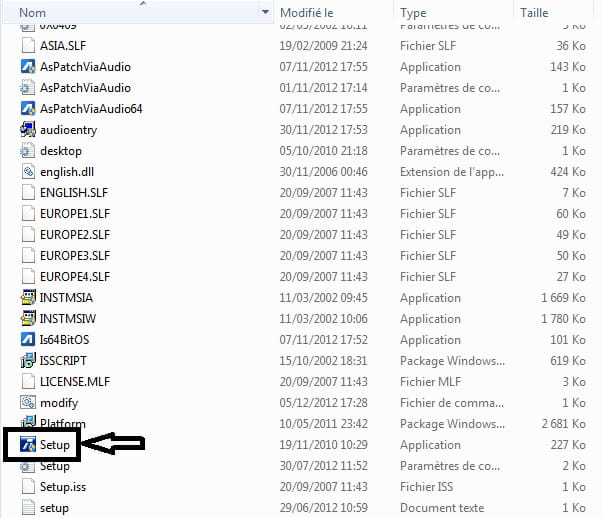
open the unzipped file and run the SETUP as administrator (right click)
in image:

once done, restart your PC and let us know how it goes
@+
--
the radiation level is higher at the job center than at Chernobyl -
re
I just downloaded AIDA64 and sent it to Billmaxime
Kaneagle sees it too :)
Did you see my last message about downloading and running the driver?
https://forums.commentcamarche.net/forum/affich-35108885-realtek-hd-audio-driver#12
@+
--
the radiation level is higher at the employment center than at Chernobyl-
Yes, I saw and successfully did it. I turned off and restarted the PC and... I don't know where to find Realtek HD audio!!! On the desktop, however, I have:
2 screenshots, AIDA64, 7Z, Via-win8 64_w, My_Drivers_3.0 oh! la!la!la!la. What can I delete? I looked in "all programs" and nada.
It's 9:30 PM! I'm okay with it, but what about you? I'm happy to have received all these responses. Thank you for replying again?
-
-
re
I don't know where to find Realtek HD audio
in the device manager >> audio, video, and game controllers
but I have:
2 screenshots, AIDA64, 7Z, Via-win8 64_w, My_Drivers_3.0 oh! la! la! la! la. What can I delete?
you can delete the 2 screenshots
I looked in "all programs" and nada.
now, are you talking about the screenshots or the driver?
if you have any questions...
@+
--
the radiation level is higher at the unemployment office than at Chernobyl -
re
you need to go to the control panel >> click on start and in the left column, click on control panel
on the page that opens, click on "device manager"
on the page that opens, click on audio controllers etc...
example of my pc

let me know if you see the driver
@+
--
the radiation level is higher at the unemployment office than at Chernobyl-
I have done all of this several times, in fact, I don't see the "Realtek High Definition Audio" driver in audio, video, and game controllers. I only have two lines "Via High Definition Audio" and Webcam. If I right-click on Via High..., I see "Update Driver" and I'm going in circles. If I double-click it, I get "Properties" and "This device is working properly" and here we go again. I'm very frustrated.
-
-
-
re
Via high definition audio
this is the one I gave you for download, it's the one that corresponds to your motherboard
let me know if you have any issues with the audio, or in the device manager (any ? or /!\ yellow)
if I right-click on Via high..., I see "update driver"
you'll see that on all drivers when you "right-click"
if you have any questions...
PS: I'm going to sleep soon
@+
--
the radiation level is higher at the unemployment office than at Chernobyl -
re
you are not bothering me :)
look at my last message and please answer my questions
https://forums.commentcamarche.net/forum/affich-35108885-realtek-hd-audio-driver#20
see you later
--
the radiation level is higher at the employment office than at Chernobyl -
re
what I mean is, do you have any problems with the pc (for the audio) or anything else?
@=
--
the radiation level is higher at the job center than in Chernobyl -
re
No, no worries at the moment.
Okay, then you can mark your topic as resolved if you have no more questions, but don't do it if you still have some.
https://www.commentcamarche.net/infos/25917-marquer-un-fil-de-discussion-comme-etant-resolu/
Thanks
@+
--
The radiation level is higher at the employment office than at Chernobyl. -
Re
Since the driver is installed, it starts by itself when the PC needs it :)
You can also check in MSCONFIG
Click on the Windows+R keys
In the window that opens, type MSCONFIG and click OK
In the window that opens, click on "Startup" (4th button)
Via High Definition Audio should be checked in the list, and thus it starts when you start your PC (Windows)
Good night
@+
--
The radiation level is higher at the unemployment office than at Chernobyl.-
Good evening, the driver is properly installed. I realize that my speakers are terrible, too old. They need to be replaced.
I am attaching this link:
https://www.avcesar.com/
My friend has it on his PC, he just opens it in the taskbar and adjusts it according to what he is listening to, on demand. Can I download it? Is it still available?
Can you please respond? After that, I will mark this topic as resolved.
-
-
Hello
I'm looking and testing on my PC and I'll get back to you...
See you
--
the radiation level is higher at the unemployment office than at Chernobyl -
I found it^^, you need to download version R 2.77 of the driver to have the Realtek HD audio manager in the control panel
the link >> https://www.touslesdrivers.com/index.php?v_page=23&v_code=44962
PS: we are on version R 2.82 of the driver, and when you have updates with W7, the driver will update and you will lose it again in the control panel....
in the image: click on the image to enlarge)

if you have any questions...
@+
--
the radiation level is higher at the employment office than at Chernobyl -
re
ok, good evening/night
@ tomorrow
--
the radiation level is higher at the job center than in Chernobyl -
hi
there's nothing complicated, you just need to download Realtek HD audio from this link and install it >> https://www.touslesdrivers.com/index.php?v_page=23&v_code=44962
if you want to close the topic to mark it as resolved, check this out
https://www.commentcamarche.net/infos/25917-marquer-un-fil-de-discussion-comme-etant-resolu/
thanks
@+
--
the radiation level is higher at the employment office than at Chernobyl




- 1
- 2
Next