
CPU at 100%, GPU at 0%
Hello everyone,
I've noticed that my CPU is almost constantly at 100% in a game like Warzone or Battlefield 5, while my graphics card shows an utilization of 1% or 2% (VRAM used and temperature around 60°C). The card is indeed being used as I'm running these games at over 100 fps in high resolution. I feel like I'm being limited by my CPU in these games.

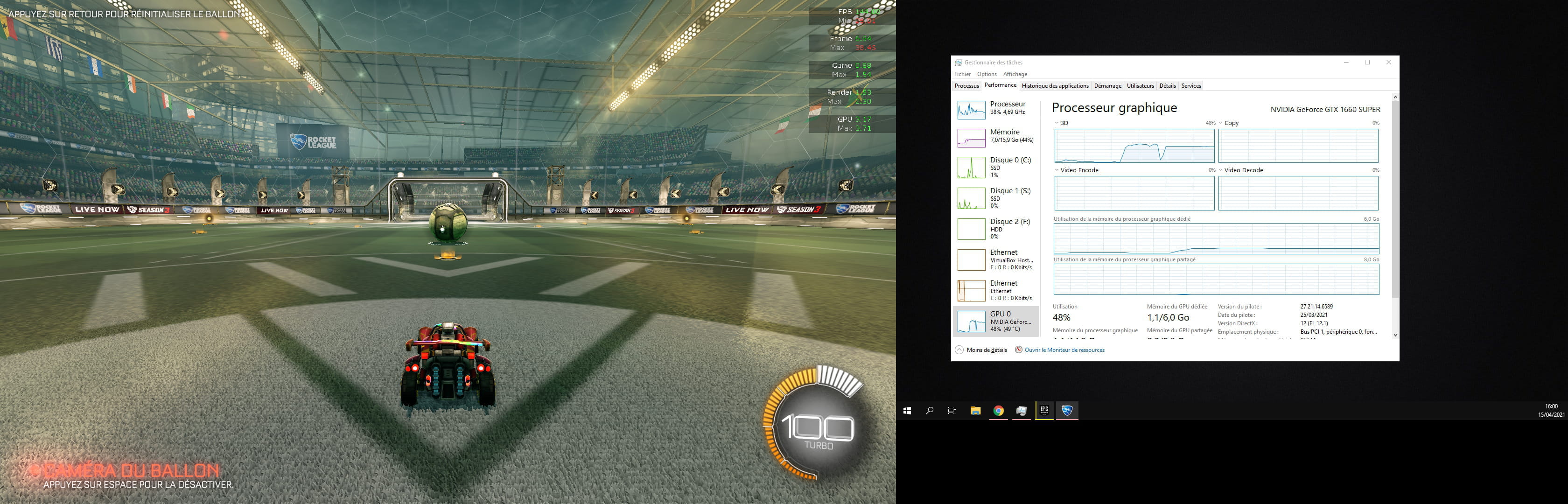
Meanwhile, in Rocket League, with fps capped at 144Hz, my CPU is at 30% and my GPU at 50%. In this case, the 3D section of the GPU in the task manager is being utilized.

Thank you for shedding some light on this. I don't know if there's a solution, but I would at least like to understand why the GPU utilization is almost zero.
For example, is it normal that when playing a 4K 60Hz video on YouTube, it's my CPU that works rather than my GPU?

My setup:
i5 9600k 6c/6t manually overclocked to 4.7GHz 1.29V
NVIDIA GTX 1660 super (PNY)
Gigabyte Z390 Gaming X motherboard
2x8GB 3200MHz RAM (XMP enabled)
Cooler Master 550w 80+ bronze power supply
Optimized Windows 10
I've noticed that my CPU is almost constantly at 100% in a game like Warzone or Battlefield 5, while my graphics card shows an utilization of 1% or 2% (VRAM used and temperature around 60°C). The card is indeed being used as I'm running these games at over 100 fps in high resolution. I feel like I'm being limited by my CPU in these games.

Meanwhile, in Rocket League, with fps capped at 144Hz, my CPU is at 30% and my GPU at 50%. In this case, the 3D section of the GPU in the task manager is being utilized.
Thank you for shedding some light on this. I don't know if there's a solution, but I would at least like to understand why the GPU utilization is almost zero.
For example, is it normal that when playing a 4K 60Hz video on YouTube, it's my CPU that works rather than my GPU?

My setup:
i5 9600k 6c/6t manually overclocked to 4.7GHz 1.29V
NVIDIA GTX 1660 super (PNY)
Gigabyte Z390 Gaming X motherboard
2x8GB 3200MHz RAM (XMP enabled)
Cooler Master 550w 80+ bronze power supply
Optimized Windows 10
2 answers
-
Hello, I have the same issue. Even after installing HWMonitor, I see that the GPU of the graphics card stays at 0 and everything runs on my processor... I have a Nvidia 2060 Super with an i5 9600K, need help please... All my games are running on that since I had to reinstall Windows due to a blue screen.
-
-
@Andrea
Have you found a solution?
-


