
Excel file bug
SolvedHello,
I still have the same problem in my file if I have more than 28 teams in the List tab in BJ14.
I didn't notice it before because I used it only up to 28 teams.
Could you please, please, look at my bug?
Thanks for your feedback
Below is the link
Regards
Dodo
https://cijoint.org/r/pZRNSMJB#c23z3ShCSINV9ifsHrie00dtDuysbA+E7tqo30hf2PI=
11 answers
-
Hello,
It is necessary to extend the formulas in the columns (AF:BL) down to row 38 which will allow you to manage 64 trinities.
Regards,
Le Pingou -
Hello,
In simulation, everything works; to be seen in real life, but there is no reason!
Thank you very much for your help.
Best regards
Dodo
-
Hello
Your file is password-protected
Best regards
-
Hello,
Sorry, I thought the old discussion was with !
marcel1924
Thank you.
Best regards
Goodbye
-
Hello,
What do the numbers in columns AK:AL correspond to? What is your version of Excel?
Daniel
-
Hello,
I don’t know how to answer for the numbers in columns AK and AL.
Is it to rank winners against winners?
I’m using Excel 2016
Thank you
Best regards
Dodo
-
What needs to be done to reproduce the error?
Daniel
-
Hello, Just by the way, add one line to your 1-line table in Part 5 See below:
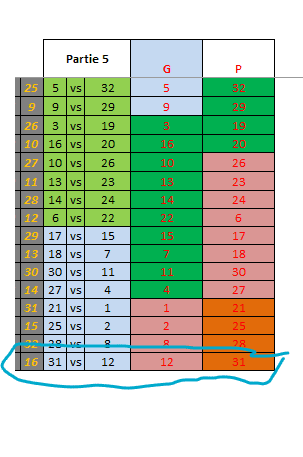
Best regards.
Le Pingou -
attached is your file
-
Hello,
32 teams is fine.
However, if I add more, I have the same problem.
Is it possible to fix it?
Thank you
Best regards
Dodo
-
Hello,
Put the file with the additions at disposal and I will look where the problem is.
Regards.
Le Pingou

