
Problem reading QR CODES
Pierr10 Posted messages 13860 Registration date Status Moderator Last intervention -
Hello
I have a Samsung A15 with which it is very difficult for me to scan QR CODES. I have tried several apps, I take the photo and that's it: I do not get the reading.
Could you please tell me which app to download? When I scroll through the first access panel, there is no command.
Yesterday, I managed to take a photo, a message should have been installed in the PDF reader and is now completely untraceable.
It is an ordinary smartphone, which has its limits, but I should be able to scan and read QR CODES, right? What do you think?
Thank you in advance for your response.
Have a nice Sunday
Danielle
5 answers
-
Hello
The A15 from 2025?
The QR code app is integrated into the phone, there’s nothing to install.
It’s explained here (only the first method): How to scan a QR code on Samsung (2 ways)
-
-
Hello,
First, check that the QR code scanning is enabled in the camera settings:
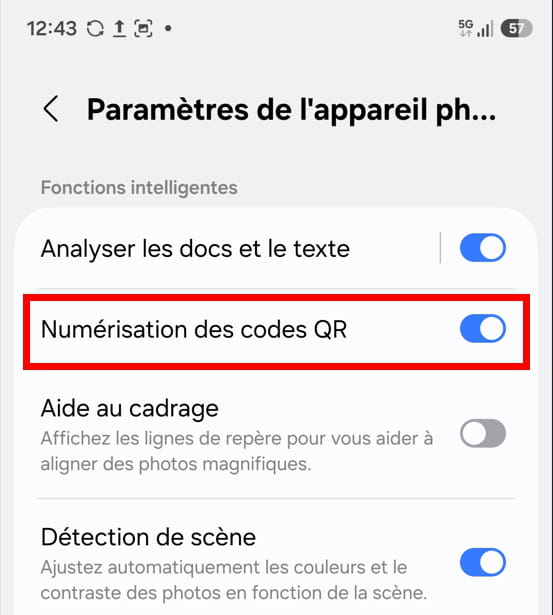
1) In the quick access settings of the smartphone, you should have the tile "QR Code Scanner".
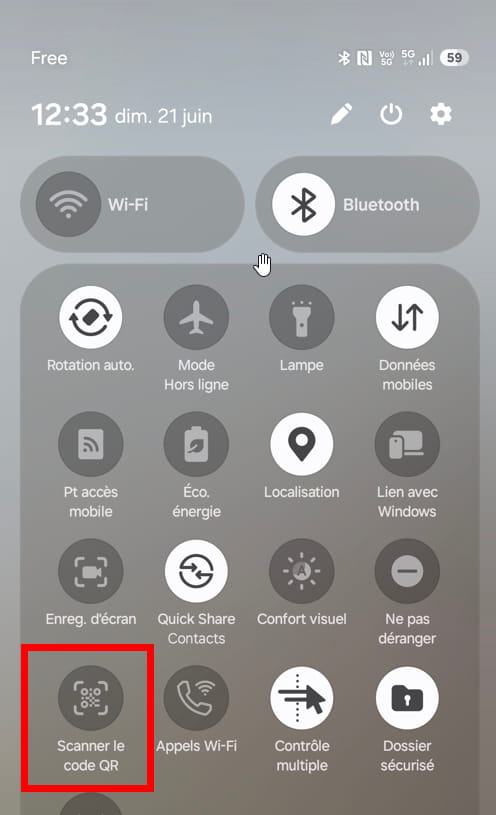
2) If you don't have it, use the camera directly. Focus on the code and wait for the app to recognize it as a QR code. Do not take a picture!
The link corresponding to the QR code will appear; click on it.3) Finally, if using the camera doesn't work, use a dedicated app. For example, QR Droid.
https://play.google.com/store/search?q=qr%20droid&c=apps
What is well conceived is clearly stated,
And the words to say it come easily.
(Boileau) -
Thank you so much for replying: I am lost.
In the settings, I don't have those windows: for me, it's: Notifications, Permissions, Screen time... and in the permissions, there is nothing.
And in the quick access, I don't have that tile.
Anyway, something happened: I must have made a false move because that tile, I think it was there. The last two are: Smart view and modes.
Thanks anyway
Have a nice end of the day
Danielle
-
In the settings, I don't have those windows: for me, it's: Notifications, Permissions, Screen Time... and in the permissions, nothing.You were almost there.
You went through Settings > Apps > Camera
You needed to click on the first line.
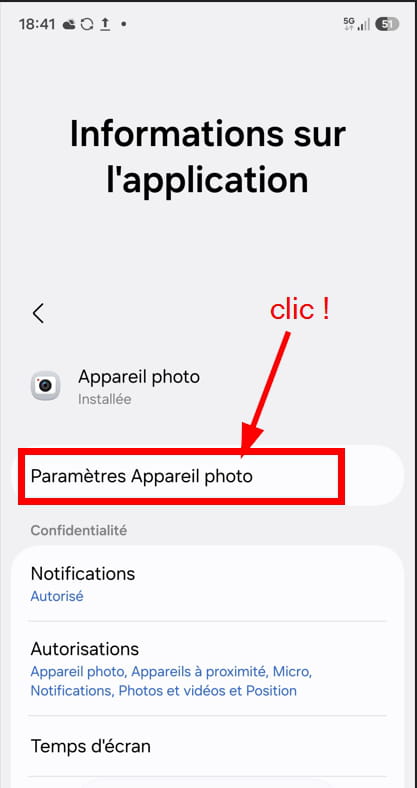
You can also find the settings in the "Camera" app: click on the icon made up of 4 little dots, then on the gear icon.
Good evening everyone,
Could you please tell us what version of Android your smartphone is running?
Example: One UI 8.5 android 16
Also check if an update to the version is possible.
-



