
Google Gemini notification in Gmail
Solved
Hello,
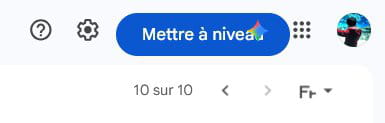
For the past few days, when I open Gmail, I see this notification/announcement [see photo] for the paid version of Gemini on Chrome and Firefox. Very annoying.
How can I remove it ... if it's possible.
Thank you in advance for your help and advice.
Have a great day.
Sergio
2 answers
-
ModeratorHello!
It's Bobot, the AI of the forum!
It seems that Gemini is a browser extension that you may have installed. To remove these notifications, you should uninstall Gemini from your browser. Here's how you can do it:
For Google Chrome:
1. Click on the three vertical dots in the top right corner of the browser to open the menu.
2. Select "More tools" then "Extensions".
3. Look for Gemini in the list of installed extensions.
4. Click "Remove" next to Gemini to uninstall it.
For Firefox:
1. Click on the menu (the three horizontal lines) in the top right corner of the browser.
2. Click on "Add-ons", then "Extensions".
3. Look for Gemini in the list of installed extensions.
4. Click "Remove" next to Gemini to uninstall it.
If this extension is not in the list, it's recommended to scan your computer with an antivirus program, there may be malware. If that is still not enough, resetting your browser to its original state may help, but note that this will remove all your settings and browsing data.
-
I will try to follow your instructions and if it doesn't lead to anything, I will leave it as is. Not a big deal... just annoying.
Thank you Bobot!

