
TOTALAV (antivirus)

rosounette Posted messages 952 Registration date Status Member Last intervention -
Hello, when I turn on my desktop PC (Windows 10), a TOTALAV page opens to install this antivirus... I have to turn off my PC and restart it... How can I get rid of it?
Thank you
6 answers
-
Hello,
Try to remove any very suspicious programs with Revo Uninstaller Free
(Not PC drivers or Microsoft programs, be careful)
https://www.revouninstaller.com/fr/revo-uninstaller-free-download/
Carefully look at the pinned topics in the Virus forum (at the top).
https://forums.commentcamarche.net/forum/virus-7
It's possible to manage on your own or with help.
Don't hesitate to post screenshots or logs. -
Hello,
Try uninstalling TotalAV via the Control Panel or use a malware removal tool, such as Malwarebytes, to eliminate any potential infection.
-
Hello,
While waiting for a security contributor to come by on this request.
" I have a TOTALAV page that opens to install this antivirus... "What does this page look like on your desktop or in one of your browsers, to gain some clarity?
So for now, apparently it is not currently installed!
Have you tried running a full scan with Windows Defender first, if that is the one currently in charge of protecting your computer?
If this page is present in one of your browsers, could you specify which browser it is exactly?
Download ResetBrowser for free for PC - CCM
If it's the Edge browser, see the following section:

What to do if Microsoft Edge is not working - Microsoft Support
Instead of turning off your PC, you can try the following key combination on your keyboard.
Ctrl + Alt + Del, and then see on "Disconnect".
-
Hello MPMP10, as soon as I turn on my desktop PC, the screen is blue and a rectangular window appears in the middle of the screen with TOTALAV and there is "install". I have to turn off my PC and turn it back on to get rid of it.
I don't know this antivirus, I have never downloaded it.
I will do what you tell me.
It doesn't happen all the time...
I have Windows 10
Thanks again
-
You're welcome.
This blue screen with TOTALAV is not a good sign, I think we will need the intervention of a security contributor.
As soon as your PC is started, do you have the option to run a full scan with Windows antivirus (apparently yes if this problem does not occur every time as you mentioned…)?
A screenshot of your screen would be welcome.
-
You can also check with System Restore.
-
-
Hello @rosounette StatusMember.
Download FRST.
Once downloaded, save FRST to your desktop, then right-click on FRST and choose Run as administrator, which looks like this:

 Wait for the message the tool is ready to run to appear, then click on Scan.
For your information:
 If opening FRST triggers a Microsoft Defender alert, ignore it, click on Additional information then Run anyway, see below.

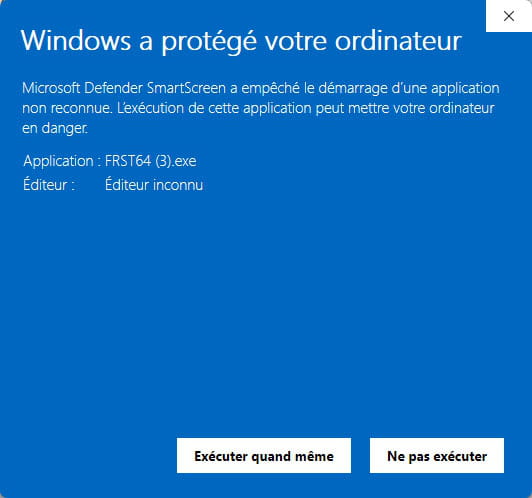
Be careful, wait for the messages saying that the scan is finished to appear.


At the end of the scan, the two reports FRST and Addition will be on the desktop.


Send the FRST and ADDITION reports to https://pjjoint.malekal.com/ or https://www.catupload.com/.
Then attach the two links generated by https://pjjoint.malekal.com/ or https://www.catupload.com/ in your response.
bazfile
Moderator/Security Contributor.
a hello, a reply, a thank you are always appreciated. -
Good evening bazfile and thank you. I will do that.
Thanks again and have a good evening.




