
Smartphone Downloads
Mijo45 -
Hello, everything I download on my Samsung 25 Ultra smartphone, I can't find anything in my folder. The same goes for if I want to download photos from my computer to my smartphone. Thank you for sharing your knowledge with me.
- Change the name of your Android smartphone on the Wi-Fi network.
- How to block incoming SMS on Smartphone?
- synchronization of calendars between 2 smartphones
- I want to reset my smartphone without a SIM card.
- What is the difference in smartphone manufacturing between Samsung in Vietnam and India?
- dissociate 1 Samsung account on 2 smartphones
4 answers
-
Hello,
The files downloaded on your Samsung Galaxy S25 Ultra are usually located in the Downloads folder, accessible via the My Files or File Manager app. If you can’t find it, check if it has been renamed or moved. Use the search function on your smartphone.
-
Hello and thank you, I did what you suggested, but no files found. I should mention that it has only been functioning since Wednesday, and when I plug it into my computer, I see that there’s nothing on the phone; I also can't download precious photos or music from my computer onto the smartphone. Maybe there’s a configuration to do that I don't know about.
-
Hello,
To view the files on the computer, you need to grant permission on the smartphone.
With the smartphone connected to the computer and unlocked, swipe down all the notifications from the top of the screen. You will find:
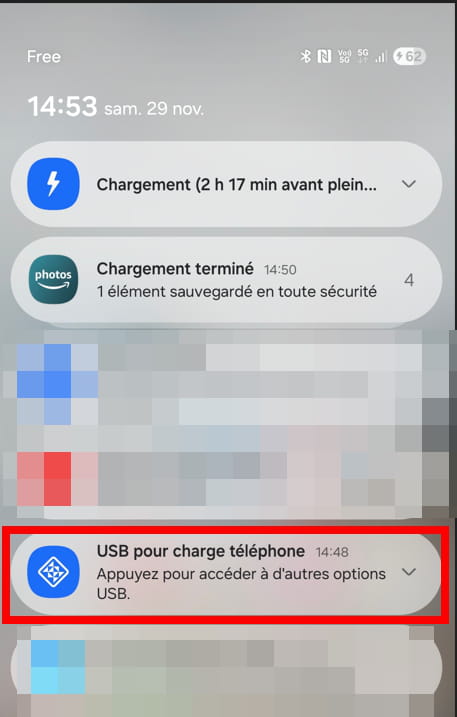
Click on the highlighted line to show all options and choose: File Transfer / Android Auto
What is well conceived is expressed clearly,
And the words to say it come easily.
(Boileau) -
Hello, a big thank you for all this advice. I finally managed to do what I wanted. Have a great weekend.

