Virus win32/Floxif.H
Solved
fabul Posted messages 42244 Registration date Status Moderator Last intervention -
Hello, I've been having trouble with my PC since last night; my PC is infected with a stubborn virus called "win32/Floxif.H," the name that Windows Defender keeps notifying me about. This happened after I connected my smartphone to my PC via USB.
The antivirus keeps screaming, and in one hour it has recorded 305 threats, which puts me in a state of total alert. I don't want to lose my data and my expensive software. I tried a utility from Kaspersky to disinfect the PC but it let me down. I'm scared of online solutions because I regularly come across unreliable websites. I'm in deep trouble.
I'm looking for help, please, someone trustworthy could guide me on how to remove this damn virus.
3 answers
-
Hello @Vano_8009 StatusMember.
To clarify, please do the following.
Download FRST.
Once downloaded, save FRST on the desktop, then right-click on FRST and choose Run as administrator which will show this:

 Wait for the message the tool is ready to run to appear then click on Analyze.
For your information:
 If opening FRST triggers a Microsoft Defender alert, disregard it, click on More info and then Run anyway, see below.

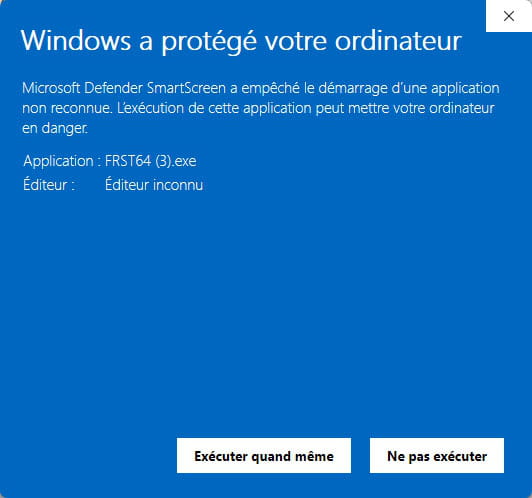
Attention, wait for the messages saying the analysis is complete to appear.


At the end of the analysis, both reports FRST and Addition will be on the desktop.


Send the FRST and ADDITION reports to https://pjjoint.malekal.com/ or https://www.catupload.com/.
Then attach the two links generated by https://pjjoint.malekal.com/ or https://www.catupload.com/ in your reply.
bazfile
Moderator/Security Contributor.
a hello, a reply, a thank you are always appreciated. -
Hello,
Install a single trusted anti-malware: Malwarebytes
(It complements Defender, it doesn’t replace it.)
Safe download: malwarebytes.com (no other site!)
Install Malwarebytes (free version OK).
Run a Full Scan.
Delete everything it finds.
Restart.
Malwarebytes is particularly good for Floxif strains that infect USB drives.
Clean your smartphone (important, the virus comes from there)
On Android, the virus often arrives via:
a file “update.apk”
a folder “system update”
.exe files copied to the root of the phone
Do this:
Connect your smartphone to your PC in “charge only” mode (no file transfer!).
Open Windows Security → Device Protection → Scan USB (if offered).
Unplug it as soon as it’s done.
If your phone contains suspicious files (.EXE, .BAT, .SCR), never run them and delete them from the phone.
Logically that should be enough, otherwise come back to the forum.
-
My dear comrades, I don't know how to thank you for your interventions. The problem is solved, the virus no longer exists. I am grateful for the intervention of Bruno83200_6929 that I received in the morning; I downloaded Malwarebytes and the PC is perfectly disinfected.
Thank you, thank you and a big thank you to the community!
-
Hello,
As far as what is visible, what Malwarebytes removes could be just the tip of the iceberg. I'm not saying it isn't good, but it doesn't allow for a deep scan of the system like other tools for knowledgeable users or experts.
Nothing beats thorough checks with suitable tools to see everything (the unguarded entry points of Windows).
@Bazfile's response, which I commend, could help if you follow his advice.
@+
-