Excel formula problem
Hello and thank you in advance for your help,
I want to find a formula to concatenate data, but I am facing the following problem with my file
I found the following formula
if (A1="";concat (b1;" ";b2))
if (a1="";a2="";concat b1;" "; b2;" ";b3)
etc etc I can have labels up to 7 lines
the formula works but I can't find the solution to nest
example from my file
column a (code) column b (a part of the label)
1 000001 sofa
2 gray with armrest
3 and wooden foot
4 000002 click clack
4 000003 armchairs
6 sets of 2 green
7 000004 carpet
8 multicolored
9
10
9 answers
-
Hello,
Here is what we can achieve with Power Query (natively integrated into Excel since 2016)
-
Hello,
I am sending you a small macro.
The data starts from line 2.
See the file: https://www.swisstransfer.com/d/3c23e37f-ffef-4120-b9d5-53aecc41182e
Best regards.
The Penguin -
Hello everyone,
Solution with Excel 365, the data being in column A and B:
=GROUPBY(SCAN("",A1:A8,LAMBDA(x,y;IF(y<>"",y,x)));B1:B8&" ";CONCAT;;0)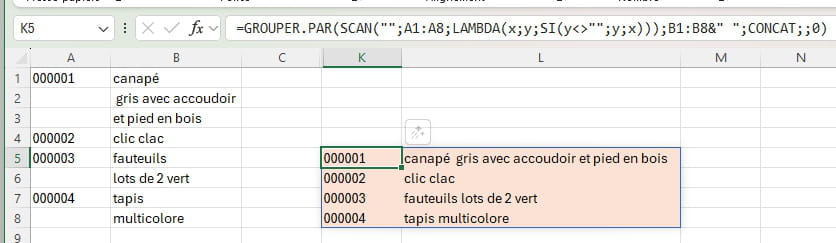
Daniel
-
Hello,
In which column is the formula ... and the expected result?
Regards.
The Penguin -
hello,
first of all, thank you for looking into my issue
column C
-
a second important indication, my file has more than 10,000 rows, I would like to be able to drag the formula down the entire column knowing that the formula must be able to take the right number of rows to concatenate, knowing that I may need to concatenate 2 rows for the next code, 7 rows for the next one, and 4 rows for the third
I hope I have been clear in my example
Thank you in advance
-
Hello,
If it's a one-time operation, I would copy your data into Word and use Find and Replace "^p^t" with "space" to concatenate everything, then just switch it back to Excel.
-
Contributor
Hello Maestro réj
One idea with A1:A10 as the selected cells containing an x in B1:B10 for the labels.
In C1 this formula: =IF($A$1="x",$B$1,"")&IF($A$2="x",$B$2,"")&IF($A$3="x",$B$3,"")&IF($A$4="x",$B$4,"")&IF($A$5="x",$B$5,"")&IF($A$6="x",$B$6,"")&IF($A$7="x",$B$7,"")&IF($A$8="x",$B$8,"")
It is by forging that one becomes a blacksmith. It is at the foot of the wall that one sees the mason. One always learns from one's mistakes.
-
Thank you for all your suggestions, I will do the tests on Monday,
Have a good Sunday
-
Hello, Thank you for your feedback.
I made a small modification to have the same presentation of the results as danielc0 and cousinhub29 (regards).
The file: https://www.swisstransfer.com/d/c28b6938-ddd4-4212-bb1c-9333d608cabc
-