
Heavily infected computer
bazfile Posted messages 58534 Registration date Status Moderator Last intervention -
Hello everyone, I'm on a friend's PC which is heavily infected. I first performed a cleanup using ADWcleaner, and there's some improvement, but it's still complicated with all these pop-ups everywhere.
She is currently on Windows 10, and I have explained the risks to her, but she still wants to stay on it.
If someone could help me, that would be really nice.
4 answers
-
Hello @foxakram StatusMember.
Download FRST.
Once downloaded, save FRST on the desktop and then right-click on FRST and choose Run as administrator which will show this:

 Wait for the message the tool is ready to work to appear, then click Scan.
For your information:
 If you get a Microsoft Defender alert, ignore it and click on More info, then Run anyway, see below.

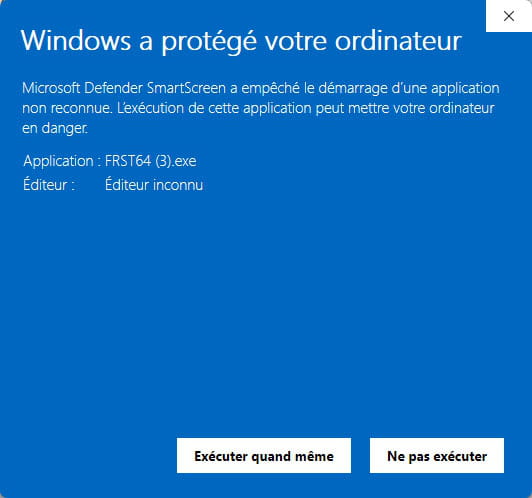
Attention, wait for the messages saying that the scan is completed to display.


At the end of the scan, the two reports FRST and Addition will be on the desktop.


Send the FRST and ADDITION reports to https://pjjoint.malekal.com/ or https://www.catupload.com/.
Then attach the two links generated by https://pjjoint.malekal.com/ or https://www.catupload.com/ in your reply.
bazfile
Moderator/Security Contributor.
A hello, a response, a thank you are always appreciated. -
Thanks a lot for your help, here are the two reports
https://pjjoint.malekal.com/files.php?id=20251028_f5n12z7b6o6
https://pjjoint.malekal.com/files.php?id=FRST_20251028_w14j8i11p13z6
-
Hello @foxakram StatusMember.
Procedure to follow in the indicated order:
1- Open FRST as an administrator by right-clicking on FRST and choosing run as administrator
2 - Copy the entire script in the box below:Start:: CreateRestorePoint: CloseProcesses: Edge Notifications: Default -> hxxps://c9af22t1nwhh9xid8a.rvioi.co.in; hxxps://d3sbot6071bc73dap7fg.credinova.co.in HKLM\SOFTWARE\Policies\Mozilla\Firefox: Restriction Task: {68C14E3A-598E-4360-885C-4476D332BADB} - System32\Tasks\AVG\Overseer => C:\Program Files\Common Files\AVG\Overseer\overseer.exe /from_scheduler:1 (No file) ContextMenuHandlers5: [igfxcui] -> {3AB1675A-CCFF-11D2-8B20-00A0C93CB1F4} => -> No file AlternateDataStreams: C:\Users\edwig\Downloads\avast_av_clear.exe:MBAM.Zone.Identifier [138] AlternateDataStreams: C:\Users\edwig\Downloads\MCPR.exe:MBAM.Zone.Identifier [143] FirewallRules: [{D1738FD1-9230-414C-9A2D-0795280E0658}] => (Allow) C:\Users\edwig\AppData\Local\Temp\EpInsNav\DL\3013\Network\EpsonNetSetup\Data\ENEasyApp.exe => No file FirewallRules: [{6154E4E6-2E22-4F89-9A3E-6E22D1340EB9}] => (Allow) C:\Users\edwig\AppData\Local\Temp\EpInsNav\DL\3013\Network\EpsonNetSetup\Data\ENEasyApp.exe => No file FirewallRules: [{227FFC57-252C-4180-B170-E10864B7D730}] => (Allow) C:\Users\edwig\AppData\Local\Temp\EpInsNav\DL\3013\Network\EpsonNetSetup\Data\ENEasyApp.exe => No file FirewallRules: [{2915EFF7-F565-4654-8EAC-114EA4B5E84A}] => (Allow) C:\Users\edwig\AppData\Local\Temp\EpInsNav\DL\3013\Network\EpsonNetSetup\Data\ENEasyApp.exe => No file End::3- Once the script is copied, click on Fix, FRST will automatically take the script from the clipboard.
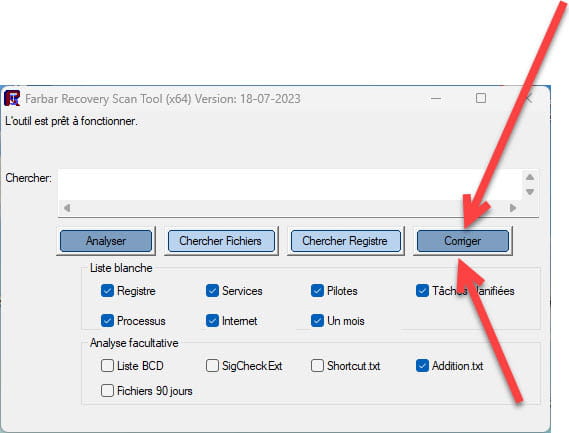

Let the fix complete and once it is finished you will be asked to restart your PC, do so as soon as prompted, see below.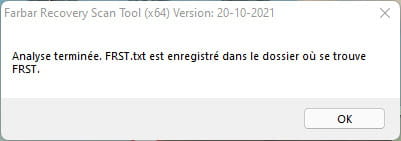

Then once your computer has restarted:
4- You will have a Fixlog file on your desktop, then send this fixlog report to https://pjjoint.malekal.com/ or https://www.catupload.com/.Then give the link generated by https://pjjoint.malekal.com/ or https://www.catupload.com/ in your reply.
5- CHECK AND TELL ME IF YOUR PROBLEM IS STILL PRESENT.
bazfile
Moderator/Security Contributor.
A hello, a reply, a thank you are always appreciated. -
Sorry for this late reply, here is the report
https://pjjoint.malekal.com/files.php?id=20251030_b65u1011d7
it's already much better ;)
