
Slow PC
4ecofuel Posted messages 28 Registration date Status Member Last intervention -
Hello,
Since the beginning of the week, my PC has suddenly become very slow. I don’t know why and I can't solve the problem. I installed CCleaner but it hasn't changed anything.
The PC is recent, purchased in January. It's a HP brand with Windows 11.
If someone could help me.
Thank you
5 answers
-
Hello,
Your HP PC was purchased in January 2025 (the warranty is therefore 2 years), contact customer service... https://www.france-sav.fr/hp.htm
-
Hello,
A PC can lag due to a virus or because too many processes are running at the same time.
You can scan and check: https://forums.commentcamarche.net/forum/affich-38206831-alors-vous-voulez-supprimer-les-virus-vous-meme-comment
A PC can lag because of one or more antivirus programs installed (Never have multiple)
You can uninstall them (Except for Defender)
A hardware issue, check the disk with CrystalDiskInfo
https://crystalmark.info/en/software/crystaldiskinfo/ -
Hello @4ecofuel StatusMember.
Download FRST .
Once downloaded, save FRST to the desktop, then right-click on FRST and choose Run as administrator, which will bring up this:

 Wait for the message the tool is ready to run to appear, then click on Analyze.
For your information:
 If you get a Microsoft Defender alert, do not pay attention, click on More info, then on Run anyway, see below.

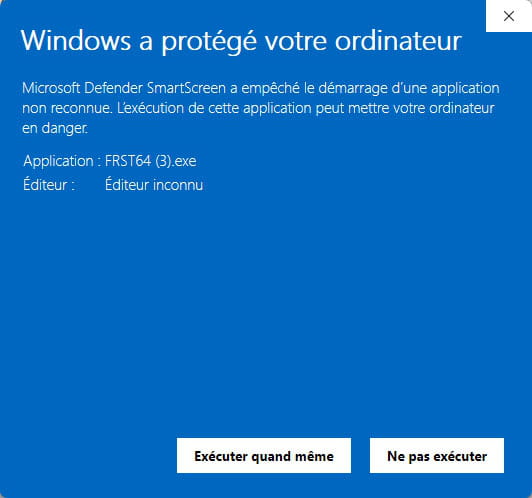
Attention, wait for the messages indicating that the scan is complete to display.


At the end of the scan, the two reports FRST and Addition will be on the desktop.


Send the FRST and ADDITION reports to https://pjjoint.malekal.com/ or https://www.catupload.com/.
Then attach the two links generated by https://pjjoint.malekal.com/ or https://www.catupload.com/ in your response.
bazfile
Moderator/Security Contributor.
a hello, a response, a thank you are always appreciated. -
Here are the links. Hoping that it's exactly what I did.
https://pjjoint.malekal.com/files.php?id=20250921_o135u6k7v9
https://pjjoint.malekal.com/files.php?id=FRST_20250921_i8n10h9q13j12
-
@4ecofuel StatusMember .
No infection on your PC, you should uninstall Avast using Avast Clear Windows Defender will take over and it will slow down your PC much less while also being just as effective.
Windows 11 is not up to date, you are on version 23H2, you should be on version 24H2. To update it, check in Windows Update.
Since your PC is not infected, your issue does not concern this forum, I will redirect it to the Windows 11 forum.
-
-
Thank you.
I am going to update the version of Windows 11. However, since today, the PC is working very well again. I think it just wasn't its week.
Fred


