
UNRECOGNIZED VIRUS (trojan malware??)
Solvedbazfile Posted messages 58529 Registration date Status Moderator Last intervention -
And bingo, a bad click and my PC is corrupted. I accepted a file I shouldn't have..
I'm trying to scan but nothing works; since I accepted it, I imagine it isn't recognized as bad (Bit Defender scan)
Yet I'm infested with pop-ups, or worse?
I used Malwarebytes which detected them and quarantined them but it continues.
Is it possible to help me clean my PC? (Windows Surface 8 tablet)
Thank you.
1 answer
-
Hello @Nannoow StatusMember.
Download FRST.
Once downloaded, save FRST to the desktop, then right-click on FRST and choose Run as administrator, which results in this:

 Wait for the message the tool is ready to run to appear, then click on Analyze.
For your information:
 If you get an alert from Microsoft Defender, disregard it and click on More information, then Run anyway, see below.

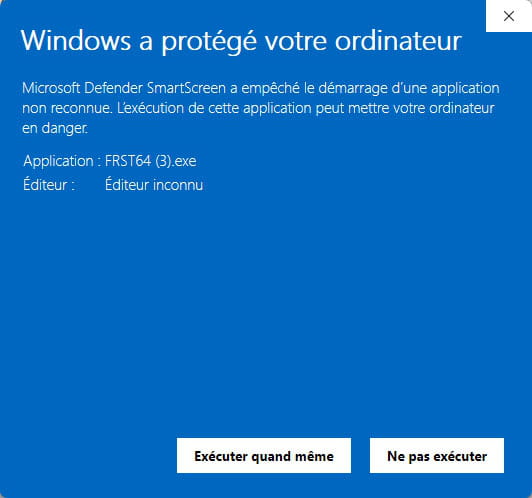
Attention, wait for the messages saying that the analysis is complete to appear.


At the end of the analysis, the two reports FRST and Addition will be on the desktop.


Send the FRST and ADDITION reports to https://pjjoint.malekal.com/ or https://www.catupload.com/.
Then attach the two links generated by https://pjjoint.malekal.com/ or https://www.catupload.com/ in your reply.
bazfile
Moderator/Security Contributor.
A hello, a reply, a thank you are always appreciated.-
-
@Nannoow StatusMember .
Procedure to follow in the indicated order:
1- Open FRST as an administrator, for this right-click on FRST and choose run as administrator
2 - Copy the entire script that is in the box below:Start:: CreateRestorePoint: CloseProcesses: HKLM\SOFTWARE\Microsoft\Windows Defender: [DisableAntiSpyware] Restriction HKLM\SOFTWARE\Microsoft\Windows Defender: [DisableAntiVirus] Restriction Task: {78656C1A-87BF-418D-A0B4-9BDC0407CDBB} - System32\Tasks\Meta\Messenger-WSP-Helper-S-1-5-21-2876891511-1938423599-366950566-1001 => MessengerHelper.exe --lassie (No file) Task: {077BA067-7C15-40F0-B22E-C9DC2A54B4A2} - System32\Tasks\Microsoft\Windows\Location\Notifications => %windir%\System32\LocationNotificationWindows.exe (No file) Task: {F3E6E7ED-A196-4E44-8803-55FAB3AD4E29} - System32\Tasks\Microsoft\Windows\UpdateOrchestrator\USO_UxBroker => %systemroot%\system32\MusNotification.exe (No file) Edge Notifications: Default -> hxxps://unionesictal.co.in; hxxps://web.webex.com Edge HKLM-x32\...\Edge\Extension: [dbconhplchnbippmjabbcedokimacfjl] AlternateDataStreams: C:\Users\Nanno\Downloads\FRST64 (2).exe:BDU [0] AlternateDataStreams: C:\Users\Nanno\Downloads\FRST64 (2).exe:MBAM.Zone.Identifier [225] AlternateDataStreams: C:\Users\Nanno\Downloads\MagiBook3D_6039_FR_fre_Setup.exe:BDU [0] AlternateDataStreams: C:\Users\Nanno\Downloads\MagiBook_FR_fre Setup (1).exe:BDU [0] AlternateDataStreams: C:\Users\Nanno\Downloads\MagiBook_FR_fre Setup (2).exe:BDU [0] AlternateDataStreams: C:\Users\Nanno\Downloads\MagiBook_FR_fre Setup.exe:BDU [0] AlternateDataStreams: C:\Users\Nanno\Downloads\MagiPen_6059_FR_fre_Setup.exe:BDU [0] AlternateDataStreams: C:\Users\Nanno\Downloads\MBSetup (1).exe:BDU [0] AlternateDataStreams: C:\Users\Nanno\Downloads\MBSetup.exe:BDU [0] AlternateDataStreams: C:\Users\Nanno\Downloads\Non confirmé 228927.crdownload:BDU [0] AlternateDataStreams: C:\Users\Nanno\Downloads\Non confirmé 876860.crdownload:BDU [0] AlternateDataStreams: C:\Users\Nanno\Downloads\OperaSetup.exe:BDU [0] AlternateDataStreams: C:\Users\Nanno\Downloads\PixillionConvertisseurImage.exe:BDU [0] AlternateDataStreams: C:\Users\Nanno\Downloads\TotalAV_Setup.exe:BDU [0] FirewallRules: [{324650F1-A0AB-4EA9-AECE-3E47418C30B3}] => (Allow) C:\Program Files\WindowsApps\SpotifyAB.SpotifyMusic_1.200.1165.0_x86__zpdnekdrzrea0\Spotify.exe => No file FirewallRules: [{CC838971-FC2C-4857-86FA-39308AB7FB60}] => (Allow) C:\Program Files\WindowsApps\SpotifyAB.SpotifyMusic_1.200.1165.0_x86__zpdnekdrzrea0\Spotify.exe => No file FirewallRules: [{8CA609BF-2A51-43A8-8E20-6165B34708A6}] => (Allow) C:\Program Files\WindowsApps\SpotifyAB.SpotifyMusic_1.200.1165.0_x86__zpdnekdrzrea0\Spotify.exe => No file FirewallRules: [{030D6C0A-942C-4C53-8EA3-810C1B455725}] => (Allow) C:\Program Files\WindowsApps\SpotifyAB.SpotifyMusic_1.200.1165.0_x86__zpdnekdrzrea0\Spotify.exe => No file FirewallRules: [{56B2ABD5-3D66-4597-A052-23A8FB922425}] => (Allow) C:\Program Files\WindowsApps\SpotifyAB.SpotifyMusic_1.200.1165.0_x86__zpdnekdrzrea0\Spotify.exe => No file FirewallRules: [{D20C03FD-61D7-448F-9814-A73274F5EA31}] => (Allow) C:\Program Files\WindowsApps\SpotifyAB.SpotifyMusic_1.200.1165.0_x86__zpdnekdrzrea0\Spotify.exe => No file FirewallRules: [{BD0BD258-B643-44E2-96A5-12AA285F0160}] => (Allow) C:\Program Files\WindowsApps\SpotifyAB.SpotifyMusic_1.200.1165.0_x86__zpdnekdrzrea0\Spotify.exe => No file FirewallRules: [{E7FF0276-B997-46AF-BDE2-459813057BEB}] => (Allow) C:\Program Files\WindowsApps\SpotifyAB.SpotifyMusic_1.200.1165.0_x86__zpdnekdrzrea0\Spotify.exe => No file EmptyTemp: End::3- Once the script is copied click on Fix, FRST will automatically take the script that is in the clipboard.

Let the fix process complete, once it is finished you will be asked to restart your PC, do it as soon as you are prompted, see below.
Then once your computer has restarted:
4- You will have a Fixlog file on your desktop, then send this fixlog report to https://pjjoint.malekal.com/ or https://www.catupload.com/.Then provide the link generated by https://pjjoint.malekal.com/ or https://www.catupload.com/ in your reply.
5- CHECK AND TELL ME IF YOUR PROBLEM IS STILL PRESENT.
bazfile
Moderator/Security Contributor.
A greeting, a response, a thank you are always appreciated. -
Awesome, what was it?
Thank you a thousand times anyway
https://pjjoint.malekal.com/files.php?id=20250827_p12g6e11y11z5
-
@Nannoow StatusMember .
These were unnecessary notifications.
The fixlog is OK.
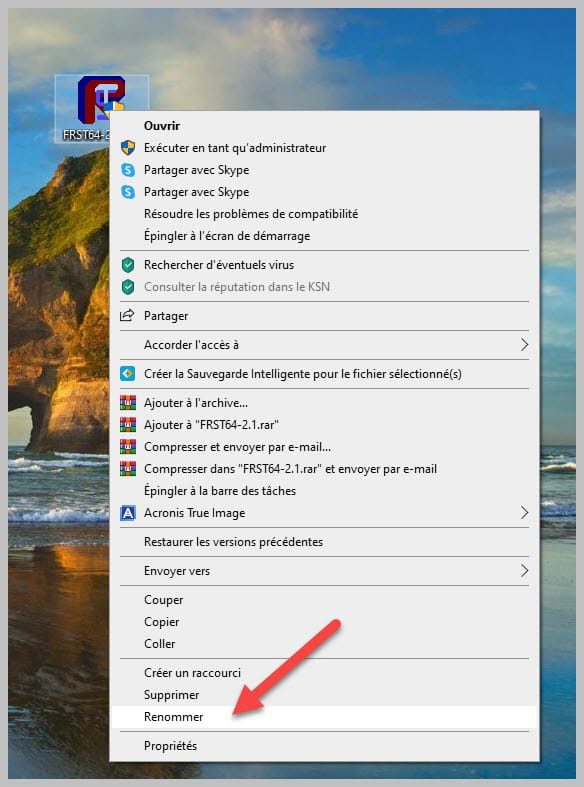
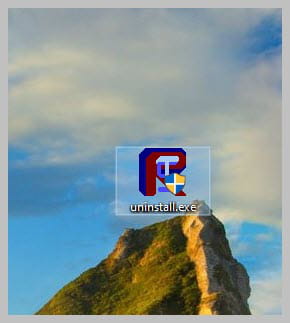
Uninstall FRST, rename the FRST file you downloaded to uninstall, then once the file is renamed, open it; the uninstallation will occur automatically with a restart of the PC.
bazfile
Moderator/Security Contributor.
A hello, a response, and a thank you are always appreciated.
-
