
Malware de Driveridentifier
Solved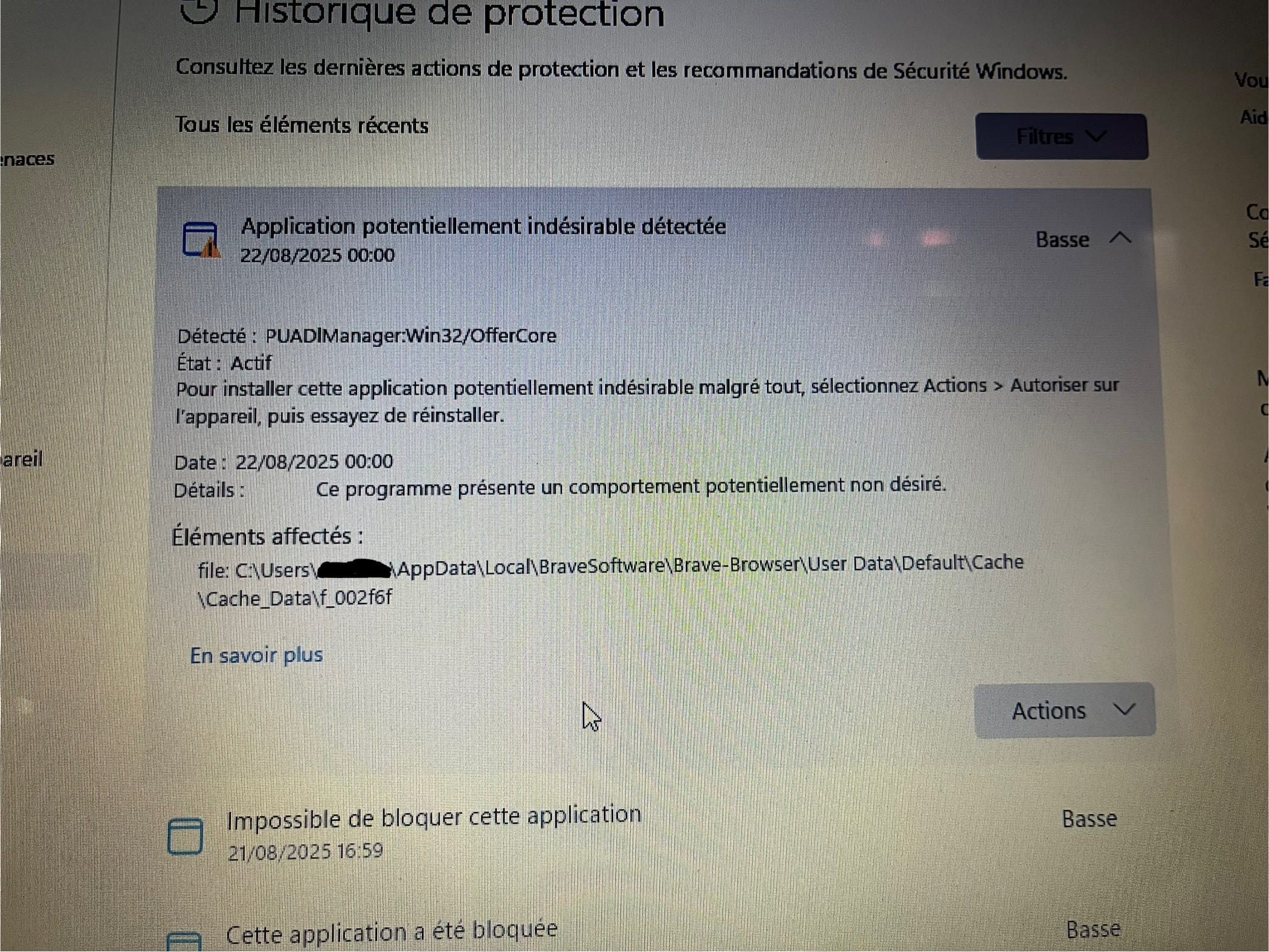
Hello,
I downloaded the driver identifier installer on my laptop to put it on a USB key and install the software on another PC that had no Wi-Fi (missing driver), and I want to clarify that I did not open it on my laptop or on the other PC. When I downloaded it, Microsoft Defender discovered that the file was suspicious, so I immediately disconnected the USB key (to which I had cut and pasted the file from my downloads) and ran a full scan with Microsoft Defender. At the end of the scan, Defender found a suspicious file in what seems to be the cache of my browser (Brave browser), and I attached a photo of it. Before deleting it, I scanned it with VirusTotal, and 37 antivirus programs deemed it suspicious. After all this, I deleted my temporary files (temp, %temp%, and prefetch) and removed all cookies, cached files, and browser history.
Now, I have several unanswered questions. Can the malware have infected other files on my PC? Can reverting to a restore point permanently fix the issue if it still exists? Are there other precautions I should take?
Any help is welcome.
3 answers
-
Moderator
Hello .
You’re overthinking it, driveridentifier contains PUPs (adwares) which aren't that serious; all free software has a business model and monetizes this way.
If you're worried about your PC I can check it for you, just follow these steps.
Download FRST.
Once downloaded, save FRST to your desktop, then right-click on FRST and select Run as administrator, which will give you this:

 Wait for the message the tool is ready to work to appear, then click on Analyze.
For your information:
 If you get a Microsoft Defender alert, ignore it, click on More information then Run anyway, see below.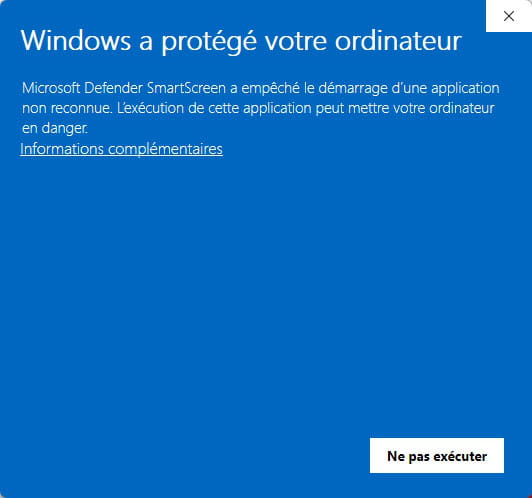

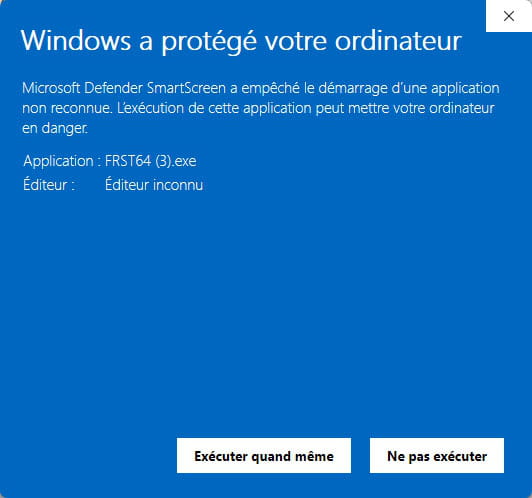
Be careful, wait for the messages indicating that the scan is complete to appear.


At the end of the scan, the two reports FRST and Addition will be on the desktop.


Send the FRST and ADDITION reports to https://pjjoint.malekal.com/ or https://www.catupload.com/.
Then attach the two links generated by https://pjjoint.malekal.com/ or https://www.catupload.com/ in your reply.
bazfile
Moderator/Security Contributor.
A hello, a response, a thank you are always appreciated. -
I just uploaded the files on catupload, the link is here: https://uploadnow.io/f/wqRg0qH
-
Moderator
.
No infection on your PC.
There are only a few orphaned processes; if you want to remove them, follow these steps.
Procedure to follow in the indicated order:
1- Open FRST as an administrator. To do this, right-click on FRST and choose Run as administrator
2 - Copy the entire script that is in the box below:Start:: CreateRestorePoint: CloseProcesses: Task: {E103D4D2-D523-46FE-A2FC-3DBB55EB575B} - System32\Tasks\Microsoft\Windows\Clip\ClipESU => %SystemRoot%\system32\clipesu.exe (No file) Task: {E1A3C166-CF34-4605-9598-BE9CBC2B3FBE} - System32\Tasks\Microsoft\Windows\Clip\ClipESUConsumer => %SystemRoot%\system32\ClipESUConsumer.exe -evaluateEligibility (No file) Task: {669E430C-F771-4F99-B1B5-4226E347ED45} - System32\Tasks\Microsoft\Windows\Clip\ClipEsuConsumerProcessPreOrder => %SystemRoot%\system32\ClipESUConsumer.exe -postProcessPreOrder (No file) Task: {442EB988-6779-4BB8-84E6-6D6AD61830F2} - System32\Tasks\Microsoft\Windows\Clip\ClipEsuConsumerProcessRefund => %SystemRoot%\system32\ClipESUConsumer.exe -processRefund (No file) Task: {E88D9B2C-DDEA-47B2-9582-085153004DB5} - System32\Tasks\Microsoft\Windows\Location\Notifications => %windir%\System32\LocationNotificationWindows.exe (No file) Task: {CCDFC0B8-01A3-4E74-A820-4F13F51D269E} - System32\Tasks\Microsoft\Windows\Mobile Broadband Accounts\MNO Metadata Parser => %SystemRoot%\System32\MbaeParserTask.exe (No file) Task: {7C894B7C-49F6-4B0C-85D0-52A0CE623EFF} - System32\Tasks\Microsoft\Windows\UpdateOrchestrator\Reboot_AC => %systemroot%\system32\MusNotification.exe /RunOnAC RebootDialog (No file) Task: {4DDD3CC2-8EA6-4411-B1FF-3143ED3EC8EE} - System32\Tasks\Microsoft\Windows\UpdateOrchestrator\Reboot_Battery => %systemroot%\system32\MusNotification.exe /RunOnBattery RebootDialog (No file) Task: {F3E6E7ED-A196-4E44-8803-55FAB3AD4E29} - System32\Tasks\Microsoft\Windows\UpdateOrchestrator\USO_UxBroker => %systemroot%\system32\MusNotification.exe (No file) GroupPolicy: Restriction ? Policies: C:\ProgramData\NTUSER.pol: Restriction HKLM\SOFTWARE\Policies\Microsoft\Edge: Restriction ShellIconOverlayIdentifiers: [ OneDrive1] -> {BBACC218-34EA-4666-9D7A-C78F2274A524} => -> No file ShellIconOverlayIdentifiers: [ OneDrive2] -> {5AB7172C-9C11-405C-8DD5-AF20F3606282} => -> No file ShellIconOverlayIdentifiers: [ OneDrive3] -> {A78ED123-AB77-406B-9962-2A5D9D2F7F30} => -> No file ShellIconOverlayIdentifiers: [ OneDrive4] -> {F241C880-6982-4CE5-8CF7-7085BA96DA5A} => -> No file ShellIconOverlayIdentifiers: [ OneDrive5] -> {A0396A93-DC06-4AEF-BEE9-95FFCCAEF20E} => -> No file ShellIconOverlayIdentifiers: [ OneDrive6] -> {9AA2F32D-362A-42D9-9328-24A483E2CCC3} => -> No file ShellIconOverlayIdentifiers: [ OneDrive7] -> {C5FF006E-2AE9-408C-B85B-2DFDD5449D9C} => -> No file ShellIconOverlayIdentifiers-x32: [ OneDrive1] -> {BBACC218-34EA-4666-9D7A-C78F2274A524} => -> No file ShellIconOverlayIdentifiers-x32: [ OneDrive2] -> {5AB7172C-9C11-405C-8DD5-AF20F3606282} => -> No file ShellIconOverlayIdentifiers-x32: [ OneDrive3] -> {A78ED123-AB77-406B-9962-2A5D9D2F7F30} => -> No file ShellIconOverlayIdentifiers-x32: [ OneDrive4] -> {F241C880-6982-4CE5-8CF7-7085BA96DA5A} => -> No file ShellIconOverlayIdentifiers-x32: [ OneDrive5] -> {A0396A93-DC06-4AEF-BEE9-95FFCCAEF20E} => -> No file ShellIconOverlayIdentifiers-x32: [ OneDrive6] -> {9AA2F32D-362A-42D9-9328-24A483E2CCC3} => -> No file ShellIconOverlayIdentifiers-x32: [ OneDrive7] -> {C5FF006E-2AE9-408C-B85B-2DFDD5449D9C} => -> No file ContextMenuHandlers5: [igfxcui] -> {3AB1675A-CCFF-11D2-8B20-00A0C93CB1F4} => -> No file FirewallRules: [{9FA33650-896D-42A7-BF55-BF114C78CFF8}] => (Allow) C:\Program Files\Bitdefender\Bitdefender Security\bdntwrk.exe => No file End::3- Once the script is copied, click on Fix, FRST automatically takes the script that is in the clipboard.

Let the fix run; once it's done, you will be asked to restart your PC, do that as soon as prompted, see below.
Then once your computer is restarted:
4- You will have a Fixlog file on your desktop, then send this fixlog report to https://pjjoint.malekal.com/ or https://www.catupload.com/.Then provide the link generated by https://pjjoint.malekal.com/ or https://www.catupload.com/ in your response.
bazfile
Moderator/Security Contributor.
A hello, a response, a thank you are always appreciated.
