
Insufficient memory or irretrievable error
TonyLucky2025 -
Hello VBA friends!
For some time now, I've been having a big issue with VBA. I developed an application in Excel VBA 64-bit that manages a professional activity, a real little ERP. So I have my working file (4MB) and my users' files (also 4MB). When I want to update the user file, I open my working file and theirs, copy my USF and modules into theirs.
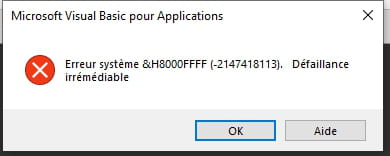
However, now when I try to open both files at the same time, I often get a 'fatal error' message. Or, if I manage to do it by cheating a bit, as soon as I copy a USF from one file to the other, it crashes with 'insufficient memory'. Given the size of the files, I don't really think it's a memory issue.
I searched the internet but couldn't find anything useful. I suspect there is a conflict when opening, but I don't know where to look. Moreover, I haven't added anything specific, just enriched the USF.
Since my files contain confidential data, I cannot upload it online. There are about twenty USF, as many modules, a few class modules, and about thirty tabs.
If anyone has any leads to suggest... Thank you in advance and have a great weekend.
4 réponses

Hello,
Why are you copying the USF and modules from one workbook to another? Strange method!
But I think it’s best not to look too much into it; your workbook is bound to be corrupted, hence this irreversible failure.
Hello, and thank you for your response.
I don't know of any other methods to transfer USFs from one file to another. It's quite simple to do in VBA. I "drag" them from one project to another.
The idea of a corrupted file. Why not? But what to do? I tested with 2 different antivirus programs and nothing was detected.

Hello,
For some time now, I've noticed that Excel, as long as it stays active, accumulates the "VBA environments" of files previously opened, even after the files are closed, which causes issues like "insufficient memory." This can be seen in the list of "projects" in the VBA editor, where the "projects" remain visible after closing the files.
To avoid these problems, it "only" takes closing Excel.
I don't know, of course, if this is what you're experiencing.
Thank you for this lead. But no, I tried closing Excel. I even restarted my computer. Nothing works.
The problem occurs when one of the two files is open, and I try to open the other. That's why I think there is a conflict between the two: same names for tabs, USF, modules... When I open my file with another one that has nothing to do with it, even if it's much larger, I don't have any issues.
The problem really comes from these two almost identical files, differing only by their name. But where could the conflict be coming from...