
Annoying screen issue that puts it to sleep, forces a reboot
endetresseraslebol Posted messages 11 Status Member -
Hello,
I have a persistent problem at the moment. My tower is new, my monitor and the rest of my equipment are old. I have a NVIDIA GeForce RTX 3050, 1TB SSD, 1TB HDD, and 8GB of RAM. Since everything is new, I haven't tested it much. Right now I'm using Photoshop, Google, and League of Legends. In fact, when I use Photoshop or just Google, sometimes with no video or anything, just a simple search, the screen goes into sleep mode for no apparent reason, and I can't wake it up without restarting the PC. Today, to give you an idea, it did this at 3:25 PM, 4:17 PM, 4:51 PM, 4:56 PM, 6:07 PM, 6:13 PM, and 6:22 PM while using only Google or Google and Photoshop.
Yet last night, I played I think from 8 PM to 11 PM on LoL with no issues at all.
Anyway, it's random, I've reinstalled the graphics drivers, updated Windows, run a scan now in the commands, and the Windows image command in the commands, re-enabled all the important software at startup.
And the only clues I have are in the event log
Application name: RadeonSoftware.exe, version: 10.1.2.1862, timestamp: 0x62de417f Faulting module name: RadeonSoftware.exe, version: 10.1.2.1862, timestamp: 0x62de417f Exception code: 0xc0000005 Offset: 0x00000000002c0178 Faulting process ID: 0x1f60 Start time of the faulting application: 0x01db4e487a75d187 Faulting application path: C:\Program Files\WindowsApps\AdvancedMicroDevicesInc-2.AMDRadeonSoftware_10.21.10044.0_x64__0a9344xs7nr4m\radeonsoftware\RadeonSoftware.exe Faulting module path: C:\Program Files\WindowsApps\AdvancedMicroDevicesInc-2.AMDRadeonSoftware_10.21.10044.0_x64__0a9344xs7nr4m\radeonsoftware\RadeonSoftware.exe Report ID: 4cf6f73d-82e3-4c53-a5ba-e06c673db238 Full package name: AdvancedMicroDevicesInc-2.AMDRadeonSoftware_10.21.10044.0_x64__0a9344xs7nr4m Application ID relative to faulting package: AMDRadeonsoftwareUWP
or even
The display driver nvlddmkm stopped responding
I have a lead, which is that I clumsily disabled amdradeon and other important things at startup with ccleaner. But re-enabling all that didn't change anything. I wonder if I have a compatibility problem between Geforce Experience and amdradeon otherwise. I add that I haven't been able to test with other cabling, but my screen being old, it works with an HDMI cable on the tower side and a VGA adapter on the screen side; if it's a standard HDMI cable, the screen displays a green hue; otherwise, the cabling is well connected and everything.
And I don't believe the graphics card is overheating, it's random and I don't hear the fans.
And unfortunately, I don’t understand very well, I don’t know anything about it,
If someone can help me, I would be eternally grateful!
Thank you for reading
7 answers
-
Hello
Install https://userdiag.com/fr/
Run a long diagnostic and paste the report link here.
The presence of a Radeon app indicates either remnants of an old graphics card from that brand or that your processor is an AMD; in the latter case, you should reinstall the drivers for the CPU and for the motherboard chipset.
And also, be careful with CCleaner; this software was great 15 years ago, but today it's more of a problem than a solution.
-
My processor is an Intel, and it's a refurbished one. So I think it must be a leftover from an old board... I will run the diagnostics and paste it here in 20 minutes.
Got it, I’ll stop CCleaner.
Thank you for your response! -
Unfortunately, it recreates the bug (I've restarted 3 times without success), impossible to complete the diagnosis, I noted that it stopped at gpu+cpu multicore, task 216 last time
The previous times it was at the same moment I think, and otherwise I have this in the event log "Name of the faulty application RadeonSoftware.exe, version: 10.1.2.1862, timestamp: 0x62de417f
Name of the faulty module: RadeonSoftware.exe, version: 10.1.2.1862, timestamp: 0x62de417f
Exception code: 0xc0000005
Error offset: 0x00000000002c0178
ID of the faulty process: 0x2e10
Start time of the faulty application: 0x01db4e5bc0f12686
Path of the faulty application: C:\Program Files\WindowsApps\AdvancedMicroDevicesInc-2.AMDRadeonSoftware_10.21.10044.0_x64__0a9344xs7nr4m\radeonsoftware\RadeonSoftware.exe
Path of the faulty module: C:\Program Files\WindowsApps\AdvancedMicroDevicesInc-2.AMDRadeonSoftware_10.21.10044.0_x64__0a9344xs7nr4m\radeonsoftware\RadeonSoftware.exe
Report ID: 6f212aeb-897c-4265-b9f4-8d1ca239fe06
Full name of the faulty package: AdvancedMicroDevicesInc-2.AMDRadeonSoftware_10.21.10044.0_x64__0a9344xs7nr4m
ID of the application related to the faulty package: AMDRadeonsoftwareUWP"Edit: Should I uninstall amdradeon with "Display Driver Uninstaller" or is it risky?
-
So, I uninstalled it, but the bug continues. I have this kind of message in the event log:
Missing localized format string
- System - Provider [ Name] IAStorDataMgrSvc - EventID 0 [ Qualifiers] 0 Version 0 Level 2 Task 0 Opcode 0 Keywords 0x80000000000000 - TimeCreated [ SystemTime] 2024-12-14T20:39:25.3631588Z EventRecordID 12509 Correlation - Execution [ ProcessID] 0 [ ThreadID] 0 Channel Application Computer DESK11-ELB1 Security - EventData Missing localized format string
A provider, IntelMEProv, has been registered in the Windows Management Instrumentation namespace root\Intel_ME, to use the LocalSystem account. This account has privileges, and the provider can cause a security violation if it does not properly represent user requests.
A provider, IntelMEProv, has been registered in the Windows Management Instrumentation namespace root\Intel_ME, to use the LocalSystem account. This account has privileges, and the provider can cause a security violation if it does not properly represent user requests.
And otherwise, I haven't done a quick diag yet, but the long one still doesn't work :/
-
userdiag.com/id/VmmS4El1Ty here is the quick diagnosis
-
-
You have an i7 3770, that's quite old, on a Dell original motherboard.
Since the motherboard's BIOS is not a native UEFI, I'm surprised that an RTX 3050 works with it. That's very surprising.
Given the age of the hardware, except for the graphics card, you should check what power supply you have, as your problem could stem from it if it's too old, which could cause issues with the 3050 that might not appreciate it.
-
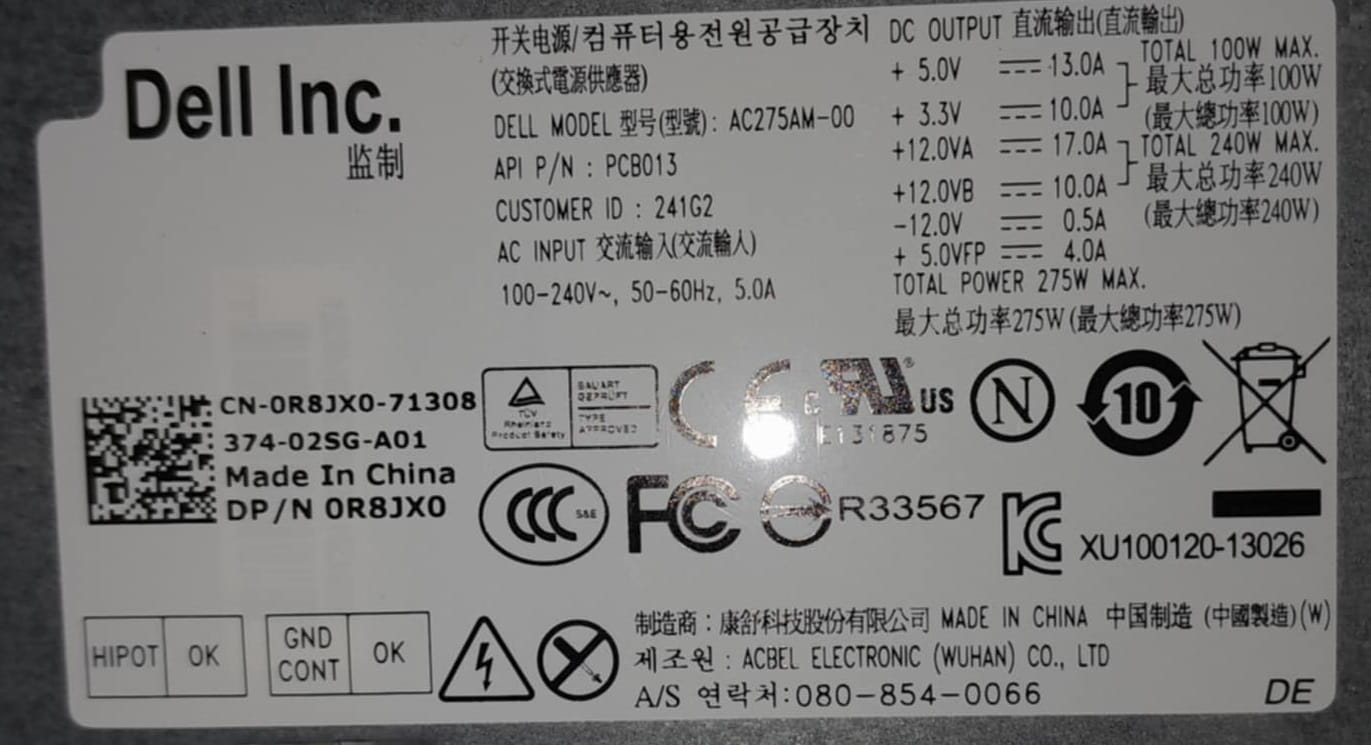
I see, I understand better now, it was a "bargain" when I bought it. So here is the power supply I think
How can I fix the problem? -
Given the power supply's design, which only provides 275w with two 12v rails for 240w (so 120 max each), this power supply is too limited for your PC, especially with the 3050. By the way, there are two variants of the RTX 3050; which model do you have? 6 or 8 GB of RAM? With or without an integrated power connector?
At the same time, I'm hesitant to tell you to change it because you can play without crashes, so...
In any case, it's anything but a good deal.
-
I indeed saw that Nvidia recommends around 550W of power supply...(chatgpt tells me that 450W might be sufficient) in any case we are far from that. This might also explain the crashes where I don't feel like the card is overheating, because actually I imagine it's drawing too much power for the power supply to provide energy to the rest of the computer. This could damage the hardware very quickly if that's the case
As for the card, it's a 6GB of RAM, and I believe that the power connector is integrated, I don't see any cable coming out of it. -
Yes, the 6 go is powered electronically through the PCI Express port of the motherboard. The issue, and this is what I wanted to get at with this information, is that your motherboard is over ten years old (more like 12 or 13) and is not designed to power a modern graphics card of this power through the PCI Express graphics port. At that time, it delivered no more than 60w. Today, it's 70w or even more, so when the card draws heavily, it collapses the voltages of the motherboard, and conversely, when it's used very little, it consumes so little for the technology of the motherboard that the bus drops out.
Changing the power supply may resolve the problem, but it's not guaranteed because the motherboard is also at fault. And yes, a good 450w power supply will be enough, but no less.
-
Oh yes, indeed... that explains why playing was possible while just being on Google Chrome was impossible at certain times.
But in that case, does it mean changing the motherboard (i7 3770, right?) to a recent i5 or i3, and also changing the power supply to at least 450w? Is that possible? And would the configuration be stable?
Edit: I’m not sure if I understood correctly, but since the power supply is internal for the graphics card, is that why the PC power supply doesn’t need 550, but 450w might be sufficient? (https://fr.msi.com/Graphics-Card/GeForce-RTX-3050-VENTUS-2X-6G-OC/Specification?utm I see 300w needed here, which is still above 275w)
-
In fact, it almost comes down to completely rebuilding a PC... i7 3770 is the processor,
And by the way, you can try removing the RTX 3050 and connecting the screen to the motherboard's video output because your processor has an integrated graphics card. At least it will validate the hypothesis that the 3050 is putting a strain on everything else.
-
-
