
Need help getting rid of the Powershell virus
Solvedbazfile Posted messages 58538 Registration date Status Moderator Last intervention -
Hello,
I think my PC is infected with the Powershell virus and I can't remove it permanently.
I understood that some of you might be able to help with this. Here are the two links to the FRST analysis:
FRST: https://www.cjoint.com/c/NHEnvEgcRFM
Addition: https://www.cjoint.com/c/NHEnvZKQGAM
Thank you very much for your help
4 answers
-
Hello @VeridisQuo StatusMember.
If you wish, you can uninstall Spybot Search & Destroy, this software is not really useful.
Procedure to follow in the order indicated:
1- Open FRST as an administrator; to do this, right-click on FRST and choose run as administrator
2 - Copy the entire script that is in the box below:Start:: CreateRestorePoint: CloseProcesses: File: C:\Windows\System32\80D1.tmp\80D2.tmp.ps1 File: C:\ProgramData\updates.ps1 HKLM\SOFTWARE\Microsoft\Windows Defender: [DisableAntiSpyware] Restriction HKLM\SOFTWARE\Microsoft\Windows Defender: [DisableAntiVirus] Restriction Task: {6CC7826F-389E-4AC9-9D5F-BCF1B98CC1F4} - System32\Tasks\Check system => C:\Windows\system32\WindowsPowerShell\v1.0\PowerShell.exe [455680 2024-02-23] (Microsoft Windows -> Microsoft Corporation) -> -windowstyle Hidden C:\ProgramData\updates.ps1 Task: {51E76355-8392-4BA3-AEF5-86FA6F1059D0} - System32\Tasks\Microsoft\Windows\Bluetooth\Chromeniumscrypt => C:\Windows\System32\WindowsPowerShell\v1.0\powershell.exe [455680 2024-02-23] (Microsoft Windows -> Microsoft Corporation) -> -WindowStyle Hidden -File C:\Users\Public\updates.ps1 Task: {719D5385-347D-415F-B402-C0B804C27FC1} - System32\Tasks\Microsoft\Windows\NetTrace\GatherNetworkInfoUDhudAIF => C:\Windows\system32\WindowsPowerShell\v1.0\powershell.exe [455680 2024-02-23] (Microsoft Windows -> Microsoft Corporation) -> -WindowStyle Hidden -ExecutionPolicy Bypass -File "C:\Windows\System32\80D1.tmp\80D2.tmp.ps1" Task: {0F270334-49AE-4ACA-8AF6-9CDEDABBDCE5} - System32\Tasks\Microsoft\Windows\Bluetooth\java => C:\ProgramData\java.exe (No file) S3 cpuz145; \??\C:\Windows\temp\cpuz145\cpuz145_x64.sys [X] CHR HKLM-x32\...\Chrome\Extension: [aegnopegbbhjeeiganiajffnalhlkkjb] AlternateDataStreams: C:\Users\Public\Shared Files:VersionCache [4832] SearchScopes: HKLM -> DefaultScope {0633EE93-D776-472f-A0FF-E1416B8B2E3A} URL = SearchScopes: HKLM-x32 -> DefaultScope {0633EE93-D776-472f-A0FF-E1416B8B2E3A} URL = FirewallRules: [TCP Query User{F32C8146-FA0A-4B3E-B95C-A012576A4556}C:\program files (x86)\common files\adobe\cep\extensions\com.frameio.panel\bin\frameiohelper.exe] => (Allow) C:\program files (x86)\common files\adobe\cep\extensions\com.frameio.panel\bin\frameiohelper.exe => No file FirewallRules: [UDP Query User{FBEEB23C-7F2E-402E-B02E-DB984998BAA5}C:\program files (x86)\common files\adobe\cep\extensions\com.frameio.panel\bin\frameiohelper.exe] => (Allow) C:\program files (x86)\common files\adobe\cep\extensions\com.frameio.panel\bin\frameiohelper.exe => No file FirewallRules: [TCP Query User{50A97719-7224-4387-A6C6-05C8E44E3D7C}C:\program files (x86)\common files\adobe\cep\extensions\com.frameio.panel\bin\frameiohelper.exe] => (Allow) C:\program files (x86)\common files\adobe\cep\extensions\com.frameio.panel\bin\frameiohelper.exe => No file FirewallRules: [UDP Query User{9BF883F1-44C7-4E37-8ABB-3E369B6BA597}C:\program files (x86)\common files\adobe\cep\extensions\com.frameio.panel\bin\frameiohelper.exe] => (Allow) C:\program files (x86)\common files\adobe\cep\extensions\com.frameio.panel\bin\frameiohelper.exe => No file FirewallRules: [{B111574E-D1C4-4B6C-980A-AC993620FA68}] => (Allow) C:\Users\jeanb\AppData\Roaming\Zoom\bin\airhost.exe => No file FirewallRules: [{E5EA6000-CF96-4B5F-8093-6D295B2E4C84}] => (Allow) C:\Users\jeanb\AppData\Roaming\Zoom\bin\airhost.exe => No file FirewallRules: [{7BFF9E60-344D-4101-8053-BD1260D87BF3}] => (Allow) C:\Program Files\BlueStacks_nxt\HD-Player.exe => No file FirewallRules: [TCP Query User{E850309A-2A1B-4A89-B423-B28E27D25C10}C:\users\jeanb\appdata\local\programs\immutable-launcher\immutable.exe] => (Allow) C:\users\jeanb\appdata\local\programs\immutable-launcher\immutable.exe => No file FirewallRules: [UDP Query User{7AF4E3C2-347C-41F1-B064-A30EC55F4792}C:\users\jeanb\appdata\local\programs\immutable-launcher\immutable.exe] => (Allow) C:\users\jeanb\appdata\local\programs\immutable-launcher\immutable.exe => No file FirewallRules: [{EA591E32-1851-4775-8423-4B7B0473BD3B}] => (Block) C:\users\jeanb\appdata\local\programs\immutable-launcher\immutable.exe => No file FirewallRules: [{C2A166D3-B06E-4004-A2DD-C095A283DB52}] => (Block) C:\users\jeanb\appdata\local\programs\immutable-launcher\immutable.exe => No file FirewallRules: [TCP Query User{C1E4994D-35A7-4943-AACC-951739420E81}C:\users\jeanb\appdata\local\godsunchained\gods unchained\standalonewindows64\gods.exe] => (Allow) C:\users\jeanb\appdata\local\godsunchained\gods unchained\standalonewindows64\gods.exe => No file FirewallRules: [UDP Query User{13C14C2B-328F-4F57-8437-EB14038DCC89}C:\users\jeanb\appdata\local\godsunchained\gods unchained\standalonewindows64\gods.exe] => (Allow) C:\users\jeanb\appdata\local\godsunchained\gods unchained\standalonewindows64\gods.exe => No file FirewallRules: [{7CCDF07E-059D-422A-87E4-09B1E2F6106E}] => (Block) C:\users\jeanb\appdata\local\godsunchained\gods unchained\standalonewindows64\gods.exe => No file FirewallRules: [{FE3E951B-DC4A-4B11-B8F1-35DD3F0AEE5F}] => (Block) C:\users\jeanb\appdata\local\godsunchained\gods unchained\standalonewindows64\gods.exe => No file FirewallRules: [TCP Query User{4B742F14-5B7F-4162-994B-BF5AC258AA21}C:\users\jeanb\appdata\roaming\utorrent\utorrent.exe] => (Block) C:\users\jeanb\appdata\roaming\utorrent\utorrent.exe => No file FirewallRules: [UDP Query User{FDC0D129-CE52-4F81-A780-38322B6B0E3E}C:\users\jeanb\appdata\roaming\utorrent\utorrent.exe] => (Block) C:\users\jeanb\appdata\roaming\utorrent\utorrent.exe => No file FirewallRules: [{80F2E06E-4CFD-464F-83FA-A3ECF2FB93B6}] => (Allow) C:\Program Files (x86)\Steam\steamapps\common\Northgard\ng32\Northgard.exe => No file FirewallRules: [{C5C7A6BF-DD10-4220-9391-0E2FB6B6B71B}] => (Allow) C:\Program Files (x86)\Steam\steamapps\common\Northgard\ng32\Northgard.exe => No file FirewallRules: [TCP Query User{73F0E24A-903E-4F01-A1F8-F24C6F3C9A68}C:\users\jeanb\appdata\roaming\utorrent\utorrent.exe] => (Allow) C:\users\jeanb\appdata\roaming\utorrent\utorrent.exe => No file FirewallRules: [UDP Query User{FA930093-8311-451A-8854-D566E1DE514F}C:\users\jeanb\appdata\roaming\utorrent\utorrent.exe] => (Allow) C:\users\jeanb\appdata\roaming\utorrent\utorrent.exe => No file FirewallRules: [{A5B52F4B-4BDA-485D-B1E0-4BBC3CD959B1}] => (Allow) D:\SteamLibrary\steamapps\common\Total War SHOGUN 2\launcher\launcher.exe => No file FirewallRules: [{A8FBCE95-B7C1-44C7-B8A3-753A96B66594}] => (Allow) D:\SteamLibrary\steamapps\common\Total War SHOGUN 2\launcher\launcher.exe => No file FirewallRules: [TCP Query User{4CAA1BFF-52C9-4509-8024-4AF7B9FC469C}D:\steamlibrary\steamapps\common\total war shogun 2\shogun2.exe] => (Allow) D:\steamlibrary\steamapps\common\total war shogun 2\shogun2.exe => No file FirewallRules: [UDP Query User{9F4BC2ED-2D67-4961-BCA5-F9FE0B304815}D:\steamlibrary\steamapps\common\total war shogun 2\shogun2.exe] => (Allow) D:\steamlibrary\steamapps\common\total war shogun 2\shogun2.exe => No file FirewallRules: [{530AD7F7-4A49-4C24-8A39-8DEE2FE28163}] => (Allow) C:\Users\jeanb\AppData\Roaming\uTorrent\uTorrent.exe => No file FirewallRules: [{77559C3B-AF5A-447E-A984-95364D2E807A}] => (Allow) C:\Users\jeanb\AppData\Roaming\uTorrent\uTorrent.exe => No file C:\Users\Public\updates.ps1 C:\ProgramData\updates.ps1 C:\Windows\System32\80D1.tmp\80D2.tmp.ps1 Hosts: EmptyTemp: End::3- Once the script is copied, click on Fix, FRST will automatically take the script that is in the clipboard.

Let the correction take place once it is finished you will be asked to restart your PC, do it as soon as you are asked, see below.
Then once your computer is restarted:
4- You will have a Fixlog file on your desktop, then send that fixlog report to https://www.cjoint.com/ or https://pixeldrain.com/
Then provide the link generated by https://www.cjoint.com/ or https://pixeldrain.com/ in your reply.
5- CHECK AND TELL ME IF YOUR PROBLEM IS STILL PRESENT
bazfile
Moderator/Security Contributor.
A hello, a reply, a thank you are always appreciated. -
Hello @bazfile StatusModerator, Security Contributor
Thank you very much for your quick response. I've noted it for Spybot, I will uninstall it.
The fix went well, here's the Fixlog: https://www.cjoint.com/c/NHEojcdBMFM
I didn't get a Powershell pop-up window at startup, so I feel like the problem is solved! I will still wait for 1 day of use before celebrating, but it looks promising.
Thanks again for this valuable help :)
-
@VeridisQuo StatusMember .
The fixlog is OK, your PC is disinfected.
Your PC was infected by this:
https://www.virustotal.com/gui/file/a81384307
Change your sensitive and important online passwords.
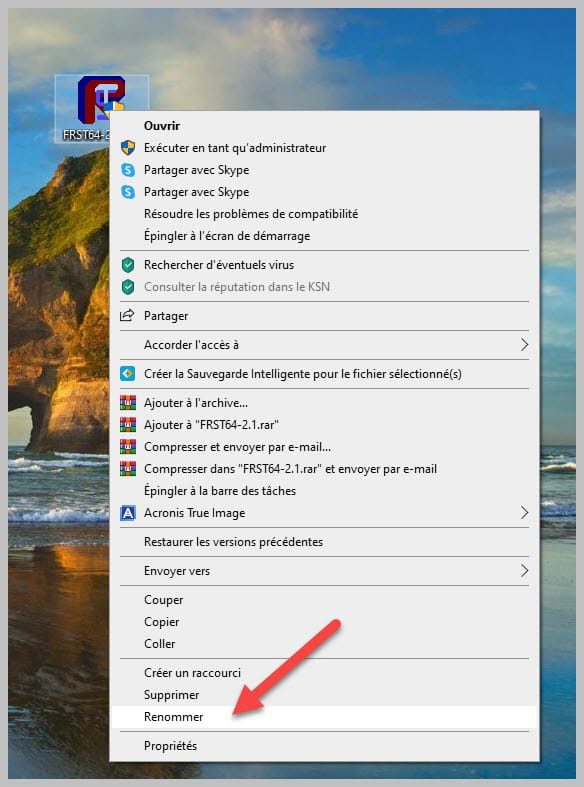
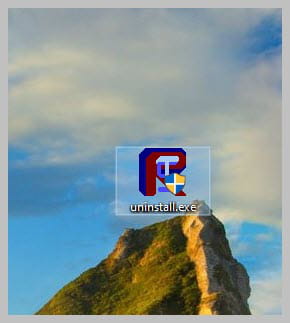
Uninstall FRST, rename the FRST file you downloaded to uninstall, then once the file is renamed, open it; the uninstallation will proceed automatically via a PC reboot.
bazfile
Moderator/Security Contributor.
A hello, a response, a thank you is always appreciated. -
That's all good, I'm going to update my passwords right away.
Thank you for your efficiency and quick response!
