
How to recover movies from an external hard drive
txiki Posted messages 6514 Registration date Status Contributor Last intervention -
Hello,
A few years ago, a friend gave me an external hard drive containing a number of movies. I have never watched these movies but I would like to do so now. However, I can't find them. I should add that I have since the beginning saved a good number of documents on this external drive, documents that are visible.
What should I do to recover my hidden movies?
Thanks to anyone who can help.
Happy holidays.
Nicole.
10 answers
-
Hello,
First, you should check the disk size and the used space:

Did you perhaps reset the disk before putting your files on it? Maybe it was even Windows that, not recognizing the disk format, suggested it to you. Initially, did you watch any videos? What are the names of the directories at the root of the disk?
-
First of all, thank you to Jee Pee for responding to me.
Unfortunately, I am quite a novice in computing and I don't really know how to answer these questions. However, I don't think I have reset the disk... Yes, when I received the disk, I saw the list of movies that were stored on it and it's possible that I watched a few of them... As for the names of the directories, I don't know where to find them.
Could it be "Recovery"?
Thanks again.
Nicole.
-
-
Hello, I am here to complete Nicole's message. You need to answer her first question and click on the external hard drive icon to discover the video files that should be there. First, do a test: make sure you have a video file on your PC, click on it, then right-click, open. It works, okay.
Next: when I want to play files from my external hard drive.
Either I click on a file and right-click, open; the movie should start playing if "auto play" is checked. I'm sending you a guide to check.
How to enable auto play for a DVD.
-
To display the disks on the PC, either click on "This PC" on the desktop or open File Explorer (Windows Key + E) and then click on This PC at the top. You will then see what corresponds to my first image above. Now I connect an external drive, it appears under the letter E:
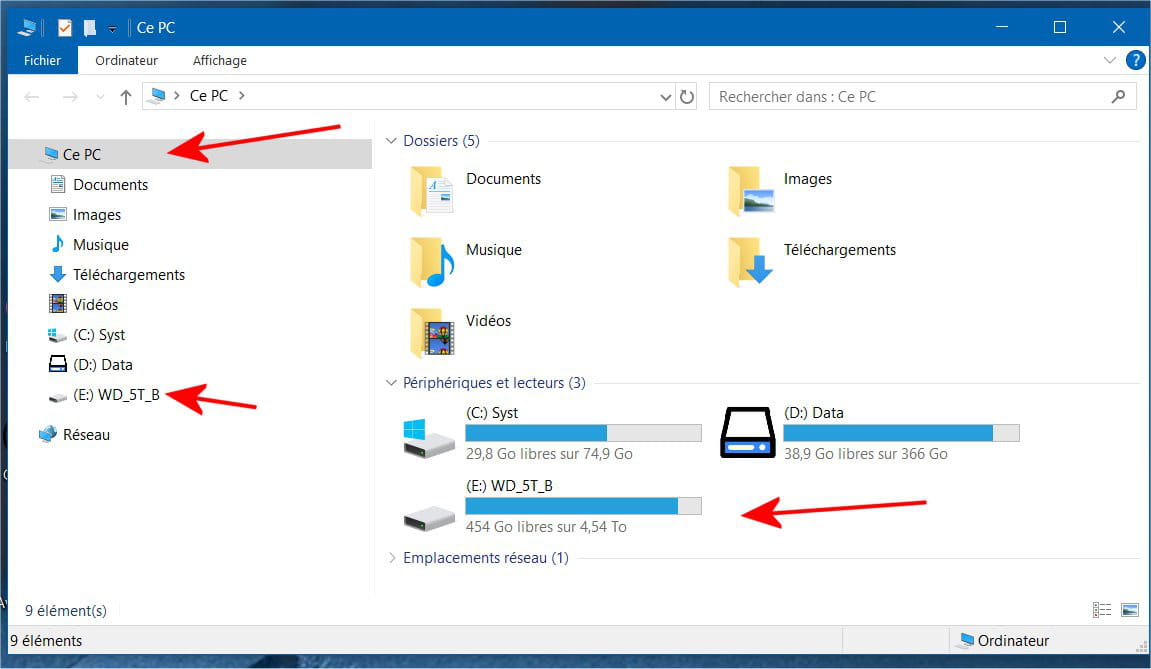
We can see its size: 4.54 TB and how much is left: 454 GB
If I want to see what this external drive contains, I click on this drive E: and I get the list of directories:

Your Recovery must be a system disk (partition) that some manufacturers, like HP, strive not to hide, causing confusion.
What size is your external drive and how much space is available?
Thank you for your attention. I admit that I am a little overwhelmed by all this information.
I have taken the requested screenshot, but I don't know how to attach it. I do not know what a URL is, and I do not understand the explanations provided on Google to find it.
Too bad!
Thanks again to everyone and happy holidays.
Nicole.
Nicole.
To upload an image to the forum, when typing your message, you need to use the landscape icon that will prompt you to provide the location of the image on your PC.
Hello everyone and to Nicole, don’t give up. You have a contribution from the municipality based on your age to take beginner classes, so get informed.
In the meantime, search the web: what is a URL?
For a screenshot, you need to find the path on your hard drive like this:
D: users(yourname) images screenshot
So, it's usually in the images folder, then in the screenshots folder that you will find your image.
So click on a page on your screen, click on screenshot, then on new, then a square in the top right, you will have a cross that follows the mouse to crop your image. Okay, you will have a copy of your screenshot that will be saved in your images folder in the sub-folder 'my screenshots.'
I remind you that we learn throughout our lives, there are computer workshops available in every municipality.
There are also aids to pay for classes and there are service providers who offer one or more home classes. "Donkeys change their minds, not fools."
Please remember to label your message "resolved" if that is the case.Thank you all for the time spent with a beginner.
I will follow your advice.Just a quick question for Jee Pee: where is the "landscape icon"?
Sorry!
Nicole
Hello, it's in the 8th position from the left at the top of the bar
when you open a message to reply
"Donkeys change their minds, not idiots"
remember to mark your message as "resolved" if that's the case-
Yes, but you need to click on reply or comment first.
You must respond first to see the icon.
Type a few words, then click on the icon, then browse to find your image and click OK, and wait a few seconds for the image to display.
You can try out things to familiarize yourself and cancel.

Thank you again to everyone.
I don't feel capable of doing all this.Happy holidays and Happy New Year.
Nicole
Hello Nicole,
"where is the "landscape icon"?": I made you a drawing of the icons to write in this forum.
After clicking on Reply here is the text area that appears with the different formatting options: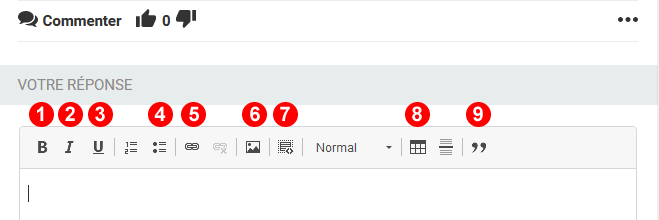
CCM response formatting buttons 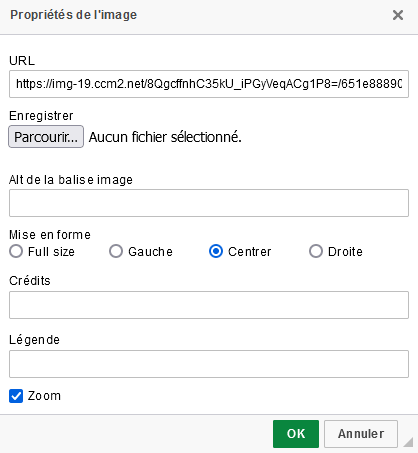
1 Bold
2 Italic
3 Underline
4 Unordered list
5 Create a link after selecting a word
6 Insert an image (the famous landscape)
7 Insert a portion of code
8 Insert a table
9 Insert a quoteSo to put an image here, click on button 6 and then, in the window that opens, click on the Browse button.
NOTE: I can't do the images like jee pee because my Windows 7 won't look like that!
We're just waiting for your images, we'll see what you see on your PC!
PS: hey guys, you're being hard on her there!
Happy end of year celebrations to everyone!
Hello Nicole_91430,

Windows 7 Pro Explorer You first need to click on the start button (at the bottom left) then select Desktop (in the case of W7).
You will see all the drives, DVD drive, USB key if one is plugged in...)Here, the external drive is a USB key (empty) called Lexar, but its name doesn't matter.
If auto-run is enabled, you will get a window asking you what you want to do, but that's not important.
But you can choose "Open folder..." or you can double-click directly on this (external) drive and you will see its contents, folders and/or files (your saved documents as you said).This is the photo that we're asking you for here. If you don’t know how to take a screenshot, you can take a picture with your phone and send it to your PC.
But by opening each of the folders one by one, you will be able to see what they contain.
You open them by double-clicking on the file.Happy end of year celebrations to everyone!
-




