PDF icons modified by Ccleaner Browser.
Good evening
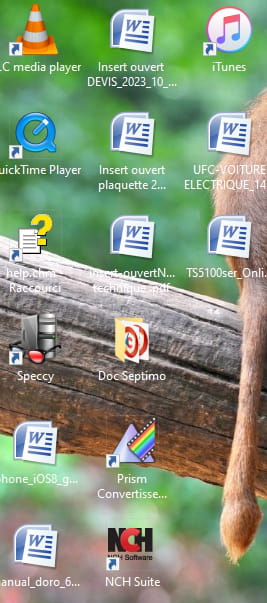
Something strange happened to me: I ran CCleaner Browser and it changed all my PDF file icons to CCleaner icons!
I don't know if I made a mistake. I uninstalled Browser.
Having no choice, I chose Word and my PDF files are unreadable.
How can I restore my PDF icons?
Thank you to anyone who could help me.
Best regards.
Claude.
5 answers
-
Hello,
Right-click on a random "Word" file, open with, check if the usual application (Adobe Reader or whatever) is in the list.
If not, choose another application and check the list again.
If it's still not there, go to the bottom to choose an application on your PC, browse to the location of the PDF reader executable (usually in Programs or Programs (x86)), select Always. -
Good evening
What is the name of the PDF reader executable?
I can't find anything that looks similar.
Is there another way?
Claude
-

Good evening,
System restore (if it is enabled…).
https://www.malekal.com/restauration-systeme-demarrage-windows-7/
“Isn't progress nice? Tomorrow, when we give a book to a kid, he will turn it every which way to see where to put the batteries.”
Coluche -
I am not very skilled, these are documents that have the PDF extension but I don't know how to modify the appearance.
I use Windows 10 and Chrome but that exceeds my capabilities.
I open the files by double-clicking.
-
Good evening
I opened it with Edge and by default: PDF files are displayed correctly.
Thank you for your help.
Sincerely.
Claude