
Supprimer virus double accent circonflexe et tréma (^) et (¨).
Solved/Closedbazfile Posted messages 58540 Registration date Status Moderator Last intervention -
Hello everyone,
when I type a circumflex accent or a diaeresis with the specific key, I get a double circumflex accent or diaeresis before the letter.
Having read about it on other forums, I think I might be infected with a virus. I have also heard about the diagnostic tool FRST.
Looking forward to some help, thank you in advance.
Best regards,
2 answers
-
Hello.
Download FRST, once downloaded save it on the desktop then right-click on FRST and choose Run as administrator you will see this:

Wait for the message the tool is ready to work to appear, then click Analyze
Warning, wait for the messages saying that the analysis is finished to appear.

At the end of the analysis you will have two text files on the desktop FRST and Addition.

Then send the FRST and ADDITION reports to https://www.cjoint.com/ then provide the two links generated by https://www.cjoint.com/ in your response.
bazfile
Moderator/Contributor security.
a hello, a reply, a thank you are always nice.-
Hello, thank you for your response.
Here are the links:
(FRST) : https://www.cjoint.com/c/MJlh2GSlv0b
(Addition) : https://www.cjoint.com/c/MJlh3PMUwmb
-
You downloaded QDA.Miner.v1.0.15.keygen, which is the reason for your infection.
Procedure to follow in the order indicated:
1- Open FRST as an administrator, for this right-click on FRST and choose run as administrator
2 - Copy the entire script in the box below:Start:: CreateRestorePoint: CloseProcesses: HKLM\...\RunOnce: [Delete Cached Standalone Update Binary] => C:\WINDOWS\system32\cmd.exe /q /c del /q "C:\Program Files\Microsoft OneDrive\StandaloneUpdater\OneDriveSetup.exe" (No file) Task: {BDDD9400-C72C-4440-8C42-67B1B2D084F4} - System32\Tasks\ASUS Live Update 2.0 => "C:\WINDOWS\System32\DriverStore\FileRepository\asussci2.inf_amd64_32ddcc2f81113491\ASUSSoftwareManager\AsusUpdateChecker.exe" /start (No file) Task: {1FEF08DF-D146-4DC1-94CB-C2116AB8EC61} - System32\Tasks\ASUS SimPro Dock Main Service => "C:\Program Files (x86)\ASUS\ASUS SimPro Dock\AsSimProDockTool.exe" (No file) Task: {CCDFC0B8-01A3-4E74-A820-4F13F51D269E} - System32\Tasks\Microsoft\Windows\Mobile Broadband Accounts\MNO Metadata Parser => %SystemRoot%\System32\MbaeParserTask.exe (No file) Task: {3F2B4006-0958-4328-8964-9FF4E8DE9E30} - System32\Tasks\Microsoft\Windows\UpdateOrchestrator\MusUx_LogonUpdateResults => %systemroot%\system32\MusNotification.exe LogonUpdateResults (No file) Task: {C27AC9B0-5BBF-4EF9-B742-1986F7117A9C} - System32\Tasks\Microsoft\Windows\UpdateOrchestrator\Reboot_AC => %systemroot%\system32\MusNotification.exe /RunOnAC ReadyToReboot (No file) Task: {DA4603D7-7722-4902-A1FD-BB106442B443} - System32\Tasks\Microsoft\Windows\UpdateOrchestrator\Reboot_Battery => %systemroot%\system32\MusNotification.exe /RunOnBattery ReadyToReboot (No file) Task: {E0F10DCF-44AD-40E8-9370-FB5DA59F93FB} - System32\Tasks\Microsoft\Windows\UpdateOrchestrator\USO_UxBroker => %systemroot%\system32\MusNotification.exe (No file) S4 ELANFPService; %SystemRoot%\System32\ELANFPService.exe [X] R2 FlexNet Licensing Service 64; "C:\Program Files\Common Files\Macrovision Shared\FlexNet Publisher\FNPLicensingService64.exe" [X] R2 HPPrintScanDoctorService; "C:\Program Files\HPPrintScanDoctor\HPPrintScanDoctorService.exe" [X] R2 WirelessKB850NotificationService; %SystemRoot%\system32\WirelessKB850NotificationService.exe [X] R2 WMIRegistrationService; %SystemRoot%\System32\DriverStore\FileRepository\mewmiprov.inf_amd64_cad1db73e8c782a6\WMIRegistrationService.exe [X] S3 ASUSSecDrive; \SystemRoot\System32\DriverStore\FileRepository\abmsvc.inf_amd64_e252965a69453f26\AbmSvcPackage\x64\ASUSSecDrive.sys [X] S1 WinSetupMon; system32\DRIVERS\WinSetupMon.sys [X] HKLM\SOFTWARE\Policies\Microsoft\Windows Defender: Restriction HKLM\SOFTWARE\Policies\Microsoft\Windows\WindowsUpdate: Restriction HKLM\SOFTWARE\Policies\Microsoft\MRT: Restriction HKLM\SOFTWARE\Policies\Microsoft\Windows Defender Security Center: Restriction GroupPolicy: Restriction ? Policies: C:\ProgramData\NTUSER.pol: Restriction Task: {7BD1E238-930F-4168-A3E2-80F19894A3A1} - System32\Tasks\Intel\iprs.Energy => C:\WINDOWS\SysWOW64\RUNDLL32.EXE [41984 2022-05-07] (Microsoft Windows -> Microsoft Corporation) -> "C:\Program Files (x86)\Common Files\ControllerHist\LockExtensiqas\cnbMBaidgeZTRAPI.dll",AugYxk C:\Program Files (x86)\Common Files\ControllerHist FirewallRules: [{08EDFD9C-0AAB-42E8-9442-CB7C8FB4B114}] => (Allow) C:\Program Files\WindowsApps\Microsoft.SkypeApp_15.92.3204.0_x86__kzf8qxf38zg5c\Skype\Skype.exe => No file FirewallRules: [{DB192849-C1D3-4C9E-A2D1-AD17B7C01C61}] => (Allow) C:\Program Files\WindowsApps\Microsoft.SkypeApp_15.92.3204.0_x86__kzf8qxf38zg5c\Skype\Skype.exe => No file FirewallRules: [{9130B04F-15DF-4B04-94AA-11073A16464A}] => (Allow) C:\Program Files\WindowsApps\Microsoft.SkypeApp_15.92.3204.0_x86__kzf8qxf38zg5c\Skype\Skype.exe => No file FirewallRules: [{7C8EC36E-3B2F-4F00-BCED-CCC1E8C2D971}] => (Allow) C:\Program Files\WindowsApps\Microsoft.SkypeApp_15.92.3204.0_x86__kzf8qxf38zg5c\Skype\Skype.exe => No file FirewallRules: [{FB1327CA-FF6D-4E52-B0C5-DA302FE06EBC}] => (Allow) C:\Program Files\WindowsApps\Microsoft.SkypeApp_15.86.3409.0_x86__kzf8qxf38zg5c\Skype\Skype.exe => No file FirewallRules: [{227A6FB2-A2D3-482B-956A-B07732418D68}] => (Allow) C:\Program Files\WindowsApps\Microsoft.SkypeApp_15.86.3409.0_x86__kzf8qxf38zg5c\Skype\Skype.exe => No file FirewallRules: [{8B863010-E409-433D-92CD-03217E1778B3}] => (Allow) C:\Program Files\WindowsApps\Microsoft.SkypeApp_15.86.3409.0_x86__kzf8qxf38zg5c\Skype\Skype.exe => No file FirewallRules: [{2B0E2269-6FC3-4FCE-B632-C807928F7F2B}] => (Allow) C:\Program Files\WindowsApps\Microsoft.SkypeApp_15.86.3409.0_x86__kzf8qxf38zg5c\Skype\Skype.exe => No file FirewallRules: [{84C82D35-87D8-405C-960C-7561D3741D40}] => (Allow) C:\Users\theod\AppData\Local\Temp\7zS496B\HP.EasyStart.exe => No file FirewallRules: [{8DF4BE63-A77E-40A5-802C-B74D4A7003DF}] => (Allow) C:\WINDOWS\System32\DriverStore\FileRepository\asussci2.inf_amd64_32ddcc2f81113491\ASUSLinkNear\AsusLinkNear.exe => No file C:\Users\theod\OneDrive\Desktop\FNS_MI\QDA.Miner.v1.0.15.keygen C:\Users\theod\AppData\Local\Temp\RarSFX2\keygen-pj.exe EmptyTemp: End::3- Once the script is copied click on Fix, FRST automatically takes the script in the clipboard.

Let the fix complete, once it is finished you will be asked to restart your PC, do it as soon as you are prompted, see below.
Then once your computer has restarted:
4- You will have a Fixlog file on your desktop, then send this report fixlog to https://pjjoint.malekal.com/ and then provide the generated link from https://pjjoint.malekal.com/ in your reply.5- CHECK AND TELL ME IF YOUR PROBLEM IS STILL PRESENT
bazfile
Moderator/Security Contributor.
A hello, a response, a thank you are always appreciated. -
Hello,
Here is the link to the fixlog file: https://www.cjoint.com/c/MJljRkz74Kb
The problem is no longer present.
Is there any other corrective action to take?
Thank you
-
-
The fixlog is OK.
Change your sensitive and important online passwords.
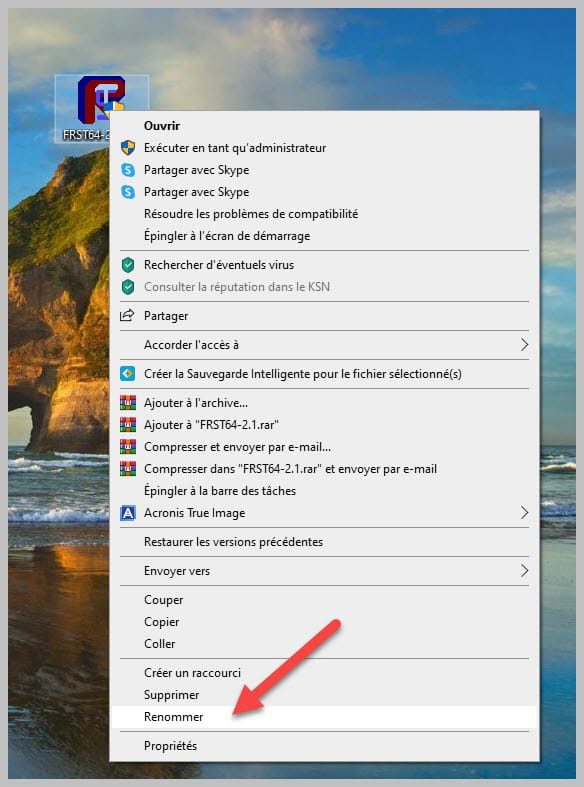
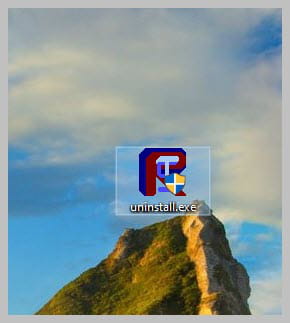
Uninstall FRST, rename the FRST file you downloaded to uninstall, then once the file is renamed, open it; the uninstallation will occur automatically upon restarting your PC.
bazfile
Moderator/Security Contributor.
A hello, a response, a thank you is always appreciated.
