
Asus TUF VG328H1B Screen Blurry Resolution
epango Posted messages 37195 Registration date Status Member Last intervention -
Hello,
I bought a 31.5-inch curved Asus TUF VG328H1B monitor. The display is blurry, especially the text.
What should I do?
The graphics card drivers are up to date...
The resolution is 1920x1080 (recommended), I can't set it higher from the Windows 11 system tab.
Thank you
Have a nice Sunday
4 answers
-
Hello,
"The resolution is 1920x1080 (recommended), I can't set it higher from the Windows 11 system tab."
1920x1080p is the maximum resolution for this screen, you can't set it any higher. However, it has a refresh rate of up to 165Hz. You might be able to play around with that.
-
"For this kind of 32" screen
you need 2160P. 1440p is a bit tight
I'm not even talking about you with your 1080p
"Imagine launching a 480p or 720p video on a 24" 1080p or 27" 1440p screen
it's not going to look good.
---
For those who will see this msg
I recommend a screen >
24" - 1080p
27" - 1440p
32" - 2160p"Where did you come up with such a thing? I have a 28" 1920x1080p screen, I display 480p and 720p videos without any problem and even on my 55" UltraHD TV, 4K. Screens know how to adapt. If you can't figure out how to solve your problem, you don't have to make up nonsense. The minimum size of screens used now, regardless of the definition (misnamed resolution) is 27". You are not going to tell the people consulting this forum to go look for 24" screens.
-
What's happening to you?
The problem isn't the display but the quality of the image.
Taking a 32" screen that does 1080p is not good. The quality of the image is going to be terrible.
If watching a video in 480/720p on a large 28" & 55" screen is not an issue for you, that's not the case for everyone.
His problem (@Pierre73) is that he sees his screen as blurry.
What he needs to do now to solve his issue is to calibrate his screen according to his preferences.
"You're not going to ask the people consulting this forum to go look for 24" screens"
Huh? I'm asking nothing, I'm advising!
It's up to (the people) to follow my advice.
It's better to have a large 27 or 28" PC screen in 1440p than in 1080p. -
Hello everyone,
Just for info: My screen is a 16-inch (2560 x 1600) on a laptop with a refresh rate of 240 Hz.
-
Hello,
Awesome. Congratulations, nice setup, did you get the one with the 4080 or 4090?
Would you get a 32" or larger screen with the same resolution as your 16" screen
or worse, a FHD 1080p on a 55" xD thinking that you’ll have the same visual quality as your 16"
-
"If for you watching a 480/720p video on a large screen 28" & 55" is not a problem. It's not the case for everyone."
Maybe you're confusing videos with video games. In video games, quality depends not only on the screen but also on the CPU power, the GPU, and the response time of the screen, which affect the FPS achieved. As for videos, if I'm not used to 480p, 720p, and 1080p, I use them on my 28" screen and my 55" TV without any problem. Obviously, a 480p video will be less beautiful than a 1080p one, for example, regardless of the screen size, simply because its definition is very low. As for 720p (High Definition), it can sometimes happen that you get a better image on the same display than a 1080p (Full HD) video because a video also depends on the equipment with which it was filmed and the "post-production" processing.
-
We're getting off topic, I wasn't talking about that
"you're confusing videos and video games"
I was just saying that it's preferable to have (and this is just my opinion and experience)
and now I'm answering your question in the post n°8 "Where did you come up with that?"
That the larger the screen, the higher the resolution should be.
I don’t see the point in buying a 32" screen (large size) that has a max resolution of 1920x1080.
Because you lose visual quality.
If we take the example of @Panth33ra StatusMember with their 16" 1600p
switching to a large 32" screen or larger (same resolution/same ***hz)
They will quickly realize they're losing quality (Colors/Contrast/Saturation/Black/Gray)
I would have preferred that the screen I bought a few months ago for €110
(I jumped on a great deal) > AOC 32"(31.5) 1440p /144hz - curved 1800R
had a resolution of 2160p instead of 1440p
and that for a resolution of 1440p (a 27") would have been sufficient, if not better.
I had to calibrate/tune my screen quite a bit to get close to the same visual quality as my old Asus 24" 144hz - 1080p.
-
-
If there are screens optimized for gaming, there are no screens that can only be used for gaming. Your problem must lie elsewhere. Perhaps a driver issue.
-
I switched to 120Hz for office work, but nothing changes. I end up thinking that it must be the screen..
Will buying an HDMI to DisplayPort adapter make any difference??
No, it won't change anything.
Download the ICC profile for your screen available HERE (official site)
Open the zip file, and double-click on ASUS VG328.icm
After that, go to Color Management in Windows
Here’s a tutorial
(I numbered and highlighted the important points to add and activate this profile)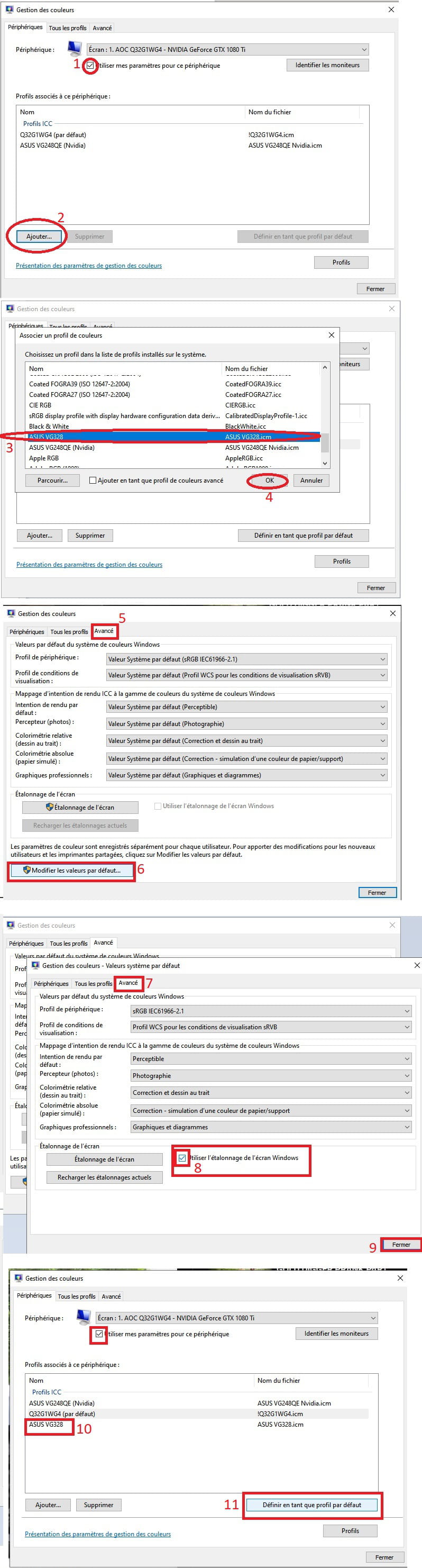
Normally, there should be a slight improvement.
You should also be able to go into your screen's OSD menu and select profiles & or choose to manually adjust the colors (RGB) / Contrast / Saturation.
For this, you need to follow your screen's manual; then experiment until you find a visual setting you like...
One last thing, I have an AOC 32" screen (or like yours 31.5)
144hz - 1440P - (curved) 1800R
For this kind of 32" screen
it should be 2160P. 1440p is a bit tight
I won't even mention your 1080p
Imagine launching a 480p or 720p video on a 24" 1080p or 27" 1440p screen
it’s not going to be pretty.
---
For those who see this message
I recommend a screen >
24" - 1080p
27" - 1440p
32" - 2160p
---
Good luck PierreHello, I don’t know what to do (I don’t have Win11)
I saw this link on the Asus website, it talks about blurry screen & text.
Reset the OSD settings of the monitor and see what happens.
In the worst case, return it for service.
Good luck
-
-
First of all, screens do not need specific drivers to function. Like HDDs, they use the generic drivers provided by Windows. Even if the specific information about the brand and model of the screen is not displayed, it does not prevent the screen from working. As updates are released, Windows collects information on recently launched screens.
The recommendations:
"For those who see this msg
I recommend a screen >
24" - 1080p
27" - 1440p
32" - 2160p"from HOenheim are unfounded, even though it is true that a 2160p resolution on a 24" screen will show small letters that are difficult to read for some, but it would not result in a blurry image. Otherwise, there wouldn’t be laptops with 15.6" screens like this one. Your screen might have a manufacturing defect, unless it’s just a simple issue of proper adjustment.

