
AMD Software: Adrenalin Edition won't open

bazfile Posted messages 58537 Registration date Status Moderator Last intervention -
Hello everyone!
I encountered a very frustrating problem. I can't open the driver for AMD Software: Adrenalin Edition graphics card. I already had this driver with the settings that suited me, but I couldn't find it in the search bar or in my file explorer. I couldn't launch it. But it didn't bother me because I had the settings that suited me. However, today I wanted to check the settings and possibly change them, but since I couldn't find the driver on my PC, I decided to reinstall it so that I could find and launch it. I managed to uninstall and reinstall it and it is indeed visible in the search bar and by right-clicking on the desktop, but it won't launch. There's just the little loading circle next to the mouse pointer but then nothing... I've uninstalled and reinstalled it several times but still nothing. I searched for tutorials on YouTube and it says to uninstall the "CN" file, which I've done, but it still doesn't change anything. The driver just won't launch. How can I solve this problem?
Thank you in advance for your replies :)
1 answer
-
Hello.
Uninstall your graphics card driver using DDU see the tutorial link at the end of the message.
Go to the installed programs and check if Adrenalin is still installed, if so, uninstall Adrenalin using Revo Uninstaller in advanced scan mode, image tutorial below.
Reinstall your graphics card driver and Adrenalin.
If it still doesn't work, I won't have any other solution to give you.
Good luck.
See DDU TUTORIAL.
Revo Uninstaller tutorial to read carefully.
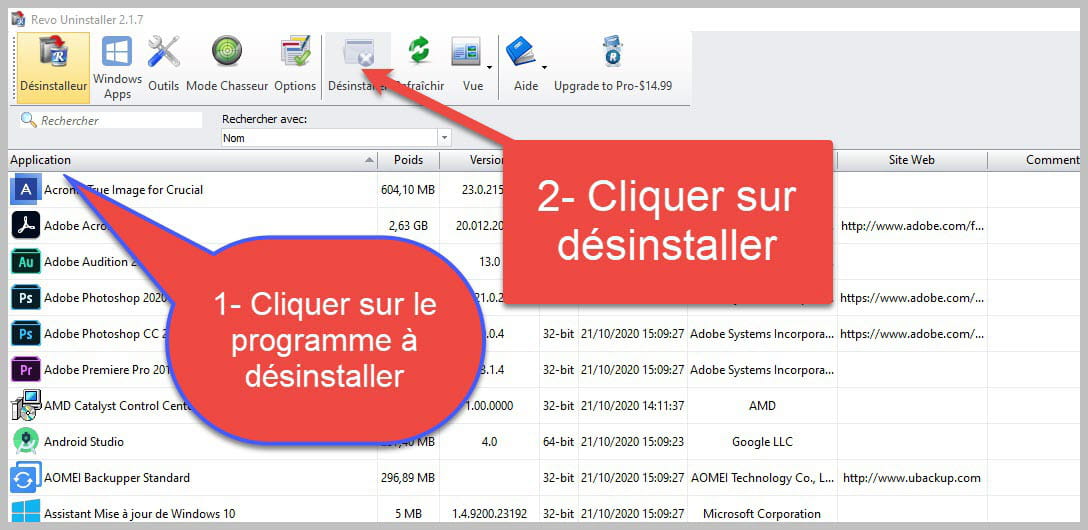

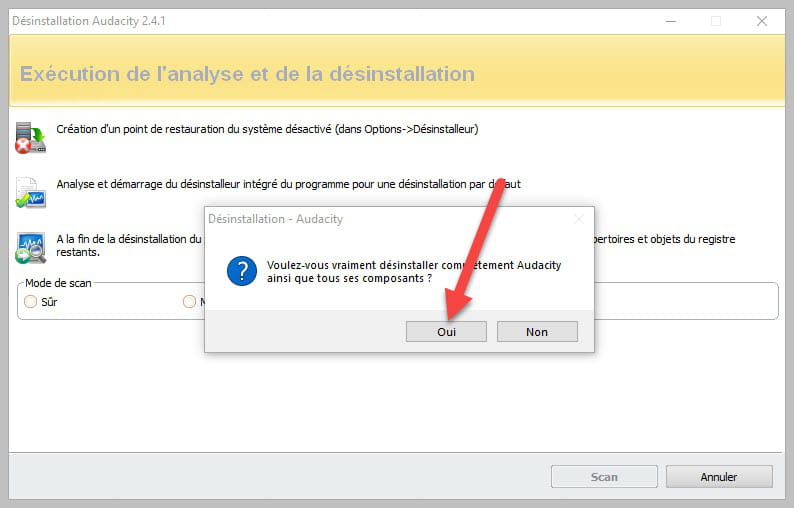
Accept the uninstallation of the program you wish to uninstall and if there is an error message saying that the uninstallation is impossible, close the error message and continue the procedure.

Check "Advanced scan" then click on "Scan."

Click on "Select all" then on "Delete," if a second list appears, do the same, and once everything is deleted, click on "Done," a restart may be requested.
bazfile
Moderator/Security Contributor.
a hello, a response, a thank you are always appreciated.
