
Animate and rotate an image at the same time in PPT
BenVH
Posted messages
1
Status
Member
-
T3chN0g3n Posted messages 69 Registration date Status Member Last intervention -
T3chN0g3n Posted messages 69 Registration date Status Member Last intervention -
Hello,
I'm looking in PowerPoint for how to "rotate right" an image of a car viewed from above. Combine the "spin" movement and the rotation of the object...
Thank you in advance!
1 answer
-
Hello,
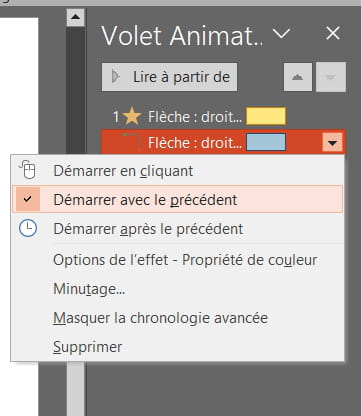
Put the two animations on the image (click on "add an animation" for the second one) and then, via the animation pane, simply right-click on it and select "start with previous." You will then need to adjust the timings (in "effect options") to ensure that the combined movement is smooth.
Best regards.
