
How to reset an inaccessible BIOS?
OliverBbc -
Hello,
For some time now, Windows 10 seems to be completely broken. The Windows Store is inaccessible, and I can't reinstall it despite all the CMD manipulations. The restore health command doesn't work, nor does CHKDSK (check disk scan) or any other recovery commands.
Today, it's my audio device that is no longer working; no audio devices are recognized, yet the service is running.
I've tried upgrading to Windows 11, hoping it would solve my problem, but after updating the BIOS via USB stick, it also became unavailable, and I can't access it.
I performed a CMOS reset by removing the battery, but nothing has changed.
My motherboard:
Base Board Product H310M PRO-D (MS-7B33)
BIOS Mode Legacy (which I’m trying to switch to UEFI by the way)
BIOS Version/Date American Megatrends Inc. 1.C0, 10/10/2020
SMBIOS Version 2.8
Config:
Processor Intel(R) Core(TM) i7-8700 CPU @ 3.20GHz, 3192 MHz, 6 core(s), 12 logical processor(s)
Physical Memory (RAM) Installed 16.0 GB
Manufacturer Micro-Star International Co., Ltd.
Operating System Name Microsoft Windows 10 Home
Version 10.0.19045 Build 19045
Is there a solution to reset the BIOS without having to go through it?
Here is the BIOS update I attempted to install via my flashed USB stick: https://fr.msi.com/Motherboard/H310M-PRO-D/support (the first one on the list, 7B33v1C)
I reinstalled Windows twice after this operation, still the same, BIOS inaccessible, as if it had been deleted.
Thanks a million to anyone who might have an idea for a solution :)!
Have a great evening,
Oliver
14 answers
-
So that's what I suspected, the BIOS hasn't been updated because it's probably not the right version for the motherboard.
On one hand, the current one is dated 2017, proof that it hasn’t been updated since the one you tried is dated 2020; on the other hand, the first BIOS of this motherboard (H310M PRO-D) is dated 2018 on the MSI site, so we're dealing with a motherboard certainly manufactured by MSI but intended for integration, which means the BIOS, drivers, and all that are found on the PC manufacturer's site and not at MSI.
This doesn't solve your problem at all, but I think it's best not to look too much into it; first, flashing the BIOS should be reserved for very specific cases, so it's better to forget about it. Also, the fact that you can't access the BIOS isn't very serious in itself; I would say there's no urgent need to do anything because to go any further you'd need the PC in front of you and in your hands.
Signature
Euskadi Ta Askatasuna -
Hello.
To enter the BIOS, use the Fast Boot utility for Windows 10 available on this page.
bazfile
Moderator/Security Contributor.
A greeting, a reply, a thank you are always appreciated. -
Hello,
Thank you for your response!
Unfortunately, as I mentioned above, the BIOS is absolutely inaccessible, and even the Fast Boot utility cannot access it.
Upon startup, there is no longer the 'page' from MSI indicating for a few seconds to press keys to access the BIOS before Windows launches. It's just a long dash > _
and then Windows starts.
I am running on two hard drives, an SSD that boots and an HDD for my data. I have to unplug my HDD; otherwise, it boots from there, and since there is no Windows installation, it obviously won't boot.
I am stuck for solutions unfortunately :/
-
In FastBoot, did you click on GO2BIOS?
For my part, there is no other solution.
Good luck.
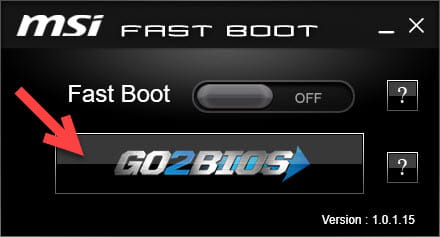
Hello
If the PC is working, it means the BIOS is too.
From there, several possibilities;
To access the BIOS, you need to do it by restarting the PC; not after a normal shutdown. If it's still not working, it means the key used is not the right one, usually Delete, or that the keyboard is not functional at the moment of POST, which is common with USB, especially if the display used is a TV, in which case you can forget it.
Signature
Euskadi Ta AskatasunaHello,
Thanks for your reply flo88, but the problem is that the page to access the BIOS doesn't even show up anymore. I've tried restarting my PC more than 20 times in vain while pressing each of the keys that usually access the BIOS :/
Bazfile: Yes, I did click on that button. It restarts my PC, then after a few seconds with the blinking underscore ( _ ), Windows starts up.
I don't know if it's possible, but could I have installed an update for a UEFI BIOS while it was in Legacy mode?
Thanks a lot for your replies! :)
I properly restarted my PC by selecting 'restart' and not a 'normal' shutdown, and I am definitely on a PC screen.
If the keyboard may not work via USB, how can we access the BIOS at that point?
There has been a real change; on MSI, the key to access the BIOS is F11, on the 'MSI' page that appears when the PC boots up, before Windows starts.
> Previously, this page always appeared, whether restarting or doing a normal boot. Today, nothing. Just a black screen; even the MSI FastBoot application fails to access the BIOS. Same goes for the CMOS reset!
-
The key is "Delete" or "F2" for 100% of motherboards, only branded PCs (HP, Medion, etc) may have a different access key.
Also try from Windows 10 itself by following this procedure: https://lecrabeinfo.net/acceder-au-bios-ou-a-luefi-dun-ordinateur.html#n2-via-windows-11-ou-10
For the keyboard, it is common to have issues with USB depending on how power is managed to the ports, try plugging the keyboard into another USB port to see otherwise you should get a PS/2 keyboard to ensure that the issue is not there.
If the FastBoot application was unable to enter the BIOS, then there is a problem; see my message 4.
None of these keys redirect me to the BIOS at startup unfortunately. I maintain that I have always been able to access my PC's BIOS via F11.
Before I performed this BIOS update, everything worked well, I could access the BIOS without any problems. The issue started since this update. Neither the utility recommended by Bazfile nor a CMOS reset have changed anything.
To better identify the problem, I ask myself this question: I don't know if it's possible, but could I have installed an update for a UEFI BIOS while it was in Legacy mode?
Hello,
To access the BIOS, unplug the SSDs/HDDs, and remove any removable supports if applicable.
If there is nothing to boot from, you should start in the BIOS without touching the keyboard.
Hello MisteryBean,
Thank you for your response!
Unfortunately, the results are still the same.
When starting up without a HDD or SDD or any peripherals connected, just the power supply and the screen via HDMI, I get the infamous little message;
Reboot and select proper boot device or insert boot media in selected boot device and press a key
I’ve tried restarting it several times, same result :/
I don't know if it's possible, but could I have installed an update for a UEFI BIOS while it was in Legacy mode?
It has nothing to do with it, recent BIOS updates validate secure boot and UEFI mode by default to avoid issues when installing Windows 11. What sometimes happens is that the PC no longer boots because it can't find a storage unit with an OS.
This brings me to the following question, how was the BIOS updated? And why?
Signature
Euskadi Ta Askatasuna-
Already mentioned in his first message:
Here is the BIOS update I tried to install via my flashed USB key: https://fr.msi.com/Motherboard/H310M-PRO-D/support (the first one on the list, 7B33v1C)
MisteryBean,
The option Change UEFI Firmware Settings is not present.
Flo88,
Alright, I understand better now! Thank you very much for this explanation :).
I wanted to upgrade to WIN11, but I had to enable TPM and Secure Boot from the BIOS. I updated the BIOS to the latest version available on the MSI website, specifically here: https://fr.msi.com/Motherboard/H310M-PRO-D/support (the first one in the list, 7B33v1C)
And I did this using a USB key formatted in FAT32, then from the BIOS > M FLASH > Select the file E7B33IMS.1C0 > INSTALLATION.
RE_
You indicated that you removed the battery to reset the CMOS, but that’s not enough.
Additionally, you have to move a jumper on the motherboard.
=> Download the manual for your board and check pages 8 and 17 => https://fr.msi.com/Motherboard/H310M-PRO-D/support#manual
Another link to get the method in French:
-
Moreover, the manual clearly states that access to the BIOS is done by the delete key...
OliverBbc, is the PC a brand model? Because in that case, you shouldn't have used a BIOS from the MSI website... that's what I wanted to get at. Besides, nothing is certain about the success of the flash, since the PC is functioning it would be interesting to see the version of the BIOS, with software like CPU-Z for example.
MisteryBean,
I was able to follow the instructions in the manual (power, jumper, both at the same time and one after the other) but nothing has changed for now.
Flo88,
The PC is a model from MEGAPORT. I'm copying below the report from CPUZ.
BIOS ------------------------------------------------------------------------- UEFI Yes BIOS Vendor American Megatrends Inc. BIOS MSG 63-0100-000001-00101111-040517-Chipset BIOS Date 04/05/17 Mainboard Vendor 000001 Version 1.C0However, on the CPUZ interface, I noticed that the BIOS Date is not the same on the interface as in the report. On the interface, the BIOS Date is 10/10/2020.
Flo88 'By the way, the manual clearly states that access to the BIOS is done by the delete key...'
Yes, it's even stranger that I access it with F11 on this PC; I'm surprised to see that in the manual too. I'm at a loss haha!
RE_
I haven't read everything, but have you tried this:
From Windows
--> In Cortana/search, type CMD
--> Right-click on Command Prompt and run as administrator
--> In the prompt, type Shutdown /r /o and confirm
--> The PC will restart into advanced options
--> If present, click on Change UEFI Firmware Settings
--> The PC should restart into the BIOS
-


