Replacing an M.2 SATA SSD with an M.2 NVMe SSD for PC boot.

beru7535 -  
 Seb38 -
Hello, I tried to replace an M.2 SATA SSD with an M.2 NVMe SSD and it didn't work; an error message appeared suggesting that I restart. Thank you in advance for your help.

8 answers

  1. Anonymous user
     
    Hello
    You need to check in the BIOS that the boot order has the NVMe first.
    If this option is not available, make sure to check your PC's documentation to confirm that it is possible and to have the latest BIOS version.
    Once set, the NVMe SSD should behave like your previous SATA SSD.
    Probably a bit faster...
    Cheers
    --
    If the answer helped you: a small thank you is nice. If it's resolved: the green button at the top is better ;-)

    Let him who has never opened a user manual throw the first mouse at me.
    0
  2. Anonymous user
     
    Good evening,

    Silly question:
    Have you installed an operating system on it?
    0
  3. beru7535
     
    Hello, yes I cloned my first SSD.
    0
    1. Anonymous user
       
      How did you do it afterwards? Did you change the boot order? The location for M.2?

      If that doesn't help, the cloning may have failed.
      0
  4. beru7535
     
    No, I removed the old SSD from its slot and I put the new one in its place.
    0
    1. jfmimi Posted messages 13662 Registration date   Status Contributor Last intervention   1 934
       
      Hello
      are you sure that your M.2 port is NVMe compatible??
      brand and model of the motherboard?
      0
  5. beru7535
     
    Yes, it's a port with a key M.
    0
    1. jfmimi Posted messages 13662 Registration date   Status Contributor Last intervention   1 934
       
      A key M can be NVMe or SATA, it doesn't mean anything
      Re: Brand and model of the motherboard?
      0
  6. beru7535
     
    Hello, it's an HP Baker 8767 motherboard (U3E1). The only information I have about the socket is that it's an M.2 3, key M (2280/2242).
    0
    1. jfmimi Posted messages 13662 Registration date   Status Contributor Last intervention   1 934
       
      Yes, the M.2 port must be NVMe
      since it is a HP branded PC
      give me the reference of the HP PC
      and provide the error message
      also check in the BIOS if there is a setting to validate for the NVMe port?
      0
  7. beru7535
     
    It's an HP Pavilion desktop-TP01-1006nf and the error message is "A problem has occurred, we will automatically restart your PC (unsuccessfully)," the other option is "Access repair settings," thank you for the information you have already provided.
    0
    1. jfmimi Posted messages 13662 Registration date   Status Contributor Last intervention   1 934
       
      Your PC has 1 M.2 PCIe x16 port and 1 M.2 PCIe x1 port, right?
      One M.2 socket 1, A key
      One M.2 socket 3, M key, (2280/2242)??
      And if you put the old M.2 SSD back, does it boot??
      0
  8. beru7535
     
    Yes, for the ports and the sockets, I put the old SSD back in and it starts.
    0
    1. jfmimi Posted messages 13662 Registration date   Status Contributor Last intervention   1 934
       
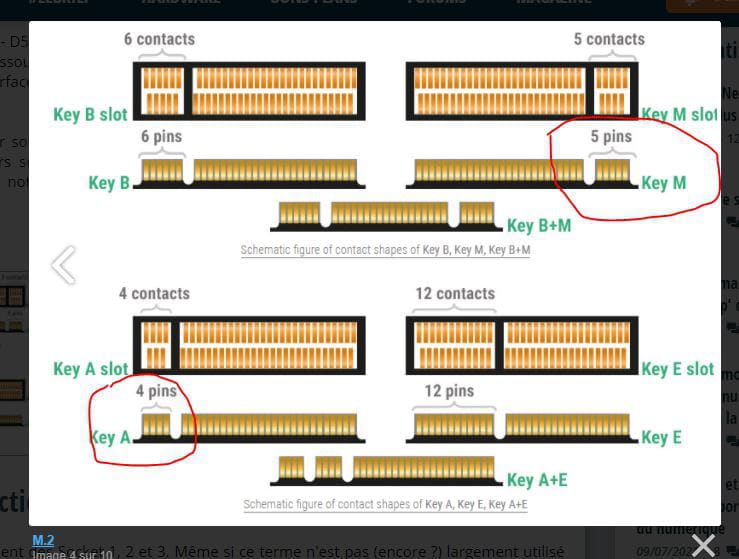
      Key M = 5 pins or contacts
      Key A = 4 pins or contacts

      with the old SSD, check in the BIOS how it is recognized
      then put the new one and see if it is also recognized
      0
    2. Seb38
       
      So you managed to do it because I have the same PC and I'm interested to know if it's possible and if so, how?
      0