
New PC RAM won't boot up
SHELBY75
-
Haniii -
Haniii -
Hello,
To quickly explain my problem, I have an MSI H310M PRO-VDH motherboard with an updated BIOS. I wanted to upgrade my RAM to 16 GB, so I bought 2X8 GB DDR4-3200 G.Skill, but when I install both sticks, my PC turns on but the screen, mouse, and keyboard remain off. When I put just 1 stick in SLOT 1, the PC turns on without any problem. I then try to turn on my PC with 1 stick in SLOT 2, the PC turns on, but once again, the screen, mouse, and keyboard are off. I have performed several Clear Cmos resets, but nothing changes. Do you have any ideas? Thank you very much.
To quickly explain my problem, I have an MSI H310M PRO-VDH motherboard with an updated BIOS. I wanted to upgrade my RAM to 16 GB, so I bought 2X8 GB DDR4-3200 G.Skill, but when I install both sticks, my PC turns on but the screen, mouse, and keyboard remain off. When I put just 1 stick in SLOT 1, the PC turns on without any problem. I then try to turn on my PC with 1 stick in SLOT 2, the PC turns on, but once again, the screen, mouse, and keyboard are off. I have performed several Clear Cmos resets, but nothing changes. Do you have any ideas? Thank you very much.
3 answers
-
Hello
it seems that slot 2 is out of order
before that did you have a stick in slot 2?
or just one in slot 1??
--
If my answer helped you, click the Thanks button.
Mark it as resolved if your issue is fixed.-
-
Hey, can someone help me? I had almost the same issue but on an MSI A320 A-Pro. I'm not sure, I wanted to overclock the RAM a bit, I set the clock to 3000MHz when it was at 1500 (big mistake). When I restarted the PC, it stayed on a black screen. The question is, can anyone tell me if it's the RAM or the motherboard?
PS: I don't have any LEDs like the 310.
-
-
Good evening,
It's rare but it happens, I had the case with an Acer, two identical new modules from the same manufacturer, one faulty.
The supplier took it back.
Just so you can test these modules in the reserved slots, if both work in one slot and not in the other, jfmimi (whom I greet) is probably right!
Best regards.
--
The one who doesn't bring joy upon arrival always does so upon leaving.
O Breizh my homeland, I love my homeland! -
I had a feeling... By pure chance, a motherboard compatible with INTEL 1151 socket and DDR4-3200 at an affordable price?
-
- Sorry for the delayed response, I've been busy elsewhere!
It seems that the LED in question is the memory one, from what can be seen!
Are you sure that both RAM sticks are good?
Have you tried them one after the other in the working slot?
It's difficult to recommend one motherboard over another; it all depends on your budget! - This card has good ratings, Gigabyte B365M DS3H, and matches what you mentioned above, around 85 to 90€, there must certainly be others available now!
I just looked at the specifications of your motherboard MSI and I see that the maximum frequency is 2666MHz in DDR4.
Your RAM sticks are at 3200MHz, which is too high for this motherboard and it’s likely that the problems are related.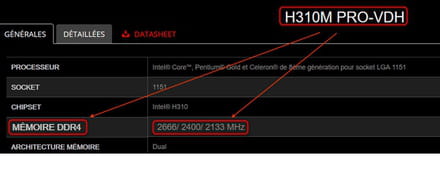
Best regards.
-


