How to Fix Critical_Service_Failed
Quentin8391
-
Malekal_morte- Posted messages 178136 Registration date Status Moderator, Security Contributor Last intervention -
Malekal_morte- Posted messages 178136 Registration date Status Moderator, Security Contributor Last intervention -
Hello everyone, this morning I encountered a problem with my computer and I really want to fix it without having to reset my data.
What happened is that I wanted to install a software, and at the end of this installation, it asked me to restart my PC, and from that moment on, the Windows error persists and I can no longer start my PC. So I would like to know if there is a way to uninstall the software in question to resolve this error. Thank you in advance, I sincerely hope to solve this problem with your help.
P.S: I don't remember the name of the software, but I know it was a program that allows you to open multiple sessions simultaneously to share your PC for two on two different screens.
What happened is that I wanted to install a software, and at the end of this installation, it asked me to restart my PC, and from that moment on, the Windows error persists and I can no longer start my PC. So I would like to know if there is a way to uninstall the software in question to resolve this error. Thank you in advance, I sincerely hope to solve this problem with your help.
P.S: I don't remember the name of the software, but I know it was a program that allows you to open multiple sessions simultaneously to share your PC for two on two different screens.
Related links:
- Échec du démarrage sur le réseau EFI 0 pour IPv4...
- Vibox (Le processus critique est mort)
- échec du démarrage réseau EFI PXE (f8-75-a4-45-eb-5b)
- How to resolve OOBESETTINGS errors during Windows 10 installation
- Process: Service Host: Encryption Services CPU Load
- Installation in progress cannot be resolved
3 answers
-
Hi,
Check out this link
https://forums.commentcamarche.net/forum/affich-35485253-critical-service-failed
Good luck to you -
Hello.
Reinstall Windows without affecting your data
Create a USB drive (8 GB) using the Microsoft tool: https://www.microsoft.com/fr-fr/software-download//windows10
You will need to go into the BIOS to set it as the first boot option. -
Hello,
Reinstall Windows 10 without formatting:
The principle is to create a Windows 10 installation USB stick and boot the computer from it to reinstall Windows without formatting in order to keep the data.
Since the computer is frozen, you need to create it from another working computer.
To create the USB stick:
You need a USB stick with at least 8 GB.- Create a USB stick with Media Creation Tool: Download and create a Windows 10 USB stick with Media Creation Tool
- Boot from it by modifying the boot sequence and indicating the USB stick or DVD: How to boot the computer from a USB stick
If the USB stick doesn't work, try making it again with Rufus: how to download Rufus.
Download the ISO file, for example with Adguard: Download Windows ISO
Launch Rufus and then indicate the path of the ISO file
In the partition scheme, choose GPT.
For more details, refer to this tutorial for details: how to create a Windows installation USB stick
The Windows 10 installation program should then start:
Follow this tutorial explaining how to install Windows 10: how to install Windows 10.
All steps are provided from A to Z with tips at the end to secure Windows 10.- Let yourself be guided to install Windows 10.
- Choose customize (not upgrade)
- During the partition phase, select the main partition and click next.
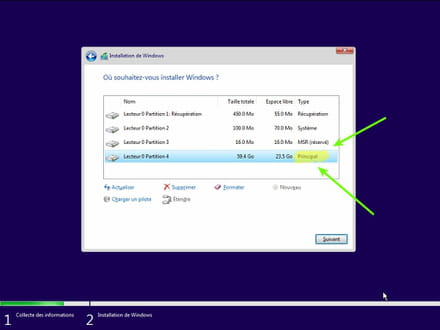
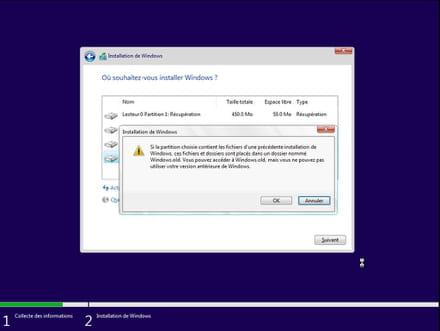
- The installer will tell you that Windows is already present and offer to move it.
- Follow the Windows installation procedure using the tutorial above.
Just don't format.
Your user data will be copied into the Windows.old folder.
Once Windows is installed, I advise you to follow these tips to properly configure and use Windows: Tips after reinstalling Windows.
--
Please press a key to continue the disinfection...