Compare multiple columns in VBA
Solved
Pazzaki
Posted messages
10
Status
Member
-
Pazzaki Posted messages 10 Status Member -
Pazzaki Posted messages 10 Status Member -
Hello,
here is my problem,
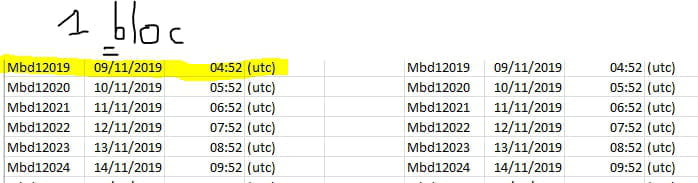
I would like to compare 2 lists of 4 columns each containing Name, date, time, and type (called block).
each list is made up of the same blocks and my goal is to compare these two lists in order to find any errors (1 block from list A does not correspond to the block from list B).
I managed to create a program in VBA by helping myself with various forums, but my program only works if the blocks are in the same order in both lists.
Here is what my program looks like:

The final goal is to have an Excel page where we can see the two lists side by side with the blocks that would be incorrect highlighted in color.
If there are any questions, feel free to ask, knowing that my programming level is very low :/
Hoping that someone can help me :)
here is my problem,
I would like to compare 2 lists of 4 columns each containing Name, date, time, and type (called block).
each list is made up of the same blocks and my goal is to compare these two lists in order to find any errors (1 block from list A does not correspond to the block from list B).
I managed to create a program in VBA by helping myself with various forums, but my program only works if the blocks are in the same order in both lists.
Here is what my program looks like:
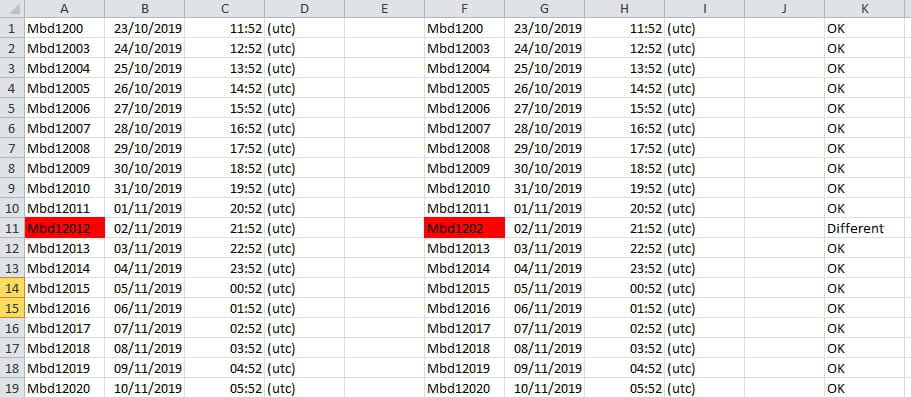
The final goal is to have an Excel page where we can see the two lists side by side with the blocks that would be incorrect highlighted in color.
If there are any questions, feel free to ask, knowing that my programming level is very low :/
Hoping that someone can help me :)
Sub Result()
Dim LastRow As Long, Row As Long 'variables
With Worksheets("Sheet1") 'choose the sheet

LastRow = .Range("B" & Rows.Count).End(xlUp).Row 'determine the number of the last non-empty row in column B in the LastRow variable

For Row = 1 To LastRow 'from the first row to the last

If Range("A" & Row).Value <> "" And Range("F" & Row).Value <> "" _
And Range("B" & Row).Value <> "" And Range("G" & Row).Value <> "" _
And Range("C" & Row).Value <> "" And Range("H" & Row).Value <> "" _
And Range("D" & Row).Value <> "" And Range("I" & Row).Value <> "" Then 'if value of the 2 columns differ then in column K -> Different

If Range("A" & Row).Value = Range("F" & Row).Value _
And Range("B" & Row).Value = Range("G" & Row).Value _
And Range("C" & Row).Value = Range("H" & Row).Value _
And Range("D" & Row).Value = Range("I" & Row).Value Then 'if values of the 2 columns = then in K-> OK

Range("K" & Row).Value = "OK"
Else
Range("K" & Row).Value = "Different"
End If
Else
Range("K" & Row).Value = ""
End If
Next Row
End With
End Sub
10 answers
-
Hello Pazzaki
Why in VBA when a simple conditional formatting will do the job:
Select the 3 columns ABC - Home - Conditional Formatting - New Rule - Use a formula .. and enter the following formula:
=AND($A1<>"";COUNTIFS($F$1:$F$5000;$A1;$G$1:$G$5000;$B1;$H$1:$H$5000;$C1)=0) being careful with the $ at the right places
before choosing the fill color
Repeat the operation for columns FGH with the formula
=AND($G1<>"";COUNTIFS($A$1:$A$5000;$G1;$B$1:$B$5000;$H1;$C$1:$C$5000;$H1)=0)
Modify the references if your table goes below or beyond row 5000
Best regards
Via
-
Re
I was absent this afternoon
I would like to reuse the code in other Excel files
Ok provided that the information is placed in the same columns, otherwise you will still have to adapt the macro code
Macro using the same principle as the MFC, by a COUNTIFS (Countifs in VBA) we count the rows with the same items, if 0, color in red and display in the last column "Different" or "OK"
Sub Result() Dim LastRow As Long, Row As Long 'variables 'choose the sheet here With Worksheets("Feuil1") LastRow = .Range("B" & Rows.Count).End(xlUp).Row 'determine the last non-empty row number in column B in the LastRow variable For Row = 1 To LastRow 'from the first row to the last 'check that block in ABCD exists in FGHI If Application.WorksheetFunction.CountIfs(.Range("F1:F" & LastRow), .Range("A" & Row), .Range("G1:G" & LastRow), .Range("B" & Row), .Range("H1:H" & LastRow), .Range("C" & Row), .Range("I1:I" & LastRow), .Range("D" & Row)) = 0 Then .Range("E" & Row) = "Different" .Range("A" & Row & ":D" & Row).Select Selection.Interior.Color = 255 Else .Range("E" & Row) = "OK" .Range("A" & Row & ":D" & Row).Interior.Pattern = xlNone End If 'check that block in FGHI exists in ABCD If Application.WorksheetFunction.CountIfs(.Range("A1:A" & LastRow), .Range("F" & Row), .Range("B1:B" & LastRow), .Range("G" & Row), .Range("C1:C" & LastRow), .Range("H" & Row), .Range("D1:D" & LastRow), .Range("I" & Row)) = 0 Then .Range("J" & Row) = "Different" .Range("F" & Row & ":I" & Row).Select Selection.Interior.Color = 255 Else .Range("J" & Row) = "OK" .Range("F" & Row & ":I" & Row).Interior.Pattern = xlNone End If Next End With End Sub
The macro works correctly if both groups of 4 columns have the same number of rows
Otherwise, you would need to add between the two parts of the code that do the checks:Next LastRow = .Range("F" & Rows.Count).End(xlUp).Row 'determine the last non-empty row number in column F in the LastRow variable For Row = 1 To LastRow 'from the first row to the last
Best regards
Via
--
"Imagination is more important than knowledge." A. Einstein-
Hello,
First of all, thank you for taking the time to help me! The problem is that I have the same issue with your program (which, by the way, works better than mine) as with mine. That is to say, if the blocks are not in order, it indicates that they are different.
My goal is to know if the blocks in columns A B C D also appear in columns F G H I. (those that do not appear would then be false). Sorry if I expressed myself poorly.
If you have any ideas on how to solve this, I’m all ears. Thank you!
Best regards
Paz -
By the way, after searching so much, I realized that I might not need 4 columns. I need each line to be an entire block.
So that name, date, time, (utc) can be searched as one block from list 1 to list 2.
This changes quite a bit, and I have to say I'm a bit lost because of that.
Sorry, could you guide me towards a solution?
Best regards
Paz -
Hello
My code correctly compares the 4 values together and works flawlessly
In your example, the blocks are not out of order; they are indeed different
for example line 2 (first 4 columns): Mbd2006 10/24/2019 12:52 (utc) which is indeed different from line 5 (the other 4 columns Mbd2006 10/27/2019 15:52 (utc)
Best regards
Via -
-
-
Hello,
Indeed, I had incorrectly defined the last column to write "Different" in the next one.
To change the number of columns, there is only one variable to modify.
I need to be away, I will send you the modifications and explanations early this afternoon. -
Hello,
could you put a copy of your workbook, which would make my work easier (working on real data)
for thatPut the workbook without confidential data as an attachment on
https://mon-partage.fr
In the download link
right-click- copy the link address and paste it into your ongoing message on ccm
There is a possibility without too much problem to compare your 2 blocks of different heights
especially if you have a large number of lines (how many?)
attached is an example of comparing 2 lists of 1 column over 10000 lines in less than a second and which would of course need to be modified to adapt to your issue
https://mon-partage.fr/f/SPyJRJWN/
in waiting
-
Here is the modified code for comparing 2 sets of 4 columns, with the first series separated from the second by an empty column.
Option Explicit
Dim i%, n%, dl%, x%, dc%
Sub Compare()
' i = row number
'n = number of 1st series of columns
'dl = last row
'dc = last column
'x = n + 4 (columns to compare)

dl = Range("A65536").End(xlUp).Row
dc = Cells(1, Columns.Count).End(xlToLeft).Column
 For n = 1 To 4
 For i = 1 To dl
 x = n + 5
 If Cells(i, n) <> Cells(i, x) Then
 Cells(i, n).Font.ColorIndex = 3
 Cells(i, x).Font.ColorIndex = 3
 Cells(i, dc + 1) = "Different"
 End If
 Next i
 Next n
End Sub-
Indeed, your code works just fine. As I replied to via55 above, my problem is a bit different after all. It would be about comparing an entire row from list 1 with the rows of list 2 (in a random order, of course) :/
message above:
Pazzaki - Dec 4, 2019 at 09:08
Moreover, after searching a lot, I realized that I might not need 4 columns. I need one row to be a whole block.
So that name, date, time, (UTC) should be searched as a single block from list 1 to list 2.
This changes quite a bit and I must say I'm a little lost now.
Sorry, could you guide me towards a solution?
Best regards
Paz
-
-
A priori, si j'ai bien compris la réponse, le code fonctionne pour une série des premières colonnes comparées à un même nombre d'une deuxième série de colonnes.
Il s'agirait maintenant de comparer les données de deux colonnes, a priori rien de plus facile, mais vous indiquez :Il s'agirait de comparer toute une ligne de la liste 1 avec les lignes de la liste 2 (dans le désordre du coup)
et là, il y a un besoin de précision.
Il n'est pas nécessaire de joindre un fichier, mais au moins un exemple précis et explicité. -
I have reread your response: for the case where you would have compacted the first 4 columns into one and the other 4 as well, it would be even simpler, of course, but is that the case?
Here, I have planned an empty column between the two others, if that is not the case, just modify:
"pc+2" to "pc+1" (twice) and pc+3 to pc+2
Option Explicit
Dim pl%, pc%, dl%
Sub Compare()
pl = 1 'number of the first row
pc = 1 'first column
dl = Range("A65536").End(xlUp).Row
'here we set the color black to the data of columns 1 and 3, then we delete column 4
'for the case where you have modified and want to run again
Range(Cells(pl, pc), Cells(dl, pc+2)).Select
Selection.Font.ColorIndex = 0
Columns(4).Delete Shift:=xlToLeft
For i = pl To dl
If Cells(i, pc) <> Cells(i, pc + 2) Then
Cells(i, pc).Font.ColorIndex = 3
Cells(i, pc + 2).Font.ColorIndex = 3
Cells(i, pc + 3) = "Different"
End If
Next i
End Sub-
The idea would be to always have the data spaced out in 4 columns (ultimately just for the sake of practice/presentation) but to be taken into account as a single block. In fact, the name, date, and time should work together. I'm not sure if I'm clear enough.

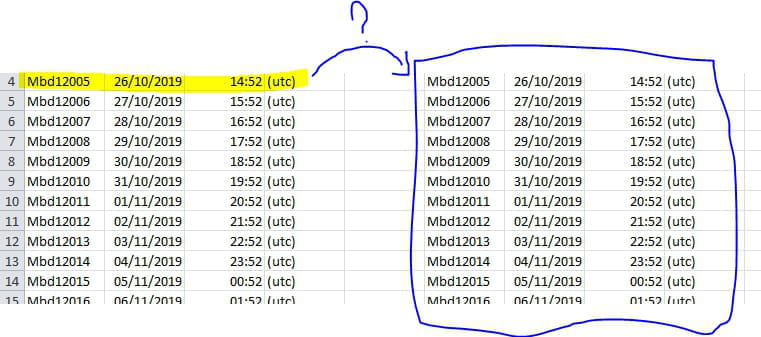
I will re-explain my problem with screenshots just in case.
I would like to know, on a scale of about 500 lines, for each block in the left list, if they are indeed in the right list. So even if "Mbd12020 12/11/2019 ...etc is on line 19 in the left list, there should be an "ok" in column E if it is indeed part of the right list (even if it is on line 24 for example)
Here in cell 19E, it would say "ok".
-
-
Hello everyone,
It's in trial on about 30 lines in column A: there is no need for test column J
I have to be away for a few hours, thanks for being patient
but if you have several thousand lines, it would be necessary to approach it differently in terms of speed
--
Michel-
Re,
attached is a proposal with a mockup
https://mon-partage.fr/f/ryuY3BL1/
If this suits you, I can improve it with parameterized procedures to make the overall layout clearer (similarity of code between the 2 blocks). Let me know...
Edit 10:40 AM
Oops!... :-/
slip-up in the clean macro in the routines module; writeSub nettoyer()
Cells.Interior.Color = xlNone
Range("A1").Select
End Sub
-
-
Hello,
As Via55 writes, if the number of rows is constant for the two groups of three columns, it should work:Option Explicit
Dim i%, n%, dl%, x%
Sub Compare()
dl = Range("A65536").End(xlUp).Row
For n = 1 To 3
For i = 1 To dl
x = n + 4
If Cells(i, n) <> Cells(i, x) Then
Cells(i, n).Font.ColorIndex = 3
Cells(i, x).Font.ColorIndex = 3
Cells(i, n + 1) = "Different"
End If
Next i
Next n
End Sub
Of course, we can modify the number of columns (value of "n"). -
The response from via55 perfectly corresponds to my issue, I am closing the topic, thank you to everyone who took the time to help me! :)