Corrupted library and missing user account
rogmont
Posted messages
16
Status
Member
-
pistouri Posted messages 19010 Registration date Status Contributor Last intervention -
pistouri Posted messages 19010 Registration date Status Contributor Last intervention -
Hello,
After creating a second partition, I wanted to transfer "my documents" and other folders from the "C" library to "E". The operation did not succeed, and I performed multiple actions hoping to find a solution, to the point that now it's a complete mess.
In the "user" folder, I only have "documents" left, and in the explorer, there are 3 "documents" folders that contain the same files... I even deleted a "user" folder.
The restoration logically did nothing.
I don’t want to perform a Windows repair for fear of losing my programs on "C". Furthermore, I don’t know if this Windows repair would resolve my issue?
If anyone has a starting solution for me to get my normal folders back in "users", I thank you in advance.
After creating a second partition, I wanted to transfer "my documents" and other folders from the "C" library to "E". The operation did not succeed, and I performed multiple actions hoping to find a solution, to the point that now it's a complete mess.
In the "user" folder, I only have "documents" left, and in the explorer, there are 3 "documents" folders that contain the same files... I even deleted a "user" folder.
The restoration logically did nothing.
I don’t want to perform a Windows repair for fear of losing my programs on "C". Furthermore, I don’t know if this Windows repair would resolve my issue?
If anyone has a starting solution for me to get my normal folders back in "users", I thank you in advance.
7 answers
-
pistouri Posted messages 19010 Registration date Status Contributor Last intervention Ambassador 8 732
Hello,
Check out this procedure
Remember to restart the PC to apply the changes.
→ ''I even deleted a folder "user "
It will be complicated if the procedure doesn't work.
Before doing the restoration, did you check the recycle bin to restore?
...
--
pistouri -
Thank you very much for your quick response and the link provided (which I had indeed seen but hesitated to use for fear of making the situation worse).
So I took the plunge... and the library is back in its place. Well done.
I managed to transfer my "doc." folders, etc. to another partition. The problem is that while the copy is successful from C to E (as far as I'm concerned), the files remain present in both folders (in the library and in the E partition folder). When I save a file in one, it automatically appears in the other; they are therefore synchronized. This means that if I ever have to format "C," I would simultaneously lose everything in "E." So no security.
Is there another method, perhaps by intervening in the registry?
I also want to point out that I have not found my user account in: C:\Users
However, as I had previously created a corresponding folder on the desktop, if I click on it, I can find the correct library. This means that the link C:\Users\xxxx\ does exist.
Could this folder be reintroduced into "C" users? And how?
Thanks again for your response, and thank you for any follow-up you can provide.
And thanks in advance to anyone else who might have an opinion on these questions. -
pistouri Posted messages 19010 Registration date Status Contributor Last intervention Ambassador 8 732
Hello,
1- The library has found its place. Well done.
2- ''When I save a file in one, it automatically shows up in the other; they are therefore synchronized.'' You need to create a folder before moving, did you do that? Maybe it's OneDrive that synchronizes if you're using it.
Example:
Important: before starting the operation, you need to create the new folders Documents, Music, Photos, and Videos on the second hard drive or on the secondary partition. For example here, on local disk D:, a folder "pistouri" with subfolders that will be the directories of the libraries to move.
1. Open File Explorer, go into Local Disk (C:), Users, and into your profile name.
2. Right-click on My Documents and choose Properties. Open the Location tab and click on the Move button.
3. Look for the desired new location and create the folders accordingly. Click on Select Folder
For example here, I created a new folder "Library pistouri" and "Documents" on disk D:.
4. Once the modification is displayed, click OK to confirm the move of the library.
5. A window will appear to confirm that you want to move all the documents present to the new location: confirm by Yes.
6. The My Documents folder disappears from its location: it is now on your secondary partition or hard drive reserved for data.
You need to repeat the procedure with My Music, My Pictures, and My Videos.
You can also move Downloads, a folder that can grow very quickly.
3 - ''I couldn't find my user account in: C:\users''
The path is This PC → Local Disk → User
4- Could this folder be reintroduced in "C" user? And how?
Yeah, you could do a system restore but it's not guaranteed that it will work.
Oops, you mentioned it in your statement →'' The restoration logically yielded nothing. ''
Take a look at the rest...
Try this:
In the search bar or Cortana on the taskbar, type→ cmd
Right-click on ''Command Prompt'' → Run as administrator
Do a copy/paste
attrib -s -h -r %USERPROFILE%
Then press Enter.
At the end of the operation, close the ''cmd'' window or type ''exit''
Then restart File Explorer or simply reboot your PC.
Check if everything is back in order.
Just a quick question:
Did you create partition E?
Why not D which is Data for default data.
Good luck.
-
Thank you very much, Pistouri, for the time you spent trying to help me.
I tried to follow the step-by-step procedure and I saw that you indicate to work from the subfolders located in C>users>UserXXXX. The problem is that I can no longer see my account here. However, I saw that there was a folder named User DOCUMENTS (probably an error on my part at some point). By moving the subfolders inside that matched my account's location, the procedure was successful. Phew! Thank you.
I don't know if there is a way to change this username to actually put my account name there? The important thing is that it works, hoping that in use it does not block certain programs.
To answer your last question about the letter assigned to the second partition of the disk, I put E because D was not available. Upon closer inspection, I saw that D was assigned to the CD drive. I just swapped them!
Have a good afternoon. -
pistouri Posted messages 19010 Registration date Status Contributor Last intervention Ambassador 8 732
Hello,
''I don’t know if there’s a way to change this username to actually match my account''
Same situation as this post
You need to check in the registry the ProfileList.
This is the registry key.
HKEY_LOCAL_MACHINE\SOFTWARE\Microsoft\Windows NT\CurrentVersion\ProfileList
Look at the SIDs to see the username.
It is possible to change it.
Start by listing the usernames present to see yours.
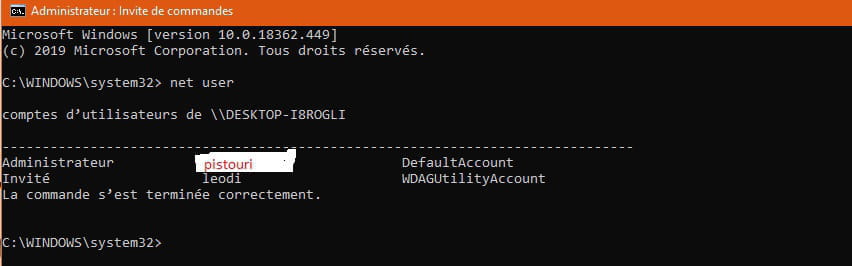
With the command net user
Account ''DefautAccount''
Or with netplwiz
The procedure is explained in the link.
...................................................................................................................................................................................
For the command attrib -s -h -r% USERPROFILE%
If that didn’t work.
In the command prompt, copy and paste
attrib -s -h -r% add a space, type your username.
Then press Enter on the keyboard.
Restart your PC.
Example:
attrib -s -h -r% rogmont
...
-
Hello,
I tried the different suggestions you provided but I can't achieve the expected result.
Ultimately, since it's working now, except for the "users" account under "C" - where I'm lost - I would prefer to leave things as they are. If it becomes an issue later, I would take the opportunity to migrate to Windows 10, hoping that it will sort out the user accounts (which I'm not sure about, by the way).
In any case, thanks again for your valuable advice. I'm not a regular on forums; can you tell?! I really appreciated your help. -
pistouri Posted messages 19010 Registration date Status Contributor Last intervention Ambassador 8 732
Hello,
It's still free to upgrade to Windows 10.
The Media Creation Tool will guide you through the process.
Some of your software may be removed; a list will appear to inform you which ones.
You can then create another user account.
Two accounts are better than one if one day you find yourself locked out for one reason or another and the reset does not work.
A preview for the reset/repair of W10.
Make sure to update your drivers, especially if you have Intel (graphics card, etc.).
Download and install Windows 10 1903
- Tuto CCM
- Tuto Malekal
P.S.: ''I'm not a forum regular, can you tell?''
Everyone has to start somewhere.
In any case, it's nice of you to reply even if your case isn't easy; others would have given up.
Feel free to open a new topic if you have questions or another problem, even though this one is half resolved.
By the way, keep your license key even if W10 stores it in your BIOS and Microsoft's servers.
You never know, for instance, if you do a fresh installation of W10 while W10 is already installed, you should ignore the box for entering the license numbers and make sure to click on ignore this step.
Or you can make a disk image beforehand if you're apprehensive using Macrium Reflect, for example; it's free.
You can mark the conversation resolved
Have a good day.