
Show / Hide rows based on a cell / dropdown list
Solved
Hello,
I am reaching out today because I am unable to achieve what I want.
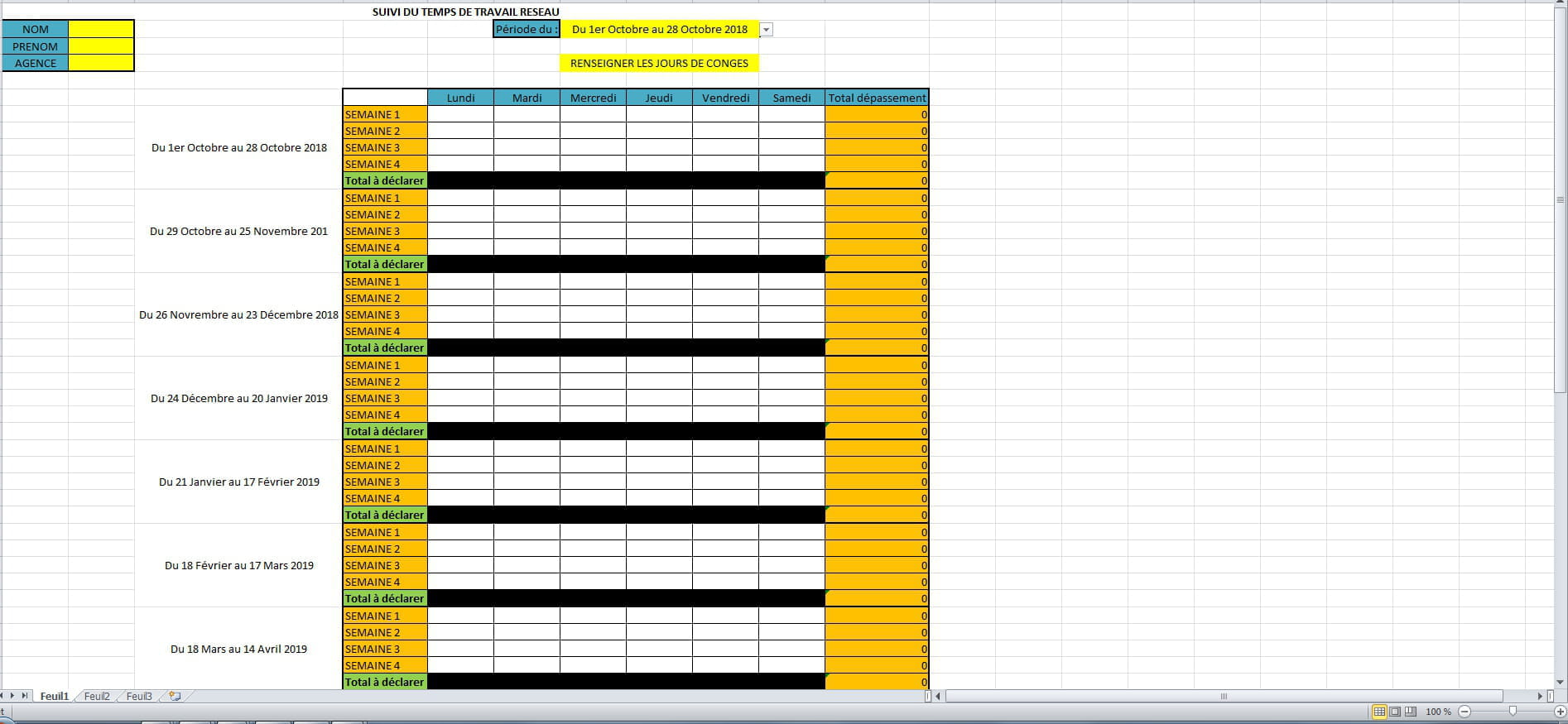
Indeed, in cell G1, I created a dropdown list of periods (which also contains blanks ...).
Below this cell, I created a table with weeks where I reference overtime hours.
I would like that depending on what is displayed in cell G1, only the rows corresponding to the period remain in the table.
So: For the period from October 1 to October 28, only the 4 weeks of this period should remain in the table.
So I imagine hiding the other rows.
Can you help me resolve this case? :/
Thank you very much,
Best regards.


I am reaching out today because I am unable to achieve what I want.
Indeed, in cell G1, I created a dropdown list of periods (which also contains blanks ...).
Below this cell, I created a table with weeks where I reference overtime hours.
I would like that depending on what is displayed in cell G1, only the rows corresponding to the period remain in the table.
So: For the period from October 1 to October 28, only the 4 weeks of this period should remain in the table.
So I imagine hiding the other rows.
Can you help me resolve this case? :/
Thank you very much,
Best regards.

3 answers
-
ContributorHello,
in VBA to download
https://www.cjoint.com/c/IJmnpORYZeQ
--
@+ The Woodpecker-
-
Contributor```html
Option Explicit Dim FL1 As Worksheet, NoCol As Integer Dim NoLig As Long, Var As Variant Private Sub CommandButton1_Click() For_X_to_Next_Ligne End Sub Sub For_X_to_Next_Ligne() Set FL1 = Worksheets("Feuil1") NoCol = 3 'lecture de la colonne C For NoLig = 7 To Split(FL1.UsedRange.Address, "$")(4) Var = FL1.Cells(NoLig, NoCol) If Range("G2") = Var Then Rows("7:71").EntireRow.Hidden = True Rows(NoLig & ":" & NoLig + 4).EntireRow.Hidden = False End If Next Set FL1 = Nothing End Sub
ATTENTION dans la liste déroulante il manque un 8 à 2018
Voilà
@+ Le Pivert ``` -
-
-
Hello,
An example of your file would be welcome, better than a photo.
To send a file,
Make sure there is NO CONFIDENTIAL DATA.
You need to use an attachment site like cjoint.com.
Go to this site: https://www.cjoint.com/
Click on browse,
Search for your file,
Click on open,
Click on "Create cjoint link",
Copy the link,
Come back here and paste it in a reply...
Best regards. -

