Deconsolidate in Excel
Nico
-
DarthLighter -
DarthLighter -
Hello,
I am looking to automatically separate information in a cell using a formula without having to manually convert it.
Here is an example of data contained in a cell:
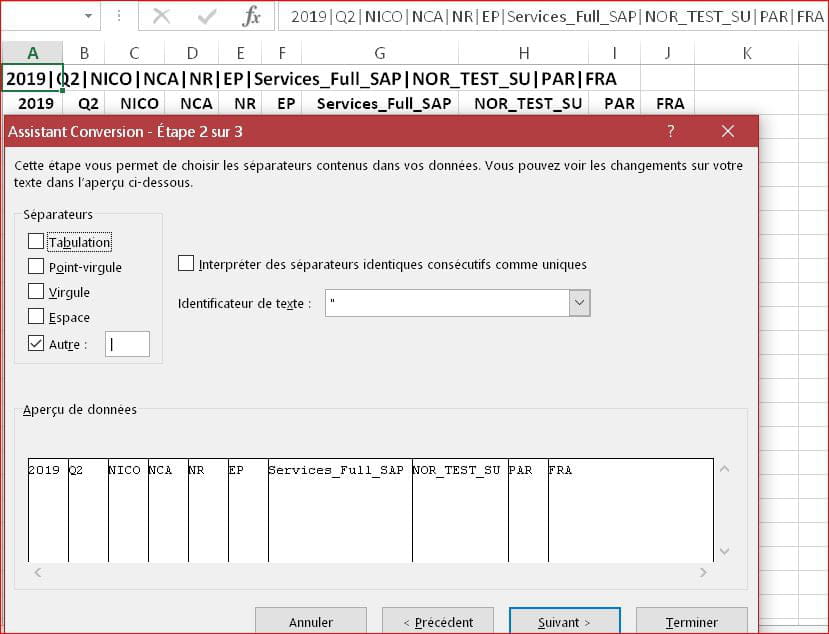
2019|Q2|NICO|NCA|NR|EP|Services_Full_SAP|NOR_TEST_SU|PAR|FRA
and I would like to have the data in separate columns (using the "|" as a separator).
Thank you
Nicolas
I am looking to automatically separate information in a cell using a formula without having to manually convert it.
Here is an example of data contained in a cell:
2019|Q2|NICO|NCA|NR|EP|Services_Full_SAP|NOR_TEST_SU|PAR|FRA
and I would like to have the data in separate columns (using the "|" as a separator).
Thank you
Nicolas
5 answers
-

Hello.
Use DATA/Conversion.
--
Retirement is great!
Especially in the Antilles...
Raymond (INSA, AFPA) -
Hello
creating a formula to deconcatenate without using the convert function is going to be particularly acrobatic given the composition of the text
It would be better to go through VBA with a click on the cell to be processed
regards
--
The quality of the answer largely depends on the clarity of the question, thank you! -
I apologize: I had skimmed the first sentence of Nico, without paying attention to "thanks to a formula" ...
So my reply #2 is irrelevant; we need to take into account the message from Vaucluse, to whom I send my friendly greetings.But it's really a shame, Nico, not to want to take advantage of such a powerful and effective tool as DATA/Conversion, which must have involved a tremendous amount of analysis and programming work for the developers at Microsoft!
--
Retirement is great! Especially in the Caribbean...
Raymond (INSA, AFPA) -
Hello everyone,
a small custom function to put in a standard module:Function decouper(ch As String, Num As Long, sep As String) decouper = Split(ch, sep)(Num - 1) End Function
Example syntax on sheet:
=decouper(A2;2;"|")
https://www.cjoint.com/c/IGmkXdpbJ3k
eric
--
By continually trying, you eventually succeed.
So the more it fails, the more likely it is to work. (the Shadoks)
In addition to the thank you (yes, it can be done!!!), remember to mark it as solved. Thank you. -
Hello,
Here is a small VBA code that you can use
It was taken from the Excel Text to Columns tool
Sub deconcatene() 'Cells you want to deconcatenate Range("A1").select 'Deconcatenation code 'Adjust B1 which is used to locate the cell from which it will paste the data Selection.TextToColumns Destination:=Range("B1"), DataType:=xlDelimited, _ TextQualifier:=xlDoubleQuote, ConsecutiveDelimiter:=False, Tab:=False, _ Semicolon:=False, Comma:=False, Space:=False, Other:=True, OtherChar _ := "|", FieldInfo:=Array(Array(1, 2), Array(2, 1), Array(3, 1)), _ TrailingMinusNumbers:=True End Sub